HydroPol2D: Distributed 2D Hydrologic-Hydrodynamic and Water Quality Model
August 25, 2026 · View on GitHub
- Documentation fully available with examples in the HydroPol2D - Docs.
HydroPol2D is an open-source, high-resolution 2D model built in MATLAB for simulating overland flow, infiltration, groundwater-surface water interactions, and pollutant transport. Developed with performance and flexibility in mind, it supports both CPU and GPU computations and can handle diverse forcing conditions such as spatially distributed rainfall, satellite-derived precipitation, design storms, and hydrograph inputs.
The model is particularly suited for urban, peri-urban, and rural catchments in both gauged and data-scarce regions.
Key Features
- 2D overland flow via Local-Inertial Model or Cellular-Automata
- Fully distributed infiltration with Green-Ampt or Darcy's law
- Groundwater recharge and shallow aquifer flow using Darcy's law and 2D Boussinesq Dynamics
- Flexible rainfall input: gauges, satellite, interpolated, synthetic hyetographs, rasters
- Snow accumulation and melt with mass balance tracking
- Dynamic reservoir and dam-break modeling
- Pollutant simulation: 1 pollutant per simulation with build-up/wash-off dynamics
- Mass-conserving adaptive time stepping (Courant-based)
- Output visualizations in
.tif,.mp4,.csv,.pdf, and.png
Installation & Dependencies
MATLAB Requirements:
- MATLAB R2020a or newer
- Required Toolboxes:
- Mapping Toolbox
- Image Processing Toolbox
- Optimization Toolbox when
flag_smoothening = 1- Parallel Computing Toolbox (for GPU mode)
Recommended:
- NVIDIA GPU with at least 2 GB VRAM and compute capability > 3.5
- 8+ GB RAM for CPU mode
External Tools:
- Microsoft Excel (for parameter configuration). Alternatively, users can only edit files in /config for rapid parametrization without requiring filling parameters/inputs in the Excel spreadsheets
- QGIS, Google Earth Engine, or R for raster preprocessing (DEM, LULC, soils, etc.)
- Documentation fully available with examples in the HydroPol2D - Docs.
Getting Started
1 Clone the Repository
git clone https://github.com/marcusnobrega-eng/HydroPol2D.git
cd HydroPol2D
Alternatively, download the ZIP from GitHub and extract it to your desired directory.
2. Open MATLAB and Navigate to the Model Folder
cd('path/to/your/model/folder')
Replace path/to/your/model/folder with the location where you cloned the repository.
3. Verify Required Files
Ensure the following are present in your working directory:
HydroPol2D_V115.m(main model script)/config/folder (parameters and flags)/HydroPol2D_functions/third_party/topotoolbox_lite/(bundled terrain runtime)Input_Spreadsheets(if excel version is used)
4. Set Up MATLAB
Open MATLAB or directly go in your model folder and open the file HydroPol2D_V115.m that MATLAB will automatically path to the model folder.
5. Configure the Model
Edit inputs in:
/config/folder. In particular, the fileinput_data_bypass_script.m. In case your forcing or other inputs do not follow the folder structure of the model, you may change the filepaths by editinginput_paths_bypass.min the same folder.- Edit
HydroPol2D_V115.mto selectrun_modeand, for Excel mode, theGeneral_Data.xlsxfile. HydroPol2D registers its own functions and bundled terrain runtime automatically. - Excel parameter files located in the
\Input_Data_Sheetsif you are running the model under theExcelmode, defined in theHydroPol2D_V115.mfile.
6. Run the Model
HydroPol2D_V115.m
The mesh selector is intentionally compact: flag_voronoi=0 uses the
production raster D4 workflow; flag_voronoi=1 loads the prepared UGRID case
specified by Voronoi case file in Excel or
InputData_Bypass.Voronoi.case_file in script mode. Voronoi controls define
background, urban, and minimum widths, the adjacent-size ratio, cells across
resolved rivers, and whether unresolved rivers use neal_subgrid or none.
Voronoi execution is CPU-only. local_inertial supports resolved 2D flow and
the Neal channel graph; kinematic, explicit diffusive, and
full_momentum currently support resolved 2D flow only. GPU execution and
production-scale performance remain gated until their separate validation
criteria are met.
Optional application workflows, including the SLURM template and SNISB dam-case runners, are grouped in Applications.
Example
Example of a rain-on-the-grid simulation of a 1 in 50-year rainfall in an urban area with the influence of urban drainage - Sao Paulo, Brazil.

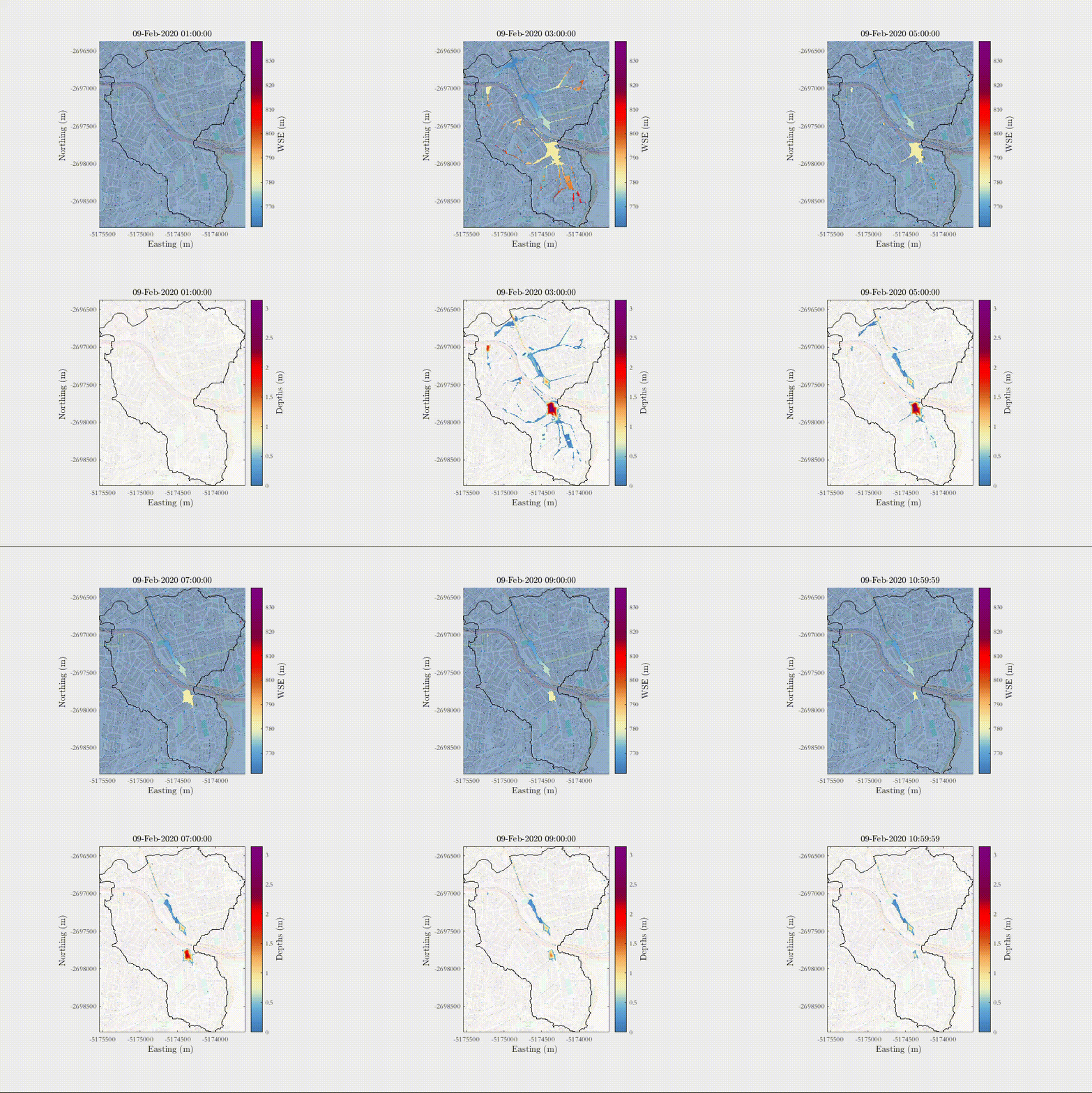
Example of a total dam-break collapse scenario in a city in Pernambuco, Northeast - Brazil.
Example of Rainfall-Runoff event in a catchment near Palo Alto -CA.
https://github.com/user-attachments/assets/739e39eb-18e8-4ec3-bee6-a7a647793774
Example of a continuous simulation of a catchment in Pune - India with spatially-varied rainfall from MSWEP for a period of approximately 22 days.
https://github.com/user-attachments/assets/3ad69bb3-3e24-4df3-b5ff-584aafcc6296
Input Data Structure
HydroPol2D requires the following input data files and parameters, which must be prepared and aligned before running the model:
Raster Inputs (.tif)
- Digital Elevation Model (DEM): Defines terrain slope, flow direction, and is used for hydrologic routing and terrain preprocessing. Must be gap-filled and optionally smoothed. Elevation in meters.
- Land Use / Land Cover (LULC): Used to assign surface properties (e.g., roughness, imperviousness, pollutant loading). Each class must be indexed and named consistently with the LULC parameter table.
- Soil Map: Classifies soils spatially to define infiltration and water balance parameters. Must match indices in the soil parameter table.
- Depth to aquifer or Depth to Bedrock Constrains the vadose zone depth and surface sub-surface interactions
- Albedo / Leaf Area Index Constrain the model parametrization for snow melt and evapotranspiration calculations
- Initial Conditions of Surface Depth, Soil Moisture, and Pollutant Mass Constrain the model to appropriate initial conditions prior to simulations
- Optional Gridded Maps:
- Rainfall intensity maps (mm/hr)
- Potential Evapotranspiration (ETP)
- Actual Evapotranspiration (ETa)
- Snow Depth
- Groundwater Table Depth
- Subgrid river bathymetry and slope rasters
All rasters must be aligned spatially (same extent, resolution, and coordinate reference, preferably EPSG:3857) or with an Equal Area projection.
Parameter Tables (Excel Sheets)
- LULC Parameter Table: Each land use class must include:
- Manning's
nroughness coefficient - Initial-abstraction
h0and initial surface-water depthd0in mm - Representative rooting depth in m
- Land-cover coefficient
Kc, which scales internally calculated reference ET to potential soil ET. Ponded open water evaporates separately atEp. - Impervious index (0 or 1)
- Water-quality coefficients:
C1(maximum buildup, kg ha^-1),C2(buildup coefficient, d^-1),C3(mass-based washoff coefficient), andC4(washoff exponent). These coefficients are pollutant- and site-specific; the generic template leaves buildup and washoff disabled. - Per-LULC snow albedo, emissivity, phase thresholds, density bounds, and process-rate parameters when snow modeling is enabled.
- Manning's
The generic LULC table is a documented starting parameterization, not a substitute for local calibration. See LULC default parameter basis for the source basis and the scope of each field.
For the Neal (2012) channel-subgrid formulation, the LULC n column is the spatial floodplain roughness. Set the single in-bank/channel coefficient separately in General_Data.xlsx as Manning, or in script mode as InputData_Bypass.general.Manning. Observation-gauge data only define output locations and never alter either roughness field.
- Soil Parameter Table: Each soil class must include:
- Vertical Saturated hydraulic conductivity
- van Genutchen and
- Initial soil water content
- Saturated water content
- Residual water content
- Horizontal Saturated hydraulic conductivity
Preprocessing must ensure that all rasters are aligned and projected.
Output Files
HydroPol2D saves results in:
- Geospatial:
.tifrasters (depth, infiltration, pollutant, velocity, recharge, etc.) Alternatively,.ncfiles can be saved for time series of gridded data. - Graphics:
.png,.pdf(hydrographs, profiles, maps) - Animation:
.mp4(dynamic maps) - Numerical:
.csv(time series, diagnostics)
Configuration Flags
Flags are configured via Excel and define:
- Simulation type (rainfall vs hydrograph)
- Processing mode (CPU vs GPU)
- Routing method (CA or Local Inertial)
- Hydrologic modules (baseflow, ET, GW, snow, pollutant)
- DEM preprocessing routines
Ensure consistency among flags (e.g., only one rainfall mode active).
Performance & Scaling
| Mode | Grid Size | Notes |
|---|---|---|
| CPU | < 1 million cells | Single-core, slower |
| GPU | > 1 million cells | Faster, requires NVIDIA GPU |
- Adaptive time stepping based on Courant number (recommended: 0.3–0.7)
References
Cite HydroPol2D using:
-
Gomes Jr, M.N., Castro, M.A., Castillo, L.M., Sánchez, M.H., Giacomoni, M.H., de Paiva, R.C. and Bates, P.D., 2025. Spatio-temporal performance of 2D local inertial hydrodynamic models for urban drainage and dam-break applications. Journal of Hydrology.
-
Gomes Jr, M. N., et al. (2023). HydroPol2D—Distributed hydrodynamic and water quality model: Challenges and opportunities in poorly-gauged catchments. Journal of Hydrology, 625, 129982.
-
Gomes Jr, M.N., Jalihal, V., Castro, M. and Mendiondo, E.M., 2025. Exploring the impact of rainfall temporal distribution and critical durations on flood hazard modeling. Natural Hazards.
-
Gomes Jr, M. N., et al. (2024). Global optimization-based calibration algorithm for a 2D distributed hydrologic-hydrodynamic and water quality model. Environmental Modelling & Software, 179, 106128.
-
Rápalo, L.M., Gomes Jr, M.N. and Mendiondo, E.M., 2024. Developing an open-source flood forecasting system adapted to data-scarce regions: A digital twin coupled with hydrologic-hydrodynamic simulations. Journal of Hydrology, 644, 131929.
-
Castro, M.D.A.R.A., Jr, M.N.G. and Mendiondo, E.M., 2025. Probabilistic DAM break flood mapping via monte-carlo simulations using a 2D local-inertial model. (DOI not available)
-
Castro, M., Gomes Jr, M., Rápalo, L. and Mendiondo, E., 2025. *Performance of Low-Complexity Hydrodynamic Models for Dam-Break Flood Mapping: Trade-offs between Full Momentum, Diffusive-Wave, and Local-Inertial Models (under review).
-
Sánchez, M.H., 2025. A novel framework for flood vulnerability assessment and fuzzy-controlled reservoir optimization in data-scarce urban watersheds (Master's thesis, University of São Paulo).
-
Sanchez, M.H., Gomes Jr, M.N., Rápalo, L., Castro, M.D.A.R.A. and Mendiondo, E.M. 2026. Assessment of urban vulnerability to floods under current and future demographic and climate scenarios. SSRN (under review).
-
Castro, M.D.A.R.A., 2024. Métodos determinísticos e probabilísticos para a avaliação do impacto de rompimentos de barragens via modelagem hidrodinâmica.
-
Gomes Jr., M. N. 2023. Advances in open source hydroinformatics for flood modeling and disaster education (Doctoral dissertation, Universidade de São Paulo).
-
Rápalo, L.M.C., 2024. Open-source tools for flood risk assessment for multiple spatio-temporal scales under scenarios of change (Doctoral dissertation, Universidade de São Paulo).
-
Rápalo, L.M., Gomes Jr, M.N. and Mendiondo, E.M., 2025. Multiple levels of human instability due to urban overland flow within the 21st century: An urban Catchment study case in Brazil. International Journal of Disaster Risk Reduction.
-
Sousa, M.R.D., Mendiondo, E.M. and Gomes, M.N., 2026. Hydrological-hydrodynamic modeling of climate-induced urban flooding of design storms using HydroPol2D: a case study in São Carlos, Brazil.* RBRH.
Contributing & Support
For issues, contact:
- Dr. Marcus N. Gomes Jr. – mngomes@stanford.edu
Repository: https://github.com/marcusnobrega-eng/HydroPol2D

This project is licensed under the GNU General Public License, version 3.
The bundled TopoToolbox runtime is documented in
third_party/NOTICE.md and
third_party/topotoolbox_lite/UPSTREAM.md.
Short Course Link with 2-h classes + PPT material (Available upon request): marcusnobrega.engcivil@gmail.com
Acknowledgments
- University of São Paulo — São Carlos School of Engineering
- University of Texas at San Antonio — Civil and Environmental Engineering
- Stanford University — Stanford Doerr School of Sustainability; Department of Earth System Science