NgAs [](https://github.com/nigrosimone/ng-as/actions/workflows/node.js.yml) [](https://www.npmjs.com/package/ng-as)
July 23, 2026 · View on GitHub
Angular pipe and directive for type casting template variables.
Description
Sometime there is a need to cast variable into component template as some type. This library has pipe and directive for type casting template variables and improve IDE suggestion and refactoring.
See the stackblitz demo, or its sources.
Get Started
Step 1: install ng-as
npm i ng-as
Step 2: usage
type casting template variables with directive eg.:
import { Component } from '@angular/core';
import { NgAsDirective } from 'ng-as';

// your interface, but also work with any typescript type (class, type, etc.)
interface Person {
  name: string;
}

@Component({
  selector: 'app-root',
  imports: [NgAsDirective],
  template: `
  <ng-container *ngTemplateOutlet="personTemplate; context: {$implicit: person}"></ng-container>

  <ng-template #personTemplate [ngAs]="Person" let-person>
    <span>Hello {{ person.name }}!</span>
  </ng-template>
  `,
})
export class AppComponent {
  // NOTE: If you have "strictPropertyInitialization" enabled,
  // you will need to add a non-null assertion (!)
  public Person!: Person; // publish your interface into html template
  person: Person = { name: 'Simone' }; // the data
}
type casting template variables with pipe eg.:
import { Component } from '@angular/core';
import { NgAsPipe } from 'ng-as';

// your interface, but also work with any typescript type (class, type, etc.)
interface Person {
  name: string;
}

@Component({
  selector: 'app-root',
  imports: [NgAsPipe],
  template: `
  <ng-container *ngTemplateOutlet="personTemplate; context: {$implicit: person}"></ng-container>

  <ng-template #personTemplate let-person>
    <span>Hello {{ (person | as: Person).name }}!</span>
  </ng-template>
  `,
})
export class AppComponent {
  // NOTE: If you have "strictPropertyInitialization" enabled,
  // you will need to add a non-null assertion (!)
  public Person!: Person; // publish your interface into html template
  person: Person = { name: 'Simone' }; // the data
}
The pipe is registered under two names, as and ngAs. They are the same pipe: as is shorter,
ngAs follows the prefixed convention and avoids clashing with another library that also exposes
an as pipe. Import NgAsPipe for as, NgAsAliasPipe for ngAs, or NgAsModule for both:
import { NgAsAliasPipe } from 'ng-as';

@Component({
  selector: 'app-root',
  imports: [NgAsAliasPipe],
  template: `
  <ng-template #personTemplate let-person>
    <span>Hello {{ (person | ngAs: Person).name }}!</span>
  </ng-template>
  `,
})
type casting template variables with the plain ngAs() function eg. (nothing to import into imports):
import { Component } from '@angular/core';
import { ngAs } from 'ng-as';

// your interface, but also work with any typescript type (class, type, etc.)
interface Person {
  name: string;
}

@Component({
  selector: 'app-root',
  template: `
  <ng-container *ngTemplateOutlet="personTemplate; context: {$implicit: person}"></ng-container>

  <ng-template #personTemplate let-person>
    <span>Hello {{ $ngAs(person, Person).name }}!</span>
  </ng-template>
  `,
})
export class AppComponent {
  // NOTE: If you have "strictPropertyInitialization" enabled,
  // you will need to add a non-null assertion (!)
  public Person!: Person; // publish your interface into html template
  person: Person = { name: 'Simone' }; // the data

  public readonly $ngAs = ngAs; // publish the helper into html template
}
That's all!
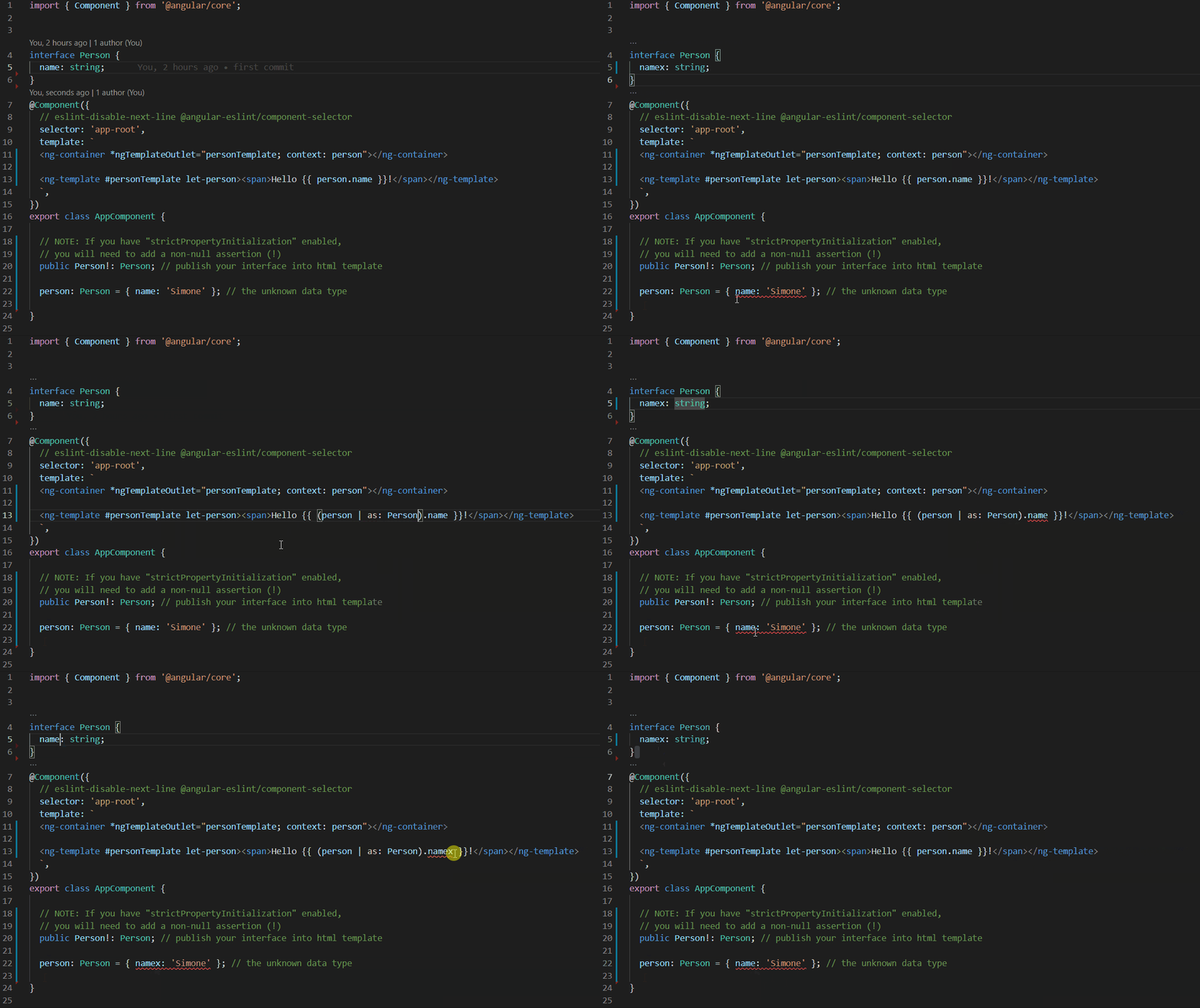
Example: MatTable
matCellDef cannot infer the type of its parent's input. But with ng-as you can strong-type its template variable.
import { Component } from '@angular/core';
import { MatTableModule } from '@angular/material/table';
import { NgAsPipe } from 'ng-as';

export interface PeriodicElement {
  name: string;
  position: number;
  weight: number;
  symbol: string;
}

const ELEMENT_DATA: PeriodicElement[] = [
  {position: 1, name: 'Hydrogen', weight: 1.0079, symbol: 'H'},
  {position: 2, name: 'Helium', weight: 4.0026, symbol: 'He'},
  {position: 3, name: 'Lithium', weight: 6.941, symbol: 'Li'},
  {position: 4, name: 'Beryllium', weight: 9.0122, symbol: 'Be'},
  {position: 5, name: 'Boron', weight: 10.811, symbol: 'B'},
  {position: 6, name: 'Carbon', weight: 12.0107, symbol: 'C'},
  {position: 7, name: 'Nitrogen', weight: 14.0067, symbol: 'N'},
  {position: 8, name: 'Oxygen', weight: 15.9994, symbol: 'O'},
  {position: 9, name: 'Fluorine', weight: 18.9984, symbol: 'F'},
  {position: 10, name: 'Neon', weight: 20.1797, symbol: 'Ne'},
];

@Component({
  selector: 'table-basic-example',
  imports: [NgAsPipe, MatTableModule],
  template: `
  <table mat-table [dataSource]="dataSource" class="mat-elevation-z8">

    <ng-container matColumnDef="position">
      <th mat-header-cell *matHeaderCellDef> No. </th>
      <td mat-cell *matCellDef="let element"> {{(element | as: PeriodicElement).position}} </td>
    </ng-container>

    <ng-container matColumnDef="name">
      <th mat-header-cell *matHeaderCellDef> Name </th>
      <td mat-cell *matCellDef="let element"> {{(element | as: PeriodicElement).name}} </td>
    </ng-container>

    <ng-container matColumnDef="weight">
      <th mat-header-cell *matHeaderCellDef> Weight </th>
      <td mat-cell *matCellDef="let element"> {{(element | as: PeriodicElement).weight}} </td>
    </ng-container>

    <ng-container matColumnDef="symbol">
      <th mat-header-cell *matHeaderCellDef> Symbol </th>
      <td mat-cell *matCellDef="let element"> {{(element | as: PeriodicElement).symbol}} </td>
    </ng-container>

    <tr mat-header-row *matHeaderRowDef="displayedColumns"></tr>
    <tr mat-row *matRowDef="let row; columns: displayedColumns;"></tr>
  </table>
  `,
})
export class TableBasicExample {
  PeriodicElement!: PeriodicElement;
  displayedColumns: string[] = ['position', 'name', 'weight', 'symbol'];
  dataSource = ELEMENT_DATA;
}
Support
This is an open-source project. Star this repository, if you like it, or even donate. Thank you so much!
My other libraries
I have published some other Angular libraries, take a look:
- NgSimpleState: Simple state management in Angular with only Services and RxJS or Signal
- NgHttpCaching: Cache for HTTP requests in Angular application
- NgGenericPipe: Generic pipe for Angular application for use a component method into component template.
- NgLet: Structural directive for sharing data as local variable into html component template
- NgForTrackByProperty: Angular global trackBy property directive with strict type checking