NgGenericPipe [](https://github.com/nigrosimone/ng-generic-pipe/actions/workflows/node.js.yml) [](https://www.npmjs.com/package/ng-generic-pipe)
July 26, 2026 · View on GitHub
Generic pipe for Angular application for use a component method into component template.
Description
Sometime there is a need to use a component method into component template. Angular best practice says do not use method into html template, eg. {{ myMethod(2) }}. With NgGenericPipe you can use all your public component methods as pure pipe with the component scope (this), eg: {{ 2 | ngGenericPipe: myMethod }}.
See the stackblitz demo.
Features
✅ 100% unit tested, types included
✅ Use all your component methods as pure pipe with component scope
✅ Strong type check
✅ Only 751 byte (minified, with gzip compression)
Get Started
Step 1: install ng-generic-pipe
npm i ng-generic-pipe
Step 2: Use ngGenericPipe into your HTML template, eg.:
import { Component } from '@angular/core';
import { NgGenericPipe } from 'ng-generic-pipe';

@Component({
  selector: 'app-root',
  template: `<div>{{ 'Simone' | ngGenericPipe: sayHello }}</div>`,
  imports: [NgGenericPipe]
})
export class AppComponent {
    sayHello(name: string): string {
      return `Hello! I'm ${name}.`;
    }
}
There is also a NgGenericDirective if you need to use multiple time the same method into the template, eg.:
import { Component } from '@angular/core';
import { NgGenericDirective } from 'ng-generic-pipe';

@Component({
  selector: 'app-root',
  template: `<div *ngGenericPipe="let fn; method: sayHello">{{ fn('Simone') }} {{ fn('Mario') }} {{ fn('Luigi') }}</div>`,
  imports: [NgGenericDirective]
})
export class AppComponent {
    sayHello(name: string): string {
      return `Hello! I'm ${name}.`;
    }
}
API
ngGenericPipe need to pipe on a value. The value become the first argument of the function called by ngGenericPipe, eg.:
'Hello world!' | ngGenericPipe: writeMessage
is translated into:
writeMessage('Hello world!')
You can pass, multiple parameter in this way, eg.:
'Hello world!' | ngGenericPipe: writeMessage:'Simone'
is translated into:
writeMessage('Hello world!', 'Simone')
and with more parameters, eg.:
'Hello world!' | ngGenericPipe: writeMessage:'Simone':'Foo':'Bar':'Baz'
is translated into:
writeMessage('Hello world!', 'Simone', 'Foo', 'Bar', 'Baz')
Because ngGenericPipe is a pure pipe, the method is memoized. This means that the pipe transform the html only if an argument change. You can force the change by passing and additional parameter that change when you need a repaint (see the example below "Call component method with component scope and force change detection
").
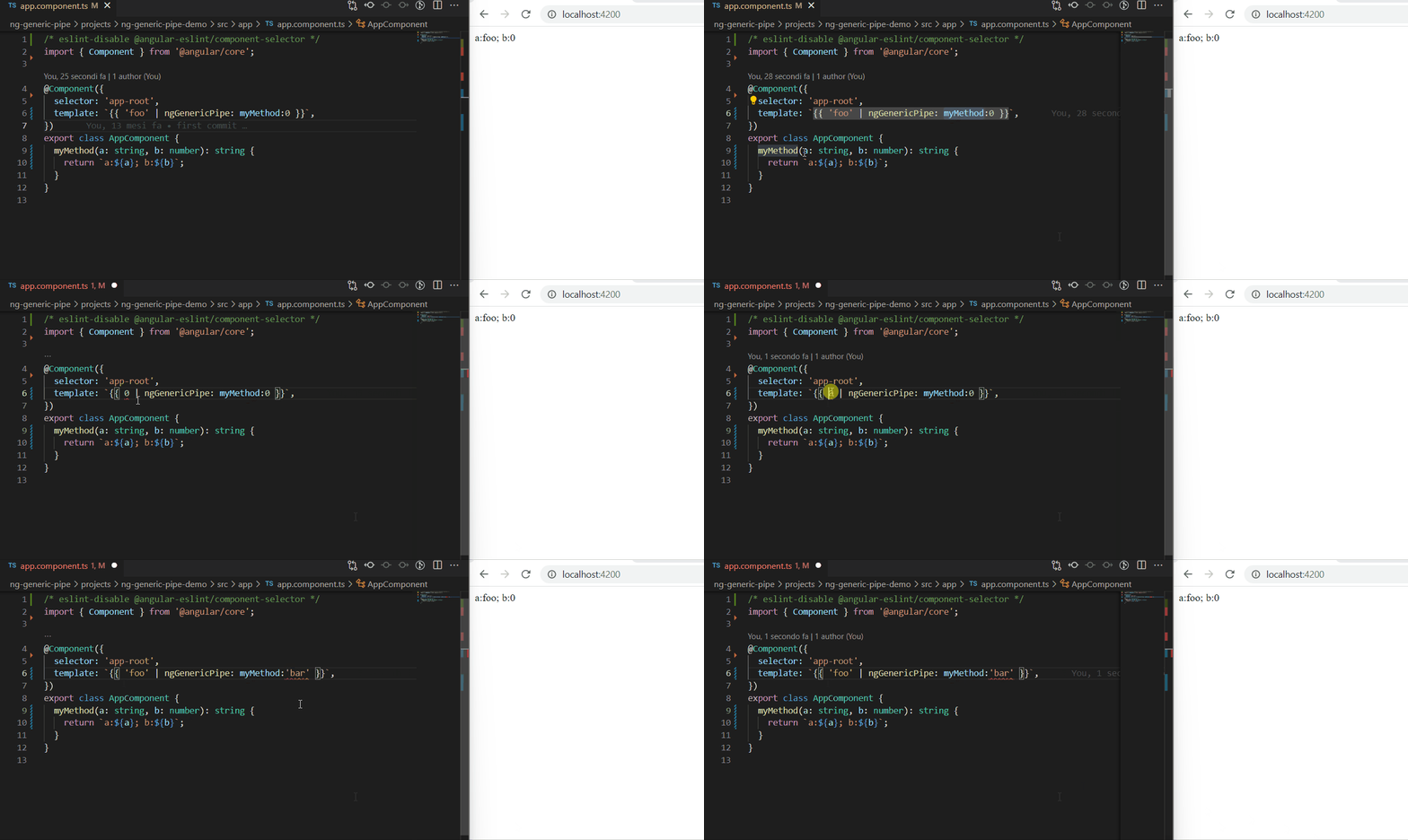
Strong type check
ngGenericPipe has strong type checking
Examples
Below there are some examples of use case.
Example: Call component method with component scope
You can call from template a component method test(x: number) and access to the component scope (this), eg.:
import { Component } from '@angular/core';
import { NgGenericPipe } from 'ng-generic-pipe';

@Component({
  selector: 'app-root',
  template: '<div>{{ 3 | ngGenericPipe: test }}</div>',
  imports: [NgGenericPipe]
})
export class AppComponent {

    public y: number = 2;

    test(x: number): number {
      return x * this.y;
    }
}
Example: Call component method with component scope and multiple parameters
You can call from template a component method test(x: number, z: number) and access to the component scope (this), eg.:
import { Component } from '@angular/core';
import { NgGenericPipe } from 'ng-generic-pipe';

@Component({
  selector: 'app-root',
  template: '<div>{{ 3 | ngGenericPipe: test:3 }}</div>',
  imports: [NgGenericPipe]
})
export class AppComponent {

    public y: number = 2;

    test(x: number, z: number): number {
      return x * this.y * z;
    }
}
Example: Call component method with component scope and no parameters
You can call from template a component method test() and access to the component scope (this), eg.:
import { Component } from '@angular/core';
import { NgGenericPipe } from 'ng-generic-pipe';

@Component({
  selector: 'app-root',
  template: '<div>{{ undefined | ngGenericPipe: test }}</div>',
  imports: [NgGenericPipe]
})
export class AppComponent {

    public y: number = 2;

    test(): number {
      return this.y;
    }
}
Example: Call component method with component scope and force change detection
You can call from template a component method test() and access to the component scope (this), eg.:
import { Component } from '@angular/core';
import { NgGenericPipe } from 'ng-generic-pipe';

@Component({
  selector: 'app-root',
  template: `
    <div>{{ undefined | ngGenericPipe: test:i }}</div>
    <button (click)="onUpdate()">Update</button>`,
  imports: [NgGenericPipe]
})
export class AppComponent {

    public y: number = Date.now();
    public i: number = 0;

    test(): number {
      return this.y;
    }

    onUpdate(){
      this.i++;
    }
}
Example: Call observable component's method
You can call from template a component's method testAsync() that return observable, eg.:
import { Component } from '@angular/core';
import { NgGenericPipe } from 'ng-generic-pipe';

@Component({
  selector: 'app-root',
  template: `<div>{{ 'hello!' | ngGenericPipe: testAsync | async }}</div>`,
  imports: [NgGenericPipe]
})
export class AppComponent {

    testAsync(value: string): Observable<string> {
      return of(value);
    }

}
How this is resolved, and how to opt out
You pass the method unbound (ngGenericPipe: sayHello, not sayHello.bind(this)), so something
has to reattach it to your component. ng-generic-pipe does that by reading the context out of the
injected ChangeDetectorRef. That works, and the test suite pins it down for the pipe, the
directive and for methods used inside an @for block - but it leans on an Angular implementation
detail rather than a public API, and it has broken once before
(#2).
If you would rather not depend on it, hand over a function that already carries its own scope. Both of these work today and are immune to any future change in how Angular exposes the context:
export class AppComponent {
  private readonly name = 'Simone';

  // bind once, up front
  readonly sayHello = this.doSayHello.bind(this);

  // ...or use an arrow field, which closes over `this` by construction
  readonly sayHelloArrow = (greeting: string): string => `${greeting}! I'm ${this.name}.`;

  private doSayHello(greeting: string): string {
    return `${greeting}! I'm ${this.name}.`;
  }
}
<div>{{ 'Hi' | ngGenericPipe: sayHello }}</div>
<div>{{ 'Hi' | ngGenericPipe: sayHelloArrow }}</div>
The trade-off is one extra field per method, which is exactly the boilerplate this library exists to remove — so reach for it only if you hit the problem.
Support
This is an open-source project. Star this repository, if you like it, or even donate. Thank you so much!
My other libraries
I have published some other Angular libraries, take a look:
- NgSimpleState: Simple state management in Angular with only Services and RxJS or Signal
- NgHttpCaching: Cache for HTTP requests in Angular application
- NgLet: Structural directive for sharing data as local variable into html component template
- NgForTrackByProperty: Angular global trackBy property directive with strict type checking