README.md
May 21, 2026 · View on GitHub


)


Getting Started
Note: See the docs for more information.
Note: This package is ESM-only.
Adding SvelTeX to a project
The quickest way is the @nvl/sv-sveltex community add-on for the Svelte CLI
(sv). In a SvelteKit project, run:
npx sv add @nvl/sv-sveltex
…and follow the prompts. It installs @nvl/sveltex and the peer dependencies
for the backends you pick, creates a sveltex.config.{js,ts}, and wires the
SvelTeX preprocessor and the .sveltex extension into your
svelte.config.{js,ts}. Starting from scratch? Run npx sv create first,
then npx sv add @nvl/sv-sveltex inside the new project.
Note
Svelte's community-add-on support is still experimental, and @nvl/sv-sveltex
itself is in alpha; community add-ons are not vetted by the Svelte
maintainers.
Manual setup
If you're not on SvelteKit, or would rather wire things up by hand:
pnpm add -D @nvl/sveltex     # If using pnpm
bun  add -D @nvl/sveltex     # If using Bun
npm  add -D @nvl/sveltex     # If using npm
yarn add -D @nvl/sveltex     # If using Yarn
deno add -D jsr:@nvl/sveltex # If using Deno
// svelte.config.js
import { vitePreprocess } from '@sveltejs/vite-plugin-svelte';
import { sveltex } from '@nvl/sveltex';

/** @type {import('@sveltejs/kit').Config} */
const config = {
    preprocess: [
        vitePreprocess(), // (optional)
        await sveltex({
            markdownBackend: 'unified',
            codeBackend: 'shiki',
            mathBackend: 'mathjax',
        }, {
            // Options
        }),
    ],
    extensions: ['.svelte', '.sveltex'],
};

export default config;
Then install the backends you chose — IntelliSense, or the error SvelTeX
throws without them, will tell you which — create a +page.sveltex file under
src/routes, and start writing Markdown, math, code blocks and TeX
components. See the docs for more.
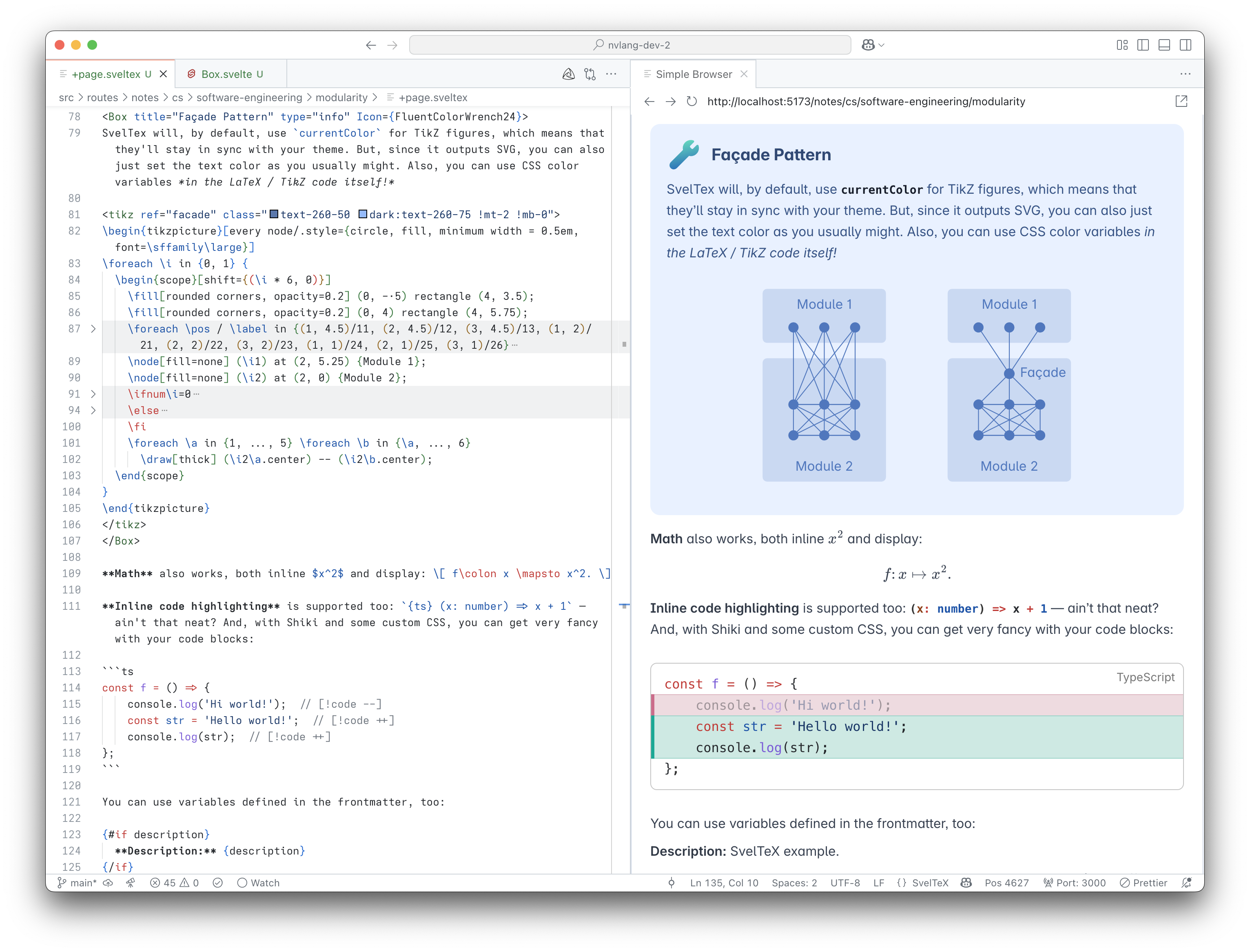
Editor integration
SvelTeX has first-class editor support: syntax highlighting and a language
server (@nvl/sveltex-language-server) that proxies the real Svelte tooling
for the Svelte parts of a .sveltex file and adds native Markdown, math and
frontmatter features.
- VS Code — install the SvelTeX extension (VS Code Marketplace; also on Open VSX for VSCodium, Cursor, Windsurf, …). It bundles the language server, so diagnostics, hover, completion, go-to-definition, rename and more work out of the box.
- Zed — the SvelTeX Zed extension provides tree-sitter highlighting and launches the same language server.
- Other LSP-capable editors (Neovim, Emacs, Sublime Text, …) — run
@nvl/sveltex-language-serverdirectly; it speaks LSP over stdio (node …/bin/server.js --stdio). - Syntax highlighting only —
@nvl/tree-sitter-sveltexis a standalone tree-sitter grammar; the VS Code extension also ships a TextMate grammar.
Inside a .sveltex file the language server additionally forwards math
regions to a bundled math language server (TeX command completion and rich
hover) and LaTeX <tex> / <tikz> regions to TexLab, when a texlab
binary is on PATH.
Note
The language-server, Zed-extension and tree-sitter packages are new and
currently in alpha — expect rough edges and breaking changes before
1.0.0.
Acknowledgments
See acknowledgments on the project site.
Note: The TSDoc comments for many of this project's interfaces, particularly those describing options to be passed to external libraries, may be copies, paraphrasings, or adaptations of the official documentations of the respective libraries. Some notable examples are MathJax and TikZ.