ECS
August 27, 2026 · View on GitHub



Fusion Monster Evaluation Project - GO Version
(No additional shell file dependencies unless necessary to install the environment using the shell, the environment is installed just to measure more accurately, in extreme cases no environment dependencies can also be fully measured project)
Please report any issues via issues.
Go version: https://github.com/oneclickvirt/ecs
Shell version: https://github.com/spiritLHLS/ecs/blob/main/README_EN.md
Language
Supported Systems and Architectures
Compilation and Testing Support
| Supported for Compilation | Tested on | Supported OS for Compilation | Tested OS |
|---|---|---|---|
| amd64 | amd64 | Linux | Linux |
| arm64 | arm64 | Windows | Windows |
| arm | MacOS(Darwin) | MacOS | |
| 386 | FreeBSD | ||
| mips,mipsle | Android | ||
| mips64,mips64le | |||
| ppc64,ppc64le | |||
| s390x | s390x | ||
| riscv64 |
For more information about the architecture and system, please test or compile it yourself, and open issues if you have any questions.
Systems Pending Support
| OS | Notes |
|---|---|
| OpenBSD/NetBSD | Some of Golang's official libraries do not support this system (especially net-related items) |
Features
- System basic information query and concurrent IP basic information query: Self-developed basics, gostun
- CPU test: Self-developed cputest supporting sysbench(lua/golang version), geekbench, winsat
- Memory test: Self-developed memorytest supporting sysbench, dd, winsat, mbw, stream
- Disk test: Self-developed disktest supporting dd, fio, winsat
- Streaming platform unlock tests concurrent query: Self-developed to UnlockTests, logic modified from RegionRestrictionCheck and others
- IP quality/security information concurrent query: Self-developed, binary files compiled in securityCheck
- Email port test: Self-developed portchecker
- Three-network return path test: Modified from zhanghanyun/backtrace to oneclickvirt/backtrace
- Three-network route test: Modified from NTrace-core to nt3
- Speed test: Based on public data from speedtest.net and speedtest.cn, developed to oneclickvirt/speedtest. The v1.8.2 upstream avoids shared-CDN user-profile cache reuse for speedtest.net requests.
- Three-network Ping test: Modified from ecsspeed to pingtest
- Supports root or admin environment testing, non-root or non-admin testing, and offline testing. When the host is online and local DNS is confirmed unavailable, it can automatically fall back to built-in DoH or DoT without rewriting resolver files; temporary DNS/network errors preserve system DNS.
For first-time users of this project, it is recommended to check the instructions: Jump to
Instructions for Use
Linux/FreeBSD/MacOS
One-click command
One-Click Command will Not install Dependencies by Default, Not update Package Manager by Default, Non-Interactive Mode by Default.
-
International users without acceleration:
export noninteractive=true && curl -L https://raw.githubusercontent.com/oneclickvirt/ecs/master/goecs.sh -o goecs.sh && chmod +x goecs.sh && ./goecs.sh install && goecs -l=en -
International/domestic users with CDN acceleration:
export noninteractive=true && curl -L https://cdn.spiritlhl.net/https://raw.githubusercontent.com/oneclickvirt/ecs/master/goecs.sh -o goecs.sh && chmod +x goecs.sh && ./goecs.sh install && goecs -l=en -
Domestic users with CNB acceleration:
export noninteractive=true && export CN=true && curl -L https://cnb.cool/oneclickvirt/ecs/-/git/raw/main/goecs.sh -o goecs.sh && chmod +x goecs.sh && ./goecs.sh install && goecs -l=en -
Short Link:
export noninteractive=true && curl -L https://bash.spiritlhl.net/goecs -o goecs.sh && chmod +x goecs.sh && bash goecs.sh install && goecs -l=enOR
export noninteractive=true && curl -L https://ba.sh/JrVa -o goecs.sh && chmod +x goecs.sh && ./goecs.sh install && goecs -l=en -
Online with no local DNS (requires DoH-capable curl, such as curl 7.62+):
export noninteractive=true && curl --doh-url https://cloudflare-dns.com/dns-query --resolve cloudflare-dns.com:443:1.1.1.1,1.0.0.1 -L https://raw.githubusercontent.com/oneclickvirt/ecs/master/goecs.sh -o goecs.sh && chmod +x goecs.sh && ./goecs.sh install && goecs -l=en
For more accurate testing, please follow the detailed instructions below to install and add non-essential dependencies
Detailed instructions
The following commands control whether dependencies are installed, whether the package manager is updated, and whether interactive or non-interactive mode is used.
Expand to view detailed instructions
-
Download the script
International users without acceleration:
curl -L https://raw.githubusercontent.com/oneclickvirt/ecs/master/goecs.sh -o goecs.sh && chmod +x goecs.shInternational/domestic users with CDN acceleration:
curl -L https://cdn.spiritlhl.net/https://raw.githubusercontent.com/oneclickvirt/ecs/master/goecs.sh -o goecs.sh && chmod +x goecs.shDomestic users with CNB acceleration:
export CN=true && curl -L https://cnb.cool/oneclickvirt/ecs/-/git/raw/main/goecs.sh -o goecs.sh && chmod +x goecs.sh -
Update package manager (optional) and install environment
./goecs.sh envNon-interactive mode:
export noninteractive=true && ./goecs.sh env -
Install
goecs./goecs.sh install -
Upgrade
goecs./goecs.sh upgrade -
Uninstall
goecs./goecs.sh uninstall -
help command
./goecs.sh -h -
Invoke the menu
goecs -l=en
DNS resolver fallback
The default -dns-mode=auto preserves system DNS unless independent probes confirm that the local resolver is unavailable. A successful response or NXDOMAIN keeps system DNS active; timeouts, SERVFAIL, packet loss, and other temporary errors are inconclusive and do not switch resolvers. After confirmed local DNS failure, goecs selects the lowest-latency built-in encrypted endpoint by measuring a real fixed-address TLS DNS query. If the existing public-connectivity preflight has no positive result, auto first performs the same bounded encrypted DNS validation before continuing. Fixed addresses bootstrap only the resolver endpoints; ordinary test domains still resolve dynamically through the selected DNS service.
-dns-mode=auto: default. Preserve system DNS and fall back to the fastest validated built-in DoH or DoT endpoint only after confirmed local resolver failure.-dns-mode=system: use system DNS only. The existing Android/Termux resolver-file repair path remains available only in this mode.-dns-mode=doh: always use built-in DoH.-dns-mode=dot: always use built-in DoT.
The fallback never changes /etc/resolv.conf or /etc/hosts; it needs access to at least one built-in encrypted resolver. The vetted, non-filtering endpoint catalog is embedded in the basics dependency and refreshed before its release tags through fixed-address TLS/DNS validation. -ut-dns remains the streaming-unlock module's explicit DNS override and is never replaced by this fallback. Leave it empty for that module to inherit the process resolver.
Command parameterization
Expand to view parameter descriptions
Usage: goecs [options]
  -analysis
        Enable/Disable post-test concise summary analysis
  -analyze
        Enable/Disable post-test concise summary analysis
  -backtrace
        Enable/Disable backtrace test (in 'en' language or on windows it always false) (default true)
  -basic
        Enable/Disable basic test (default true)
  -ut
        Enable/Disable unlock media test (default true)
  -utipver string
        Set unlock test IP version (auto=test all available, ipv4=IPv4 only, ipv6=IPv6 only) (default "auto")
  -utregion string
        Set unlock test region (0=Global, 1=Global+TW, 2=Global+HK, 3=Global+JP, 4=Global+KR, 5=Global+NA, 6=Global+SA, 7=Global+EU, 8=Global+Africa, 9=Global+Oceania, 10=TW only, 11=HK only, 12=JP only, 13=KR only, 14=NA only, 15=SA only, 16=EU only, 17=Africa only, 18=Oceania only, 19=Sports only, 20=All) (default "0")
  -utshowip
        Deprecated compatibility flag; unlock output shows IP version in section headers automatically
  -cpu
        Enable/Disable CPU test (default true)
  -cpum string
        Set CPU test method (supported: sysbench, geekbench, winsat) (default "sysbench")
  -cpu-method string
        Set CPU test method (supported: sysbench, geekbench, winsat) (default "sysbench")
  -cput string
        Set CPU test thread mode (supported: single, multi) (default "multi")
  -cpu-thread string
        Set CPU test thread mode (supported: single, multi) (default "multi")
  -disk
        Enable/Disable disk test (default true)
  -diskm string
        Set disk test method (supported: fio, dd, winsat) (default "fio")
  -disk-method string
        Set disk test method (supported: fio, dd, winsat) (default "fio")
  -diskmc
        Enable/Disable multiple disk checks, e.g., -diskmc=false
  -diskp string
        Set disk test path, e.g., -diskp /root
  -dns-mode string
        DNS mode (auto=preserve system then encrypted fallback, system=system DNS only, doh=force DoH, dot=force DoT) (default "auto")
  -email
        Enable/Disable email port test (default true)
  -h    Show help information
  -help
        Show help information
  -l string
        Set language (supported: en, zh) (default "zh")
  -lang string
        Set language (supported: en, zh) (default "zh")
  -log
        Enable/Disable logging in the current path
  -memory
        Enable/Disable memory test (default true)
  -memorym string
        Set memory test method (supported: stream, sysbench, dd, winsat, auto) (default "stream")
  -memory-method string
        Set memory test method (supported: stream, sysbench, dd, winsat, auto) (default "stream")
  -menu
        Enable/Disable menu mode, disable example: -menu=false (default true)
  -nt3
        Enable/Disable NT3 test (in 'en' language or on windows it always false) (default true)
  -nt3loc string
        Specify NT3 test location (supported: GZ, SH, BJ, CD, ALL for Guangzhou, Shanghai, Beijing, Chengdu and all) (default "GZ")
  -nt3-location string
        Specify NT3 test location (supported: GZ, SH, BJ, CD, ALL for Guangzhou, Shanghai, Beijing, Chengdu and all) (default "GZ")
  -nt3t string
        Set NT3 test type (supported: both, ipv4, ipv6) (default "ipv4")
  -nt3-type string
        Set NT3 test type (supported: both, ipv4, ipv6) (default "ipv4")
  -ping
        Enable/Disable ping test
  -security
        Enable/Disable security test (default true)
  -speed
        Enable/Disable speed test (default true)
  -spnum int
        Set the number of servers per operator for speed test (default 2)
  -tgdc
        Enable/Disable Telegram DC test
  -upload
        Enable/Disable upload the result (default true)
  -v    Display version information
  -version
        Display version information
  -web
        Enable/Disable popular websites test
Windows
- Download the compressed file with the .exe file: Releases
- After unzipping, right-click and run as administrator.
PS: If it's a VM environment, it's OK not to run it in administrator mode, because VMs have no native testing tools and will automatically enable alternative methods for testing. PPS: Please refrain from downloading executable files labelled with a GUI for the time being, as they have not been fully adapted. The compressed packages for the CI version are unaffected.
Docker
Expand to view how to use it
International image: https://hub.docker.com/r/spiritlhl/goecs
Please ensure Docker is installed on your machine before executing the following commands
Privileged mode + host network
docker run --rm --privileged --network host spiritlhl/goecs:latest -menu=false -l=en
Unprivileged mode + non-host network
docker run --rm spiritlhl/goecs:latest -menu=false -l=en
Using Docker to execute tests will result in some hardware testing bias and virtualization architecture detection failure. Direct testing is recommended over Docker testing.
Mirror image: https://cnb.cool/oneclickvirt/ecs/-/packages/docker/ecs
Please ensure Docker is installed on your machine before executing the following commands
Privileged mode + host network
docker run --rm --privileged --network host docker.cnb.cool/oneclickvirt/ecs:latest -menu=false -l=en
Unprivileged mode + non-host network
docker run --rm docker.cnb.cool/oneclickvirt/ecs:latest -menu=false -l=en
Compiling from source code
Expand to view compilation instructions
- Clone the public branch of the repository
git clone -b public https://github.com/oneclickvirt/ecs.git
cd ecs
- Install Go environment (skip if already installed)
Select go 1.25.4 version to install
curl -L https://cdn.spiritlhl.net/https://raw.githubusercontent.com/spiritLHLS/one-click-installation-script/main/install_scripts/go.sh -o go.sh && chmod +x go.sh && bash go.sh
- Compile
go build -ldflags="-checklinkname=0" -o goecs
- Run test
./goecs -menu=false -l=en
Supported compilation parameters:
- GOOS: supports linux, windows, darwin, freebsd, openbsd
- GOARCH: supports amd64, arm, arm64, 386, mips, mipsle, s390x, riscv64
Cross-platform compilation examples:
# Compile Windows version
GOOS=windows GOARCH=amd64 go build -ldflags="-checklinkname=0" -o goecs.exe
# Compile MacOS version
GOOS=darwin GOARCH=amd64 go build -ldflags="-checklinkname=0" -o goecs_darwin
QA
Q: Why is sysbench used by default instead of geekbench?
A: Comparing the characteristics of both:
| Comparison | sysbench | geekbench |
|---|---|---|
| Application scope | Lightweight, runs on almost any server | Heavyweight, won't run on small machines |
| Test requirements | No network needed, no special hardware requirements | Requires internet, IPv4 environment, minimum 1GB memory |
| Open source status | Based on LUA, open source, can compile for various architectures | Official binaries are closed source, cannot compile your own version |
| Test stability | Core test components unchanged for 10+ years | Each major version updates test items, making scores hard to compare between versions (each version benchmarks against current best CPUs) |
| Test content | Only tests computing performance | Covers multiple performance aspects with weighted scores, though some tests aren't commonly used |
| Suitable scenarios | Good for quick tests, focuses on computing performance | Good for comprehensive testing |
| Ranking | sysbench.spiritlhl.net | browser.geekbench.com |
Note that goecs allows you to specify CPU test method via parameters. The default is chosen for faster testing across more systems.
Q: Why use Golang instead of Rust for refactoring?
A: Because network-related projects currently trend toward Golang, with many components maintained by open source communities. Many Rust components would require building from scratch, I'm too lazy I don't have that technical capability.
Q: Why not continue developing the Shell version instead of refactoring?
A: Because there were too many varied environment issues. Pre-compiled binary files are easier for solving environment problems (better generalization).
Q: Are there explanations for each test item?
A: Each test project has its own maintenance repository. Click through to view the repository description.
Q: How do I manually terminate a test halfway through?
A: Press Ctrl+C to terminate the program. After termination, a goecs.txt file and share link will still be generated in the current directory containing information tested so far.
Q: How do I test in a non-Root environment?
A: Execute the installation command manually. If you can't install it, simply download the appropriate architecture package from releases, extract it, and run the file if you have execution permissions. Alternatively, use Docker if you can.
Thanks
Thank he.net bgp.tools ipinfo.io maxmind.com cloudflare.com ip.sb scamalytics.com abuseipdb.com ip2location.com ip-api.com ipregistry.co ipdata.co ipgeolocation.io ipwhois.io ipapi.com ipapi.is ipqualityscore.com bigdatacloud.com dkly.net virustotal.com ipfighter.com getipintel.net fraudlogix.com and others for providing APIs for testing, and thanks to various websites on the Internet for providing query resources.
Thank
provided free hosting support for this open source project's shared test results storage
Thanks also to the following platforms for editorial and testing support



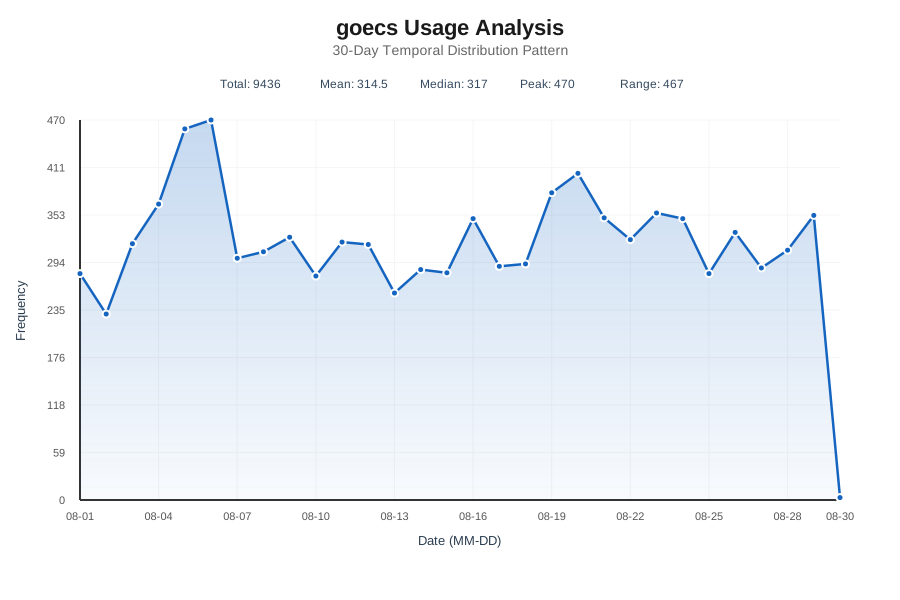
History Usage
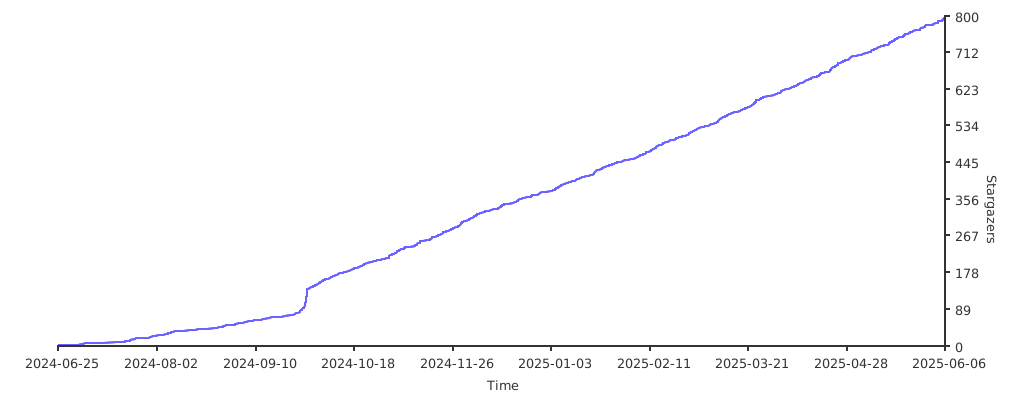
Stargazers over time
License