DSH Launcher Panel
September 3, 2026 · View on GitHub



Start DeepSeek Harness (dsh) inside VS Code and open its web UI in the built-in browser.
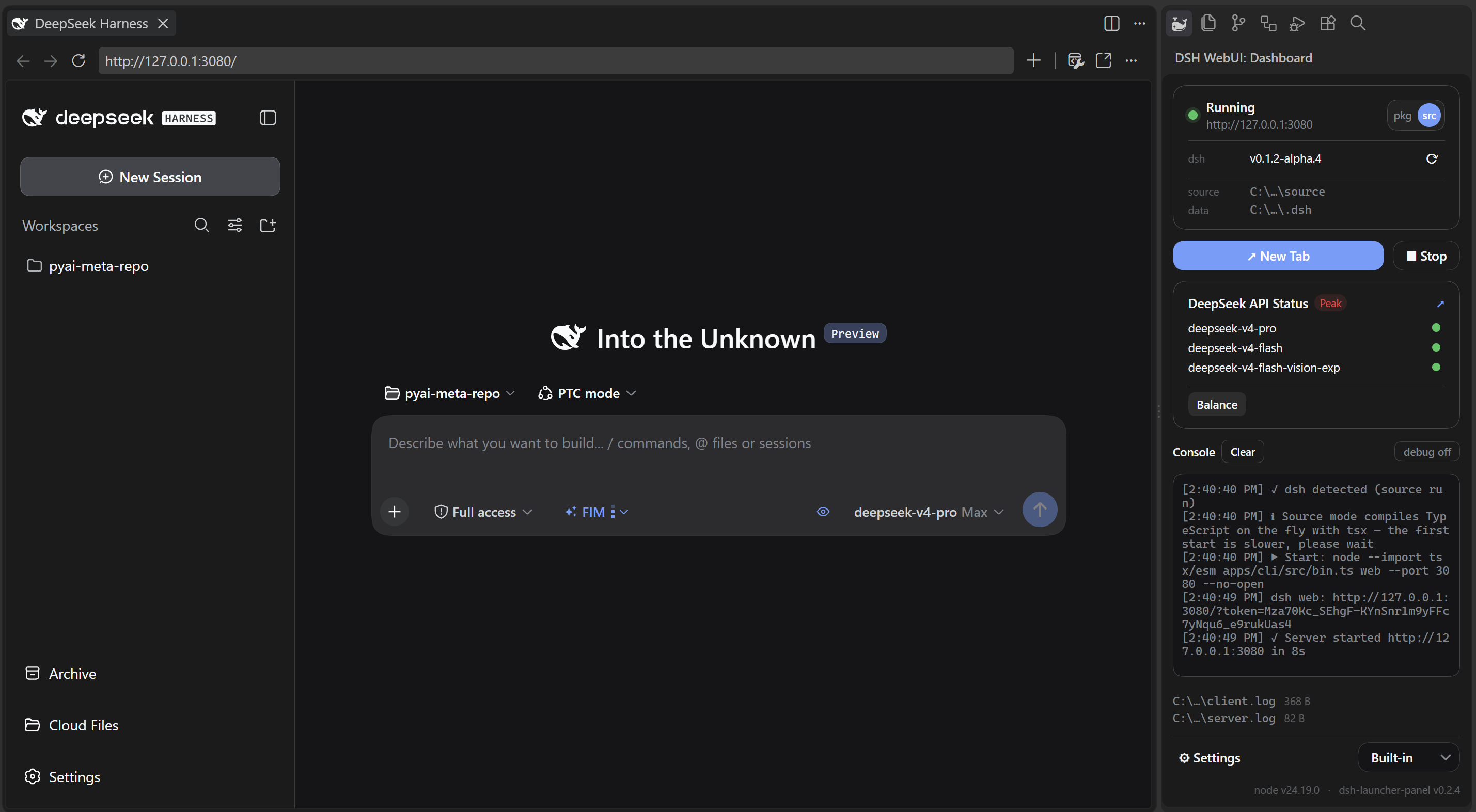
This extension does not ship an LLM model, DeepSeek Harness itself, or a DeepSeek API key.
Principles
- Loose coupling — the extension starts dsh only through its public entry points (a launcher-managed pnpm install or a source checkout), reads only the stable
~/.dshdata, and never depends on dsh internals — so your dsh plugins keep working as-is, and the launcher keeps working across dsh upgrades.
Features
- Start / Stop — installs dsh into a launcher-managed location (first run), then runs
pnpm exec dsh weband opens the web UI once it is ready. - Source run — clones deepseek-harness automatically into a managed location and runs it (a custom
dsh.srcPathoverrides the clone location); an existing checkout at that path is reused as-is. Before starting it runspnpm install+ build when deps are missing/stale or the checkout moved past its last build (detected via the commit hash in dsh's own build record); the build is preceded bypnpm run clean(when the checkout provides the script) to clear stale build residue, and uses dsh's official build profile so the web UI shows the same DeepSeek Harness brand as the packaged dsh. - Dashboard panel — server status, a live console (with clickable log files), the official DeepSeek API status with Peak / Off-peak pricing (weekends are billed at the off-peak rate), and your account balance.
- DSH Update — click the refresh button (⟳) to check; when a new version is available, an Update button appears next to the dsh version (pkg reinstalls the channel's latest; source checks out the newest official
dsh-v…release tag, never upstream master). - Browser choice — built-in or system browser.
Usage
Click the 🐳DSH WebUI whale icon in the activity bar, then click Start. The status bar whale icon mirrors the launcher state (blue pill while running, pulsing spout while starting) — click it for a quick menu: Open Web UI / Open Dashboard / Stop / Open Settings.
Settings
Settings → search "dsh":
| Key | Default | Description |
|---|---|---|
| dsh.runMode | pnpm | pnpm installs dsh into a launcher-managed location and runs pnpm exec dsh web; source runs a local checkout via tsx |
| dsh.npmChannel | latest | npm dist-tag pkg mode installs @deepseek-ai/dsh from on first install, and the Update button targets it: latest (stable), next (release candidates), or alpha (alphas). An installed dsh always starts as-is — the channel never downgrades or auto-upgrades it. Source mode ignores this and always tracks the newest official dsh-v<version> git tag. |
| dsh.pkgPath | empty | Optional: custom directory where pkg mode installs dsh. When empty, a managed default location is used. |
| dsh.srcPath | empty | Optional: path to an existing deepseek-harness clone for source mode. When empty, the extension clones the repo automatically. |
| dsh.nodePath | empty | Path to node.exe; empty uses the node on PATH |
| dsh.port | 3080 | Web UI port |
| dsh.autoOpenBrowser | true | Automatically open the browser after Start; turn off to keep your current tab (the Start button's "New Tab" click still opens one per dsh.browser) |
| dsh.browser | built-in | built-in uses VS Code's Simple Browser (falls back to the system browser if unavailable); external opens the system browser |
| dsh.hideConsole | true | Hide the server console window on Windows |
| dsh.clearServerLogOnStart | true | Clear the server log file at the start of each launch so it only contains the current run |
| dsh.sourceDebug | false | Print module-loading progress in source mode (NODE_DEBUG=module, very verbose; console shows a periodic count, full detail in the server log) |
Notes
- The default pnpm mode installs dsh with pnpm (the tool the dsh repo itself uses) into a managed location and runs it directly — npm's peer resolver can hang indefinitely on dsh's dependency graph, so
npxis not offered. On the first install the chosen location (default or custom) is recorded indsh.pkgPath/dsh.srcPath, so it shows up in Settings and stays pinned. - The mode pill in the panel uses short labels:
pkg= the pnpm mode,src= the source mode. Whendsh.srcPathdoes not point at an existing checkout, the launcher asks where to clone. - The panel shows where dsh lives (
packagein pkg mode,sourcein source mode) and thedata(~/.dsh) locations; the dsh row has Update and Check updates buttons. - Start/stop is idempotent: it probes the port first and does not start twice.
- Closing VS Code does not stop the server; stop it from the panel or command palette.
- The 🐳 whale artwork (activity bar icon + status bar icon font) is Twemoji's spouting whale (Twitter, Inc., CC-BY 4.0) rendered as a monochrome silhouette with punched eye and belly-band details — see NOTICE.
- The API Status card supports DeepSeek only for now — it only shows when a DeepSeek model is configured in dsh.
- Log files:
~/.dsh-launcher-panel/logs/client.log(launcher activity) andserver.log(server output), alongside the managed package/source dirs; both are clickable in the panel. The managed dirs live directly under the user's home directory (%USERPROFILE%on Windows). - DSH cannot run "minimal mode" properly on Windows for now.
Environment
- Node.js — 22.x (22.19 or later) or >= 24 (the 23.x line is not supported)
- pnpm — required for the default pnpm mode; if missing, the extension installs it automatically (
npm install -g pnpm) on first start - VS Code — 1.85+
- PowerShell 7 — optional; recommended on Windows (dsh's tool subprocesses use
pwsh; the launcher itself works with any shell)
License
MIT