KubeDiagrams
July 13, 2026 · View on GitHub









Generate Kubernetes architecture diagrams from Kubernetes manifest files, kustomization files, Helm charts, helmfile descriptors, and actual cluster state.
There are several tools to generate Kubernetes architecture diagrams, see here for a detailed list. Compared to these existing tools, the main originalities of KubeDiagrams are the support of:
- most of all Kubernetes built-in resources,
- any Kubernetes custom resources,
- customizable resource clustering,
- any Kubernetes resource relationships,
- declarative custom diagrams,
- an interactive diagram viewer,
- a modern web application,
- a plugin for JetBrains IDEs,
- main input formats such as Kubernetes manifest files, customization files, Helm charts, helmfile descriptors, and actual cluster state,
- main output formats such as D2, DOT, draw.io, GIF, JPEG, Mermaid, PDF, PNG, SVG, and TIFF,
- D2 Diagram Generation
- Mermaid Diagram Generation,
- editable draw.io export,
- a very large set of examples.
KubeDiagrams is available as a Python package in PyPI, a container image in DockerHub, a kubectl plugin, a Nix flake, and a GitHub Action, see here for more details.
An Online KubeDiagrams Service is freely available at https://kubediagrams.lille.inria.fr/.
Read Real-World Use Cases and What do they say about it to discover how KubeDiagrams is really used and appreciated.
Try it on your own Kubernetes manifests, Helm charts, helmfiles, and actual cluster state!
Examples
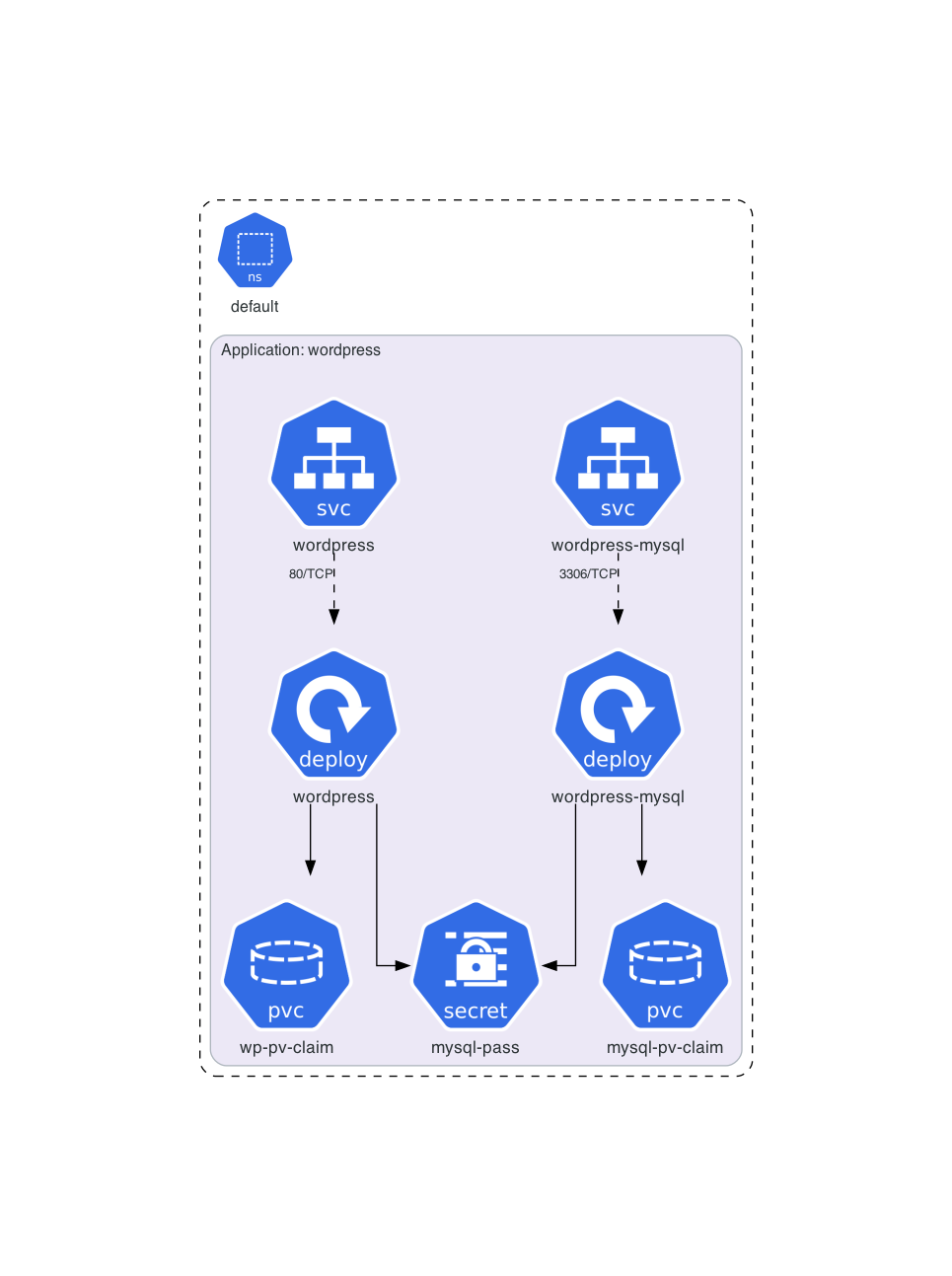
Architecture diagram for official Kubernetes WordPress tutorial manifests:
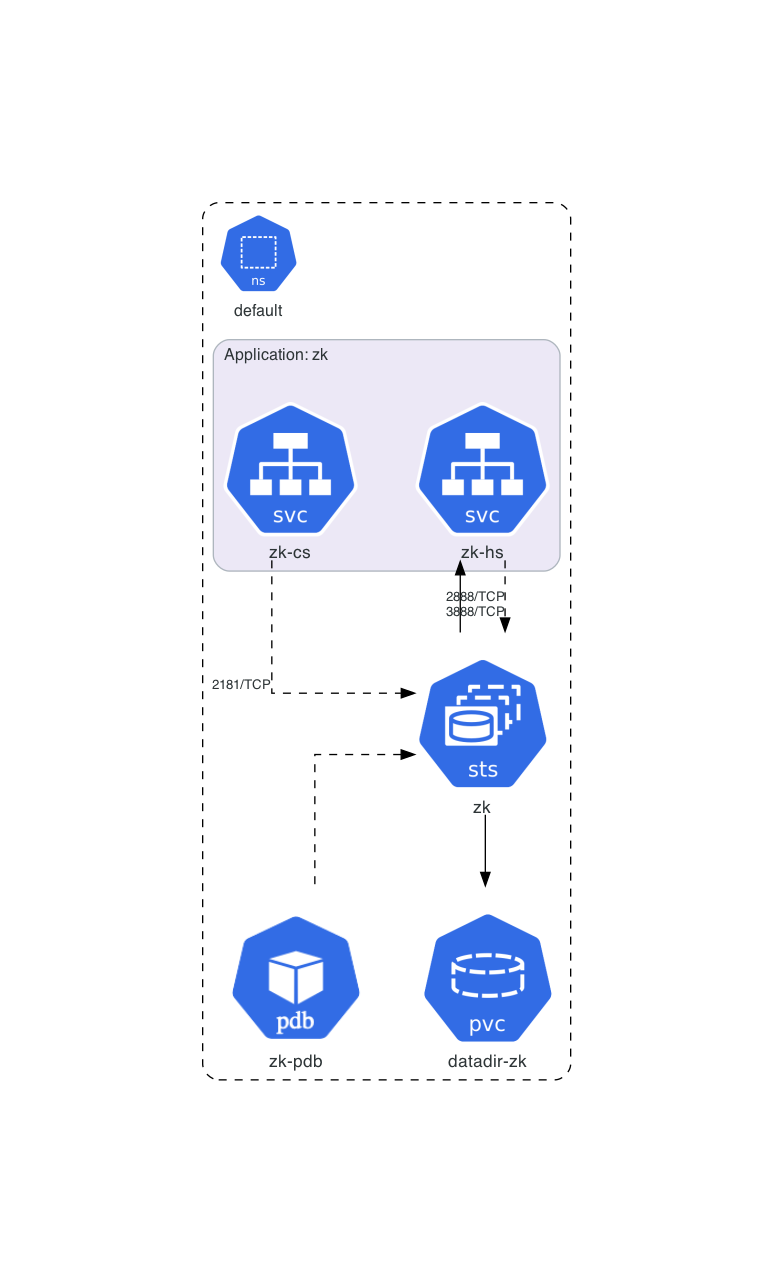
Architecture diagram for official Kubernetes ZooKeeper tutorial manifests:
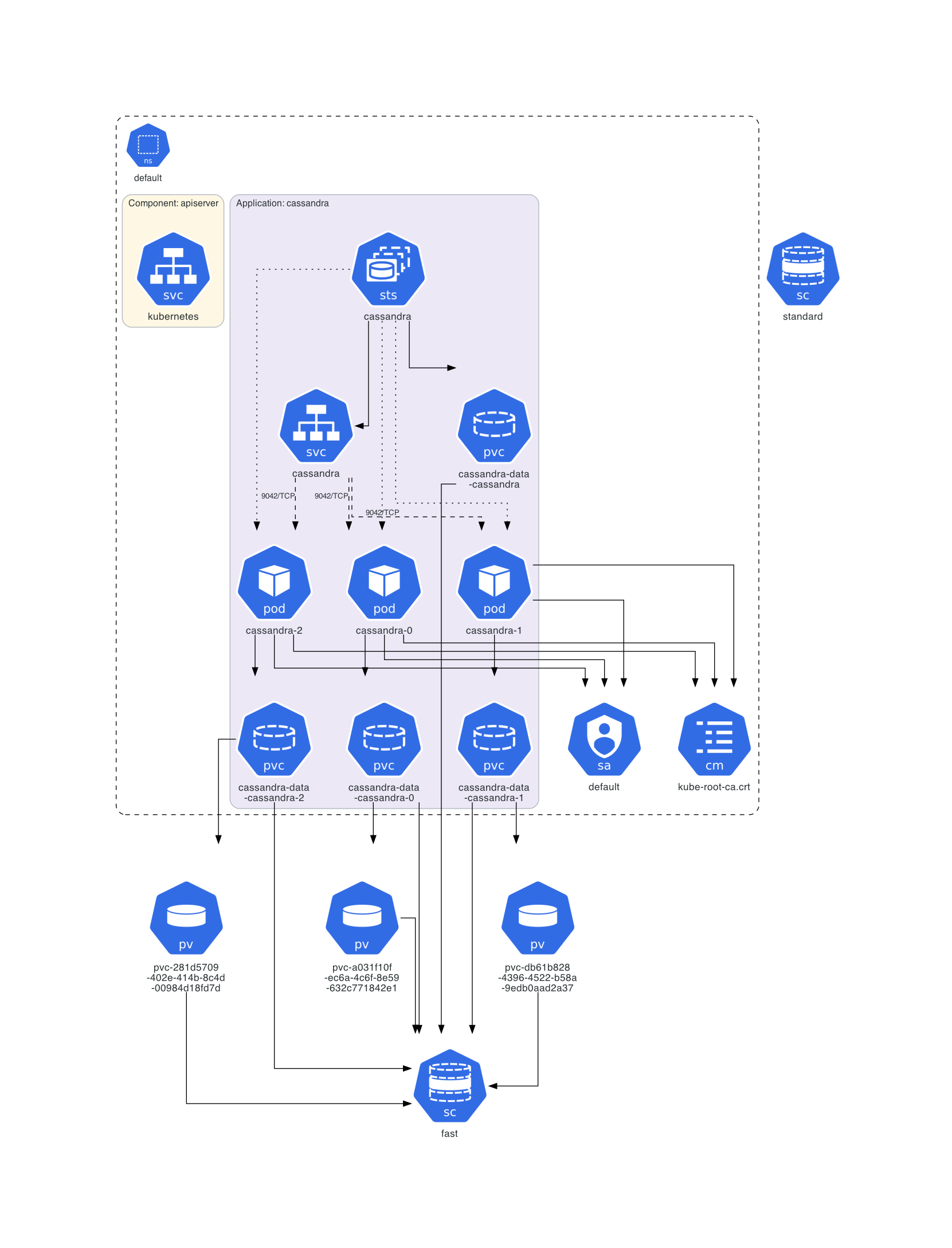
Architecture diagram of a deployed Cassandra instance:
Architecture diagram for Train Ticket:A Benchmark Microservice System:

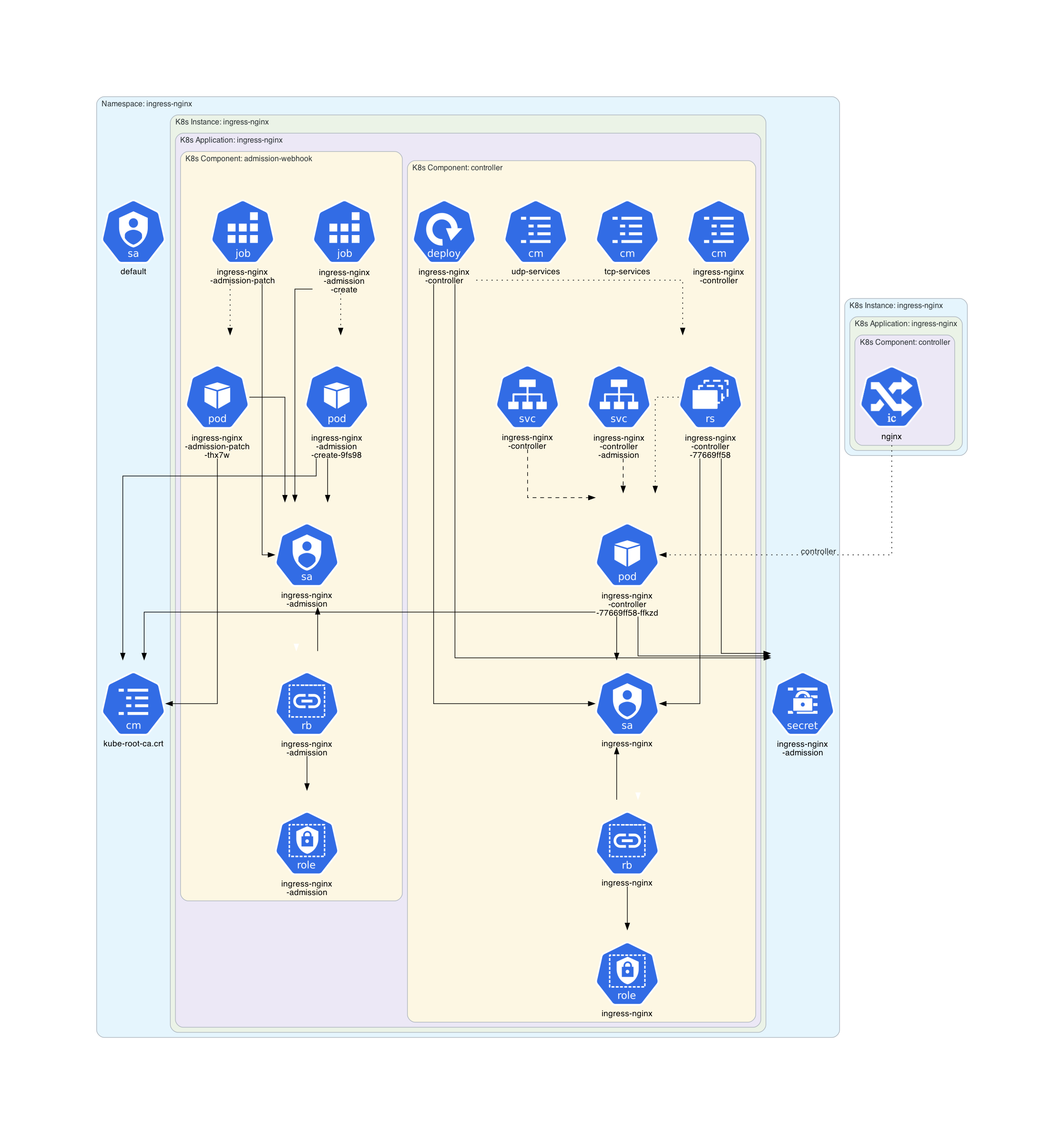
Architecture diagram of the Minikube Ingress Addon:
Architecture diagram for the Kube Prometheus Stack chart:

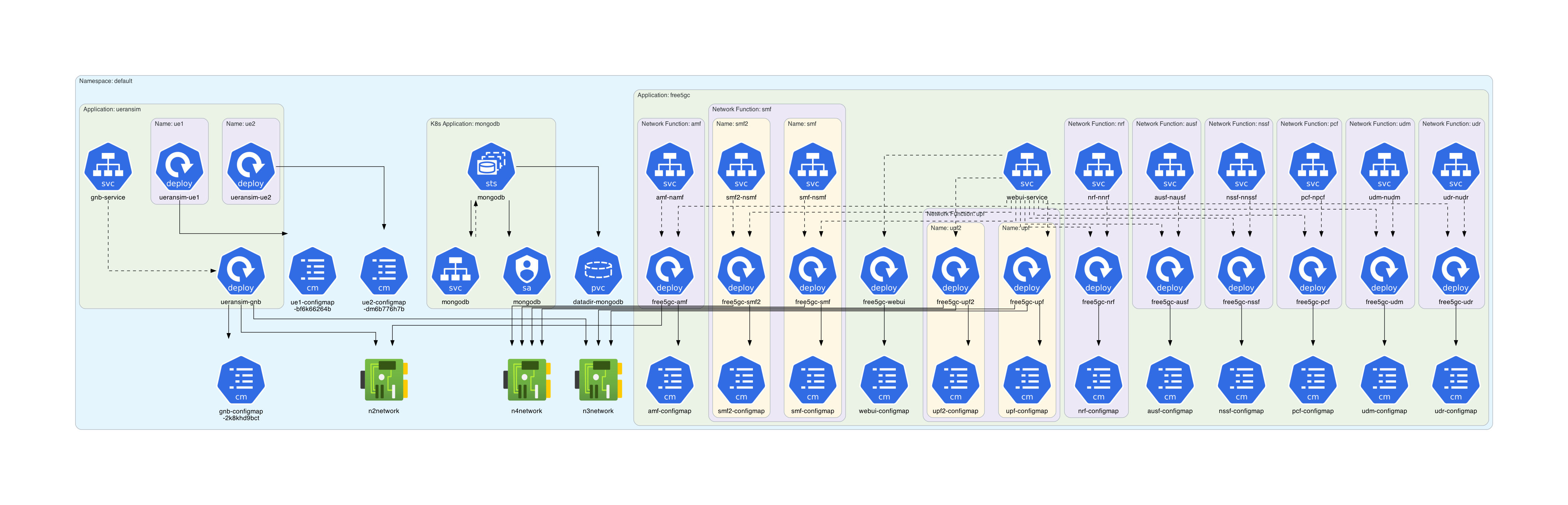
Architecture diagram for free5gc-k8s manifests:
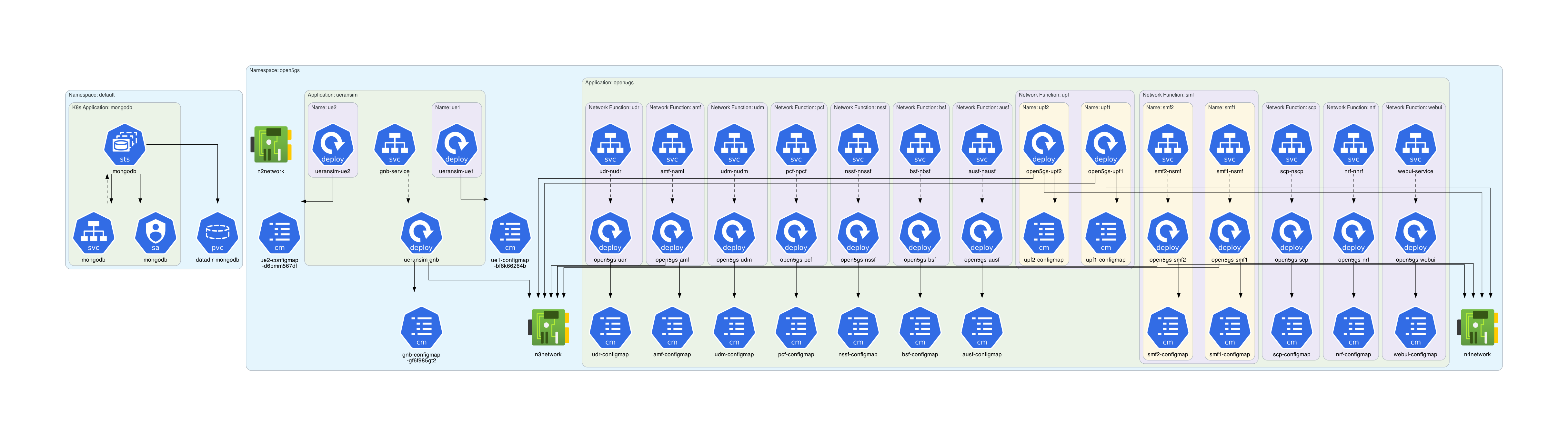
Architecture diagram for open5gs-k8s manifests:
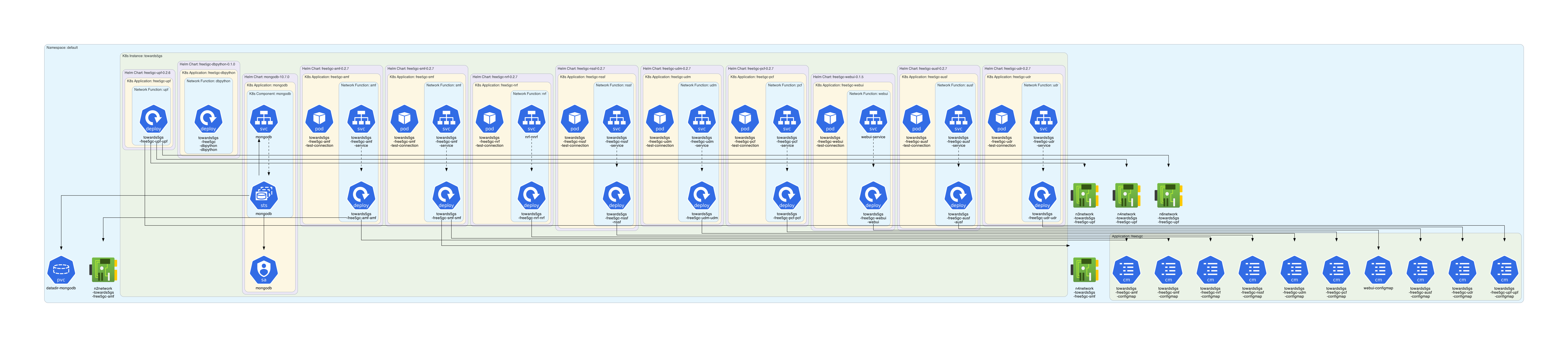
Architecture diagram for the Towards5GS-helm chart:
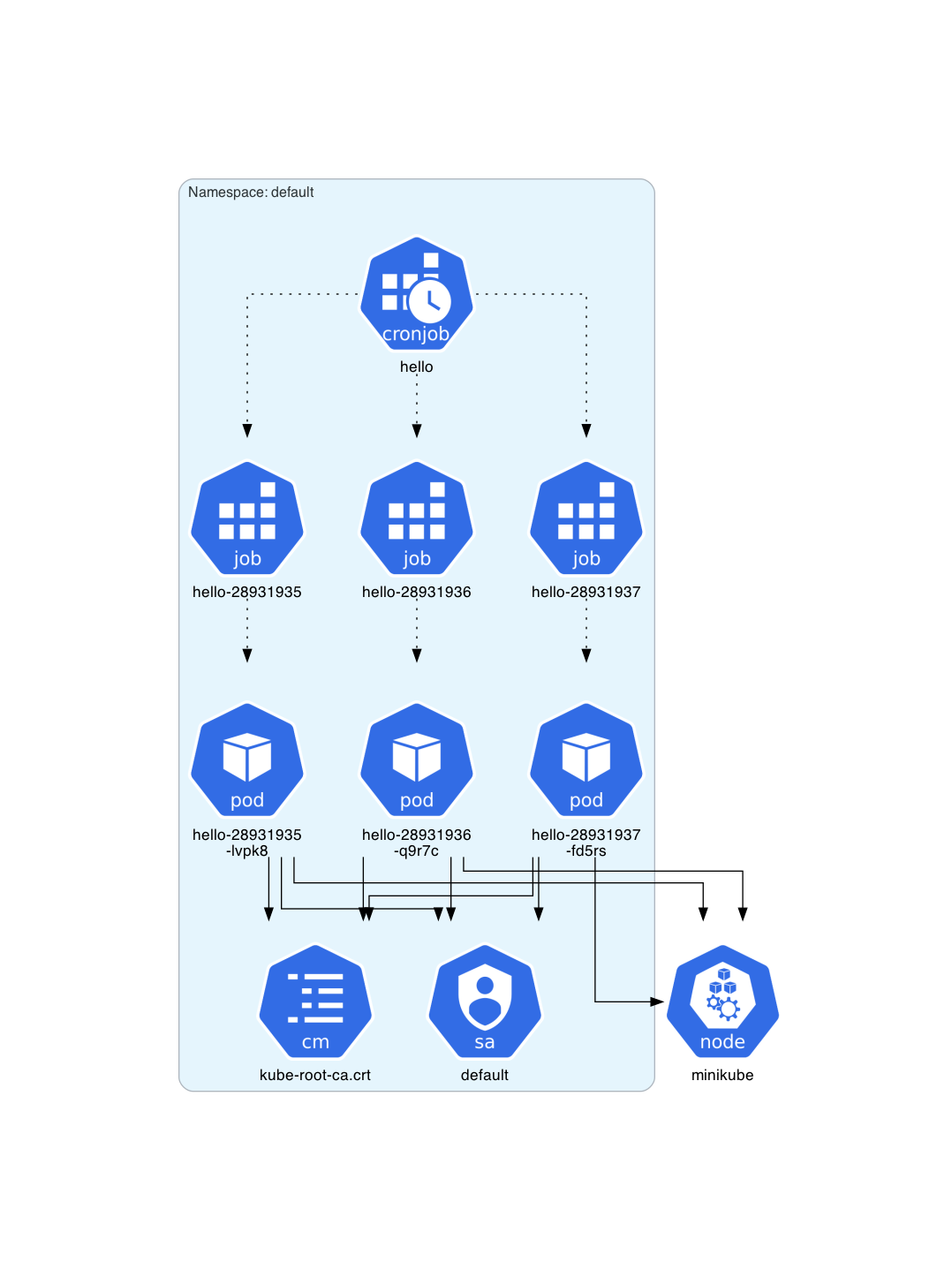
Architecture diagram for a deployed CronJob instance:
Architecture diagram for NetworkPolicy resources: 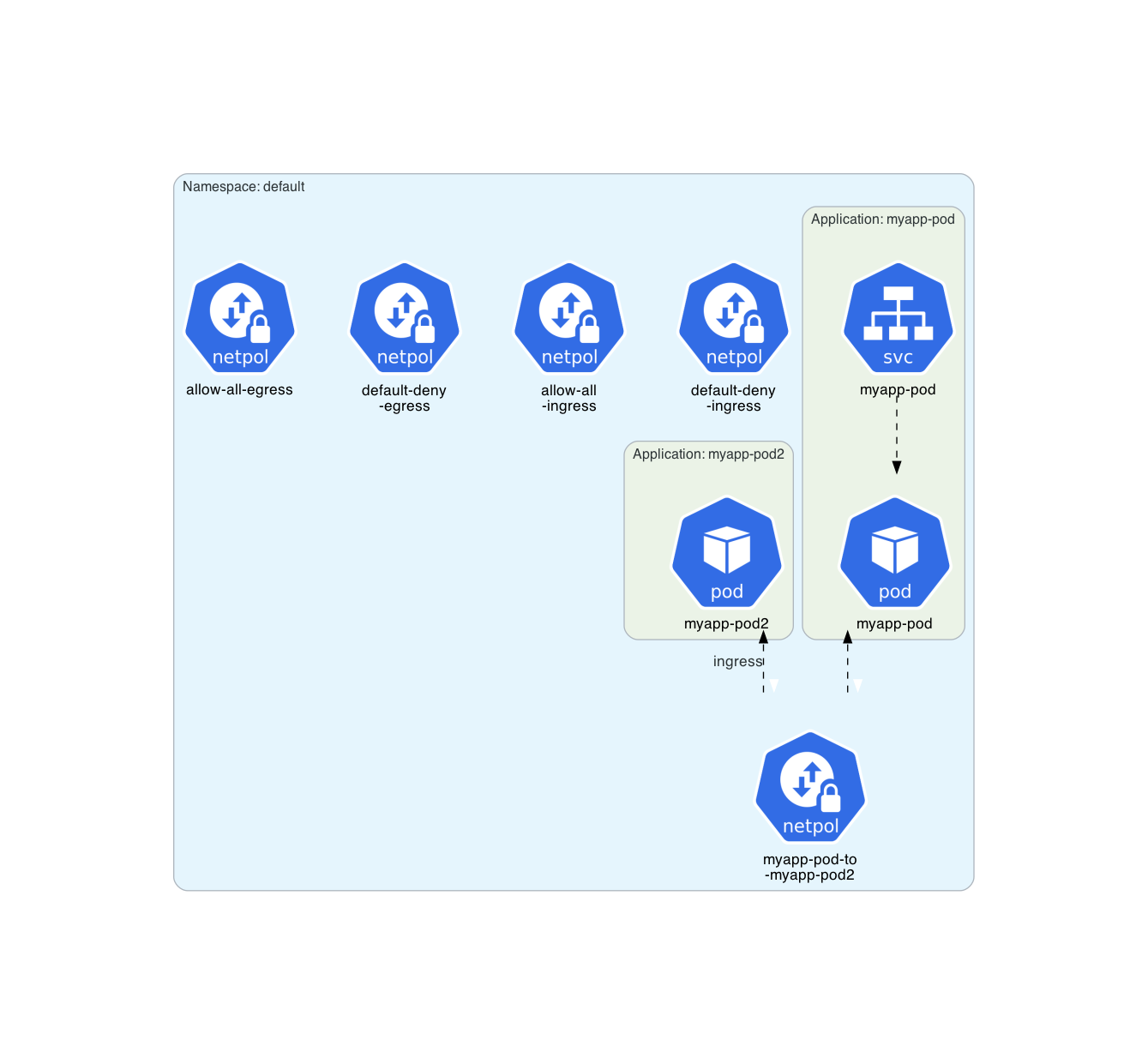
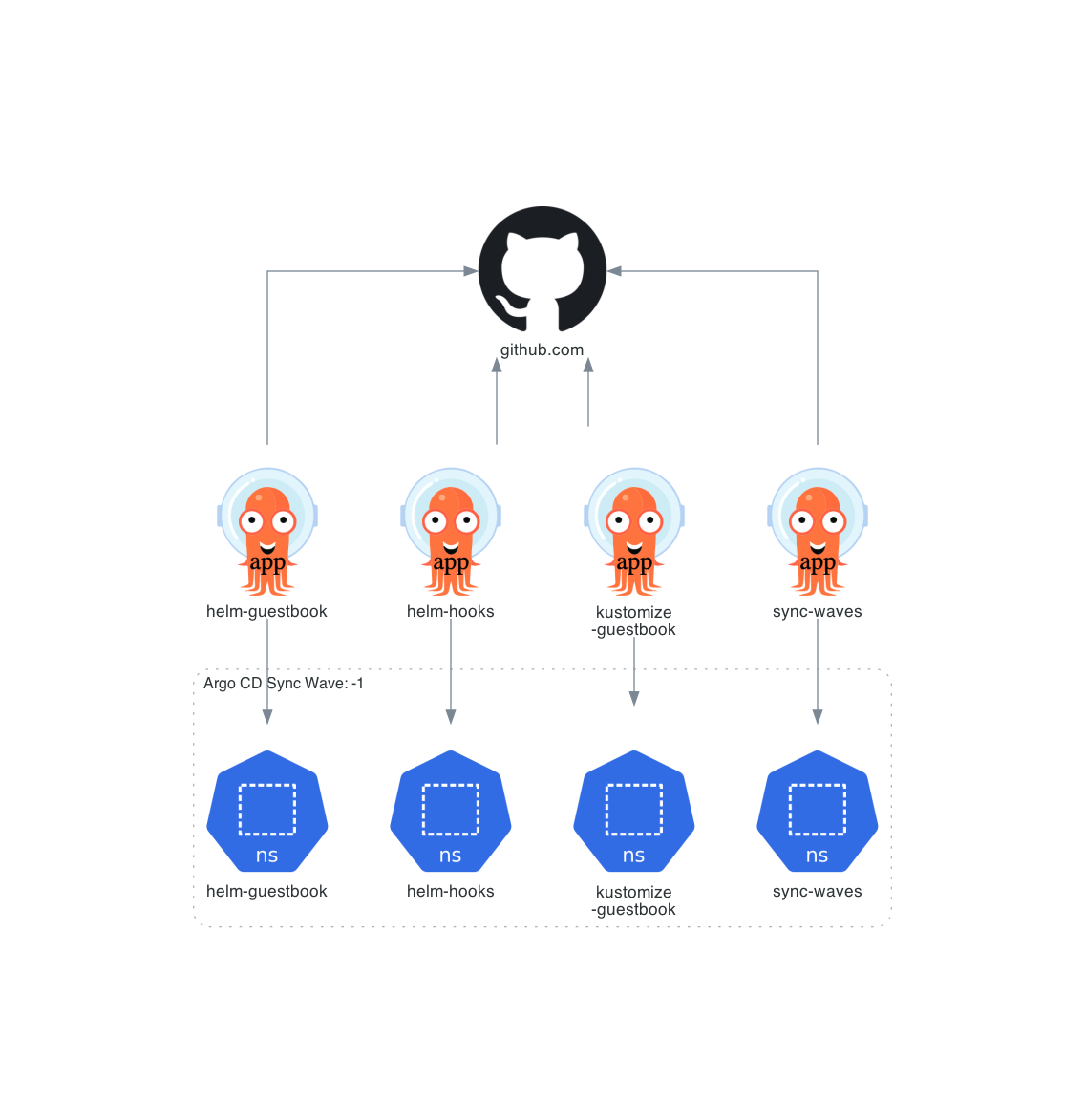
Architecture diagram for an Argo CD example:
Architecture diagram for an Argo Events example:

Many other architecture diagrams are available into examples/.
Business Applications
- Bank of Anthos
- DeathStarBench
- Official Kubernetes WordPress tutorial
- Official Kubernetes ZooKeeper tutorial
- Official Kubernetes Cassandra tutorial
- Online Boutique
- OpenTelemetry Demo
- TeaStore
- Train Ticket
5G Core Network Functions
- free5gc-k8s
- docker-open5gs
- Gradiant 5G Charts
- open5gs-k8s
- OpenAirInterface 5G Core Network
- Towards5GS-helm
Kubernetes Operators
- Argo
- cert-manager
- External Secrets Operator
- Gateway API
- Istio
- Kube Prometheus Stack
- LeaderWorkerSet API
Kubernetes Control Planes
Other examples
Prerequisites
Following software must be installed:
Getting Started
Online with nothing to install on your machine
You could test KubeDiagrams directly from your favorite Web browser here.
From PyPI
Following command installs KubeDiagrams and all its Python dependencies, i.e., PyYAML, Diagrams, and graphviz2drawio.
# using pip (pip3)
pip install KubeDiagrams
From Nix
Alternatively, you can install via Nix:
nix shell github:philippemerle/KubeDiagrams
From Docker Hub
KubeDiagrams container images are available in Docker Hub. You can download the latest container image via:
docker pull philippemerle/kubediagrams
From source
You can start directly from source:
# clone the KubeDiagrams repository
git clone https://github.com/philippemerle/KubeDiagrams.git

# install required Python packages
pip install PyYAML diagrams

# make KubeDiagrams commands available into $PATH
PATH=$(pwd)/KubeDiagrams/bin:$PATH
From Windows
To use KubeDiagrams from Windows operating system, only the container image is supported currently.
Note
Any contribution would be welcome to translate KubeDiagrams' Unix-based scripts to Windows-based scripts.
Usage
KubeDiagrams provides two commands: kube-diagrams and helm-diagrams.
kube-diagrams
kube-diagrams generates a Kubernetes architecture diagram from one or several Kubernetes manifest files.
kube-diagrams -h
usage: kube-diagrams [-h] [-o OUTPUT] [-f FORMAT] [-c CONFIG] [-v] [--without-namespace] filename [filename ...]

Generate Kubernetes architecture diagrams from Kubernetes manifest files

positional arguments:
  filename              the Kubernetes manifest filename to process

options:
  -h, --help            show this help message and exit
  -o, --output OUTPUT   output diagram filename
  -f, --format FORMAT   output format, allowed formats are d2, dot, dot_json, drawio, gif, jp2, jpe, jpeg, jpg, mermaid, pdf, png, svg, tif, tiff, set to png by default
  --embed-all-icons     embed all icons into svg or dot_json output diagrams
  -c, --config CONFIG   custom kube-diagrams configuration file
  -n, --namespace NAMESPACE
                        visualize only the resources inside a given namespace
  -v, --verbose         verbosity, set to false by default
  --without-namespace   disable namespace cluster generation
Examples:
# generate a diagram from a manifest
kube-diagrams -o cassandra.png examples/cassandra/cassandra.yml

# generate a diagram from a kustomize folder
kubectl kustomize path_to_a_kustomize_folder | kube-diagrams - -o diagram.png

# generate a diagram from a helmfile descriptor
helmfile template -f helmfile.yaml | kube-diagrams - -o diagram.png

# generate a diagram from the actual default namespace state
kubectl get all -o yaml | kube-diagrams -o default-namespace.png -

# generate a diagram of all workload and service resources from all namespaces
kubectl get all --all-namespaces -o yaml | kube-diagrams -o all-namespaces.png -
🧩 kubectl Plugin Support
You can use KubeDiagrams as a kubectl plugin as well for a more integrated Kubernetes workflow. This allows you to run commands like:
kubectl diagrams all -o diagram.png
To enable this, simply symlink or copy the kubectl-diagrams script onto your $PATH:
ln -s $(which kubectl-diagrams) /usr/local/bin/kubectl-diagrams
Note
You will also already need kube-diagrams on your $PATH as well for this to work.
You can alternatively install it via Nix:
nix shell github:philippemerle/KubeDiagrams#kubectl-diagrams
helm-diagrams
helm-diagrams generates a Kubernetes architecture diagram from an Helm chart.
Usage: helm-diagrams <helm-chart-url> [OPTIONS] [FLAGS]

A script to generate a diagram of an Helm chart using kube-diagrams.

Options:
  -o, --output <file>          Specify the output file for the diagram
  -f, --format <format>        Specify the output format (e.g., png, svg)
  --embed-all-icons            Embed all icons into svg or dot_json output diagrams
  -c, --config <file>          Specify the custom kube-diagrams configuration file
  -h, --help                   Display this help message

Any flag supported by helm template, e.g.:
  -g, --generate-name          Generate the name (and omit the NAME parameter)
  --include-crds               Include CRDs in the templated output
  -l, --labels stringToString  Labels that would be added to release metadata. Should be divided by comma. (default [])
  --name-template string       Specify template used to name the release
  --set stringArray            Set values on the command line (can specify multiple or separate values with commas: key1=val1,key2=val2)
  --set-file stringArray       Set values from respective files specified via the command line (can specify multiple or separate values with commas: key1=path1,key2=path2)
  --set-json stringArray       Set JSON values on the command line (can specify multiple or separate values with commas: key1=jsonval1,key2=jsonval2)
  --set-literal stringArray    Set a literal STRING value on the command line
  --set-string stringArray     Set STRING values on the command line (can specify multiple or separate values with commas: key1=val1,key2=val2)
  -f, --values strings         Specify values in a YAML file or a URL (can specify multiple)
  --version string             Specify a version constraint for the chart version to use. This constraint can be a specific tag (e.g. 1.1.1) or it may reference a valid range (e.g. ^2.0.0). If this is not specified, the latest version is used

Examples:
  helm-diagrams https://charts.jetstack.io/cert-manager -o diagram.png
  helm-diagrams https://charts.jetstack.io/cert-manager --set crds.enabled=true -o cert-manager.png
  helm-diagrams oci://ghcr.io/argoproj/argo-helm/argo-cd -f svg
  helm-diagrams --help
Note
helm-diagrams requires that the helm command was installed.
Examples:
# generate a diagram for the Helm chart 'cert-manager' available in HTTP repository 'charts.jetstack.io'
helm-diagrams https://charts.jetstack.io/cert-manager

# generate a diagram for the Helm chart 'argo-cd' available in OCI repository 'ghcr.io'
helm-diagrams oci://ghcr.io/argoproj/argo-helm/argo-cd

# generate a diagram for the Helm chart 'some-chart' available locally
helm-diagrams some-path/some-chart
With Docker/Podman
KubeDiagrams images are available in Docker Hub.
# For usage with Podman, replace 'docker' by 'podman' in the following lines.

# generate a diagram from a manifest
docker run -v "$(pwd)":/work philippemerle/kubediagrams kube-diagrams -o cassandra.png examples/cassandra/cassandra.yml

# generate a diagram from a kustomize folder
kubectl kustomize path_to_a_kustomize_folder | docker run -v "$(pwd)":/work -i philippemerle/kubediagrams kube-diagrams - -o diagram.png

# generate a diagram from a helmfile descriptor
helmfile template -f helmfile.yaml | docker run -v "$(pwd)":/work -i philippemerle/kubediagrams kube-diagrams - -o diagram.png

# generate a diagram from the actual default namespace state
kubectl get all -o yaml | docker run -v "$(pwd)":/work -i philippemerle/kubediagrams kube-diagrams -o default-namespace.png -

# generate a diagram of all workload and service resources from all namespaces
kubectl get all --all-namespaces -o yaml | docker run -v "$(pwd)":/work -i philippemerle/kubediagrams kube-diagrams -o all-namespaces.png -

# generate a diagram for the Helm chart 'cert-manager' available in HTTP repository 'charts.jetstack.io'
docker run -v "$(pwd)":/work philippemerle/kubediagrams helm-diagrams https://charts.jetstack.io/cert-manager

# generate a diagram for the Helm chart 'argo-cd' available in OCI repository 'ghcr.io'
docker run -v "$(pwd)":/work philippemerle/kubediagrams helm-diagrams oci://ghcr.io/argoproj/argo-helm/argo-cd
GitHub Action
You can use KubeDiagrams (and Helm Diagrams) in your GitHub Action workflows.
name: "Your GitHub Action Name"
on:
  workflow_dispatch: # add your specific triggers (https://docs.github.com/en/actions/writing-workflows/choosing-when-your-workflow-runs/events-that-trigger-workflows)
jobs:
  test:
    runs-on: ubuntu-latest
    steps:
      - name: "Generate diagram from Kubernetes manifest"
        uses: philippemerle/KubeDiagrams@main
        with:
          type: "kubernetes"
          args: "-o examples/cassandra/cassandra.png examples/cassandra/cassandra.yml"

      - name: "Generate diagram from Helm chart"
        uses: philippemerle/KubeDiagrams@main
        with:
          type: "helm"
          args: "https://charts.jetstack.io/cert-manager"
Action philippemerle/KubeDiagrams@main is available here.
KubeDiagrams Plugin for JetBrains IDEs
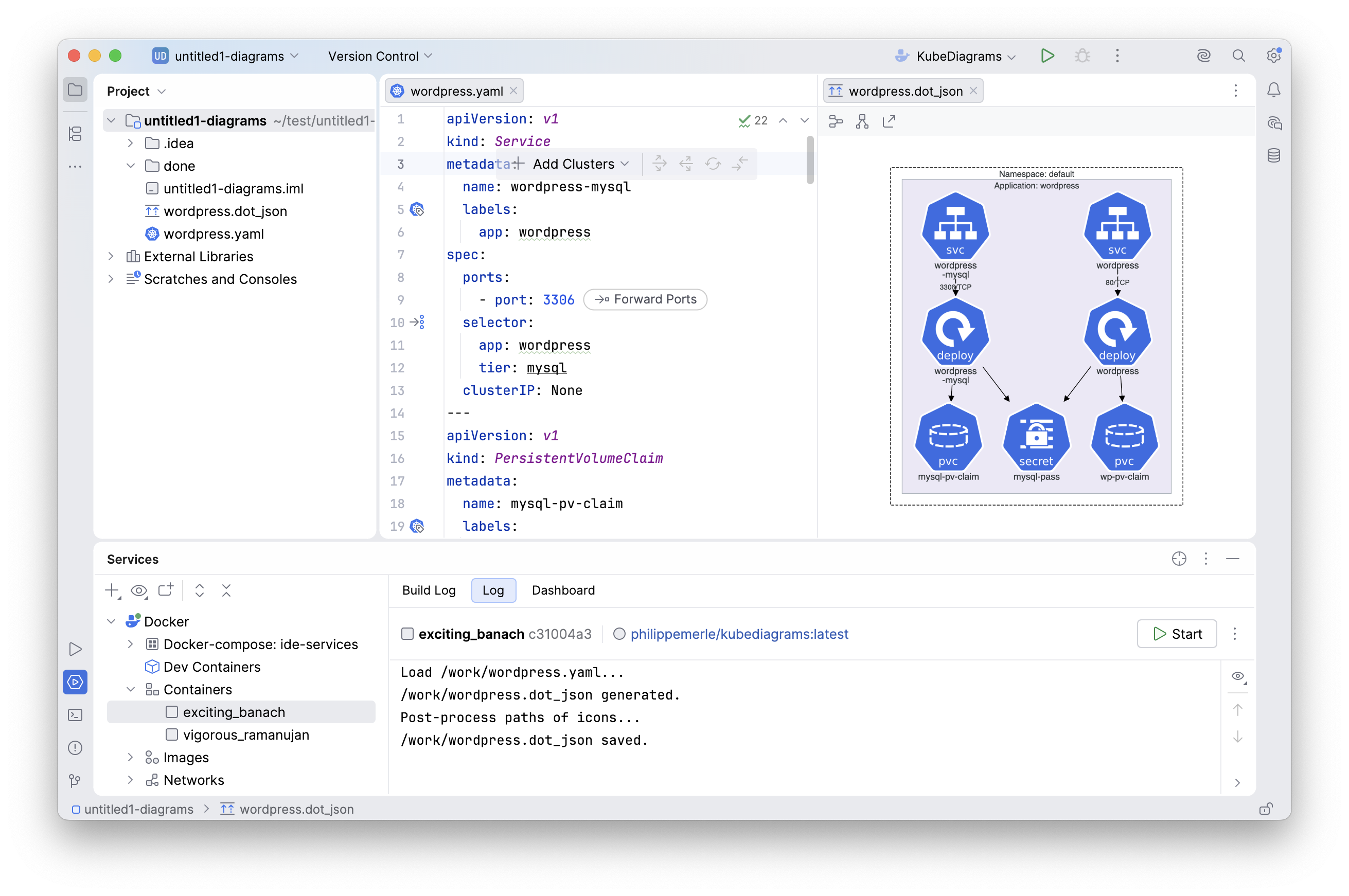
The KubeDiagrams Plugin for JetBrains IDEs is available here.
Features
Kubernetes built-in resources
KubeDiagrams supported the following 51 Kubernetes resource types:
| Kind | ApiGroup | Versions | Icon |
|---|---|---|---|
APIService | apiregistration.k8s.io | v1beta1 v1 |  |
ClusterRole | rbac.authorization.k8s.io | v1beta1 v1 |  |
ClusterRoleBinding | rbac.authorization.k8s.io | v1beta1 v1 |  |
ComponentStatus | v1 |  | |
ConfigMap | v1 |  | |
ControllerRevision | apps | v1 |  |
CronJob | batch | v1beta1 v1 |  |
CSIDriver | storage.k8s.io | v1beta1 v1 |  |
CSINode | storage.k8s.io | v1 |  |
CSIStorageCapacity | storage.k8s.io | v1 |  |
CustomResourceDefinition | apiextensions.k8s.io | v1beta1 v1 |  |
DaemonSet | apps extensions | v1beta1 v1beta2 v1 |  |
Deployment | apps extensions | v1beta1 v1beta2 v1 |  |
Endpoints | v1 |  | |
EndpointSlice | discovery.k8s.io | v1 |  |
FlowSchema | flowcontrol.apiserver.k8s.io | v1beta3 v1 |  |
Group | rbac.authorization.k8s.io | v1 |  |
HorizontalPodAutoscaler | autoscaling | v1 v2beta1 v2beta2 v2 |  |
Ingress | networking.k8s.io extensions | v1beta1 v1 |  |
IngressClass | networking.k8s.io | v1beta1 v1 |  |
Job | batch | v1beta1 v1 |  |
Lease | coordination.k8s.io | v1 |  |
LimitRange | v1 |  | |
MutatingWebhookConfiguration | admissionregistration.k8s.io | v1beta1 v1 |  |
Namespace | v1 |  | |
NetworkAttachmentDefinition | k8s.cni.cncf.io | v1 |  |
NetworkPolicy | networking.k8s.io | v1 |  |
Node | v1 |  | |
PersistentVolume | v1 |  | |
PersistentVolumeClaim | v1 |  | |
Pod | v1 |  | |
PodDisruptionBudget | policy | v1beta1 v1 |  |
PodSecurityPolicy | policy extensions | v1beta1 v1 |  |
PodTemplate | v1 |  | |
PriorityClass | scheduling.k8s.io | v1beta1 v1 |  |
PriorityLevelConfiguration | flowcontrol.apiserver.k8s.io | v1beta3 v1 |  |
ReplicaSet | apps | v1 |  |
ReplicationController | v1 |  | |
ResourceQuota | v1 |  | |
Role | rbac.authorization.k8s.io | v1beta1 v1 |  |
RoleBinding | rbac.authorization.k8s.io | v1beta1 v1 |  |
RuntimeClass | node.k8s.io | v1 |  |
Secret | v1 |  | |
Service | v1 |  | |
ServiceAccount | v1 |  | |
StatefulSet | apps | v1beta1 v1beta2 v1 |  |
StorageClass | storage.k8s.io | v1beta1 v1 |  |
User | rbac.authorization.k8s.io | v1 |  |
ValidatingWebhookConfiguration | admissionregistration.k8s.io | v1beta1 v1 |  |
VerticalPodAutoscaler | autoscaling.k8s.io | v1 |  |
VolumeAttachment | storage.k8s.io | v1 |  |
Note: The mapping between these supported Kubernetes resources and architecture diagrams is defined into bin/kube-diagrams.yml.
Currently, there are 12 unsupported Kubernetes resource types:
| Kind | ApiGroup |
|---|---|
Binding | |
Event | |
TokenReview | authentication.k8s.io |
LocalSubjectAccessReview | authorization.k8s.io |
SelfSubjectAccessReview | authorization.k8s.io |
SelfSubjectReview | authorization.k8s.io |
SelfSubjectRulesReview | authorization.k8s.io |
SubjectAccessReview | authorization.k8s.io |
CertificateSigningRequest | certificates.k8s.io |
Event | events.k8s.io |
NodeMetrics | metrics.k8s.io |
PodMetrics | metrics.k8s.io |
Kubernetes custom resources
The mapping for any Kubernetes custom resources can be also defined into KubeDiagrams configuration files as illustrated in examples/k0s/KubeDiagrams.yml, examples/kube-prometheus-stack/monitoring.coreos.com.kdc, examples/lws/KubeDiagrams.yml, examples/argo/KubeDiagrams.yaml, and examples/external-secrets/external-secrets.io.kdc. Following lists some custom resources already supported in examples.
| Kind | ApiGroup | Versions | Icon |
|---|---|---|---|
Application | argoproj.io | v1alpha1 |  |
EventBus | argoproj.io | v1alpha1 |  |
EventSource | argoproj.io | v1alpha1 |  |
Rollout | argoproj.io | v1alpha1 |  |
Sensor | argoproj.io | v1alpha1 |  |
Workflow | argoproj.io | v1alpha1 |  |
Service | serving.knative.dev | v1 |  |
Route | route.openshift.io | v1 |  |
Chart | helm.k0sproject.io | v1beta1 |  |
ControlNode | autopilot.k0sproject.io | v1beta2 |  |
EtcdMember | etcd.k0sproject.io | v1beta1 |  |
Plan | autopilot.k0sproject.io | v1beta2 |  |
UpdateConfig | autopilot.k0sproject.io | v1beta2 |  |
Alertmanager | monitoring.coreos.com | v1 |  |
Prometheus | monitoring.coreos.com | v1 |  |
PrometheusRule | monitoring.coreos.com | v1 |  |
ServiceMonitor | monitoring.coreos.com | v1 |  |
LeaderWorkerSet | leaderworkerset.x-k8s.io | v1 |  |
Certificate | cert-manager.io | v1alpha1 v1alpha2 v1 |  |
ClusterIssuer | cert-manager.io | v1alpha1 v1alpha2 v1 |  |
Issuer | cert-manager.io | v1alpha1 v1alpha2 v1 | |
ExternalSecret | external-secrets.io | v1alpha1 v1beta1 v1 |  |
SecretStore | external-secrets.io | v1alpha1 v1beta1 v1 |  |
Kubernetes resources clustering
With KubeDiagrams, Kubernetes resources can be clustered within the architecture diagrams automatically. KubeDiagrams uses the metadata.namespace resource field as first clustering criteria. Then, the metadata.labels keys can be used to define subclusters. Following table lists the predefined mappings between label keys and cluster titles, and background colors as defined in the bin/kube-diagrams.yml file (see the clusters list).
| Label Key | Cluster Title | Background Color | Recommended |
|---|---|---|---|
app.kubernetes.io/instance | K8s Instance: label value |  | Yes |
release | Release: label value | | No |
helm.sh/chart | Helm Chart: label value |  | Yes |
chart | Chart: label value | | No |
app.kubernetes.io/name | K8s Application: label value |  | Yes |
app | Application: label value | | No |
tier | Tier: label value | | No |
app.kubernetes.io/component | K8s Component: label value |  | Yes |
component | Component: label value | | No |
service | Microservice: label value | | No |
rbac.authorization.k8s.io/aggregate-to-admin | Admin ClusterRole Aggregation | transparent | Yes |
rbac.authorization.k8s.io/aggregate-to-edit | Edit ClusterRole Aggregation | transparent | Yes |
rbac.authorization.k8s.io/aggregate-to-view | View ClusterRole Aggregation | transparent | Yes |
Resource clustering could be also annotation-based, i.e. based on metadata.annotations keys. Following table lists the predefined mappings between annotation keys, cluster titles, and background colors as defined in the bin/kube-diagrams.yml file.
| Annotation Key | Cluster Title | Background Color | Recommended |
|---|---|---|---|
helm.sh/hook | annotation value | | Yes |
New label/annotation-based mappings can be easily defined in custom configuration files (see examples/minikube/KubeDiagrams.yml, examples/k0s/KubeDiagrams.yml, examples/free5gc-k8s/KubeDiagrams.yml, examples/open5gs-k8s/KubeDiagrams.yml, examples/towards5gs-helm/KubeDiagrams.yml, examples/lws/KubeDiagrams.yml, and examples/argo/KubeDiagrams.yaml)
and provided to KubeDiagrams via the --config command-line option.
Kubernetes resource relationships
With KubeDiagrams, each relationship between Kubernetes resources is represented by a visual edge between visual nodes.
Following table lists the predefined edges as defined in the bin/kube-diagrams.yml file (see the edges map).
| Edge Kind | Edge Style | Edge Color | Meaning |
|---|---|---|---|
REFERENCE | solid | black | Used when a resource refers to another resource directly |
SELECTOR | dashed | black | Used when a resource refers to other resources via a selector |
OWNER | dotted | black | Used when a resource owns another resource |
COMMUNICATION | solid | brown | Used to represent ingress and egress networking policies between pods |
New edges can be easily defined or redefined in custom configuration files, and provided to KubeDiagrams via the --config command-line option.
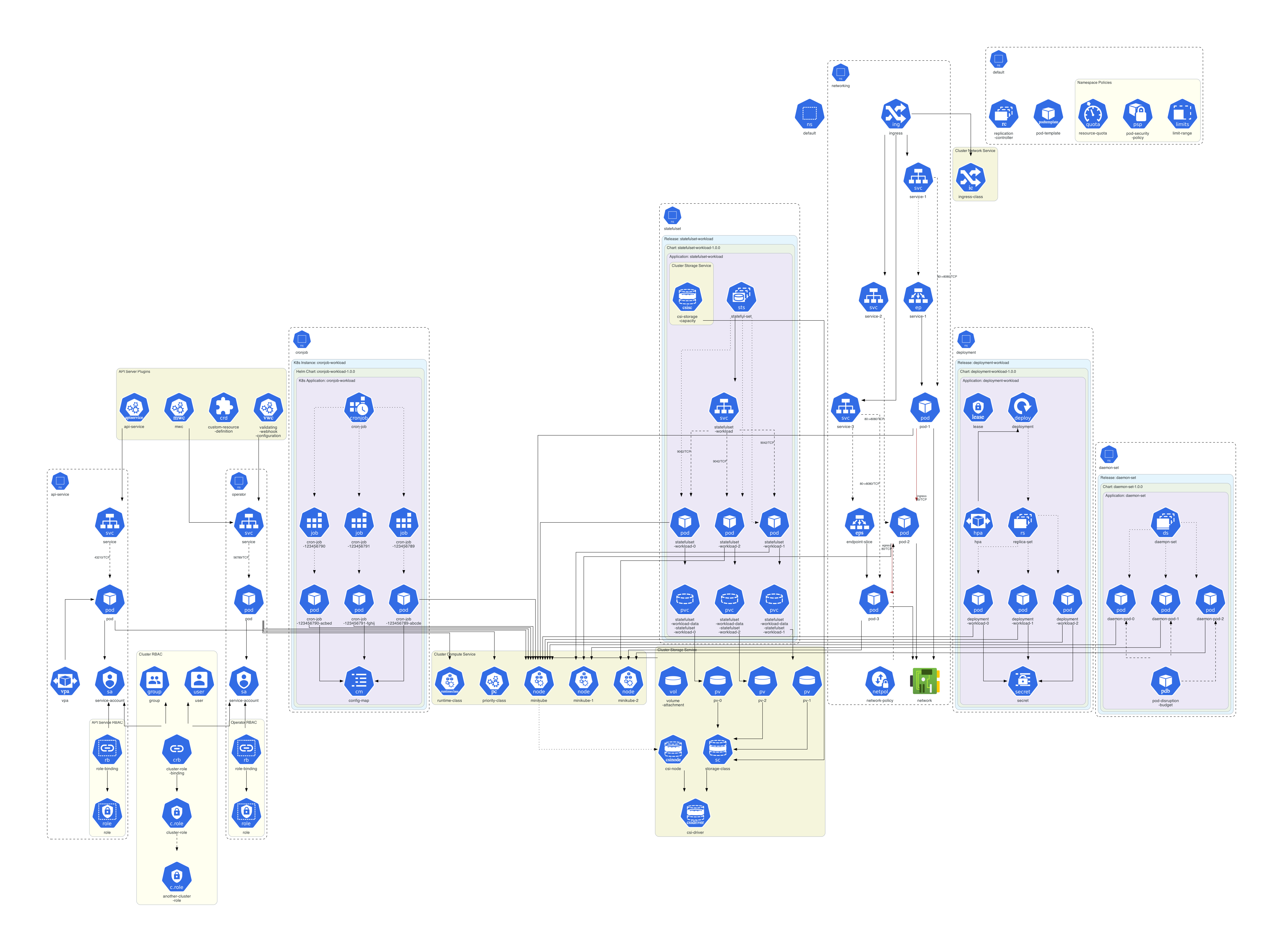
Following diagram illustrates all the visual nodes, edges, and clusters supported by default by KubeDiagrams.
 .
.
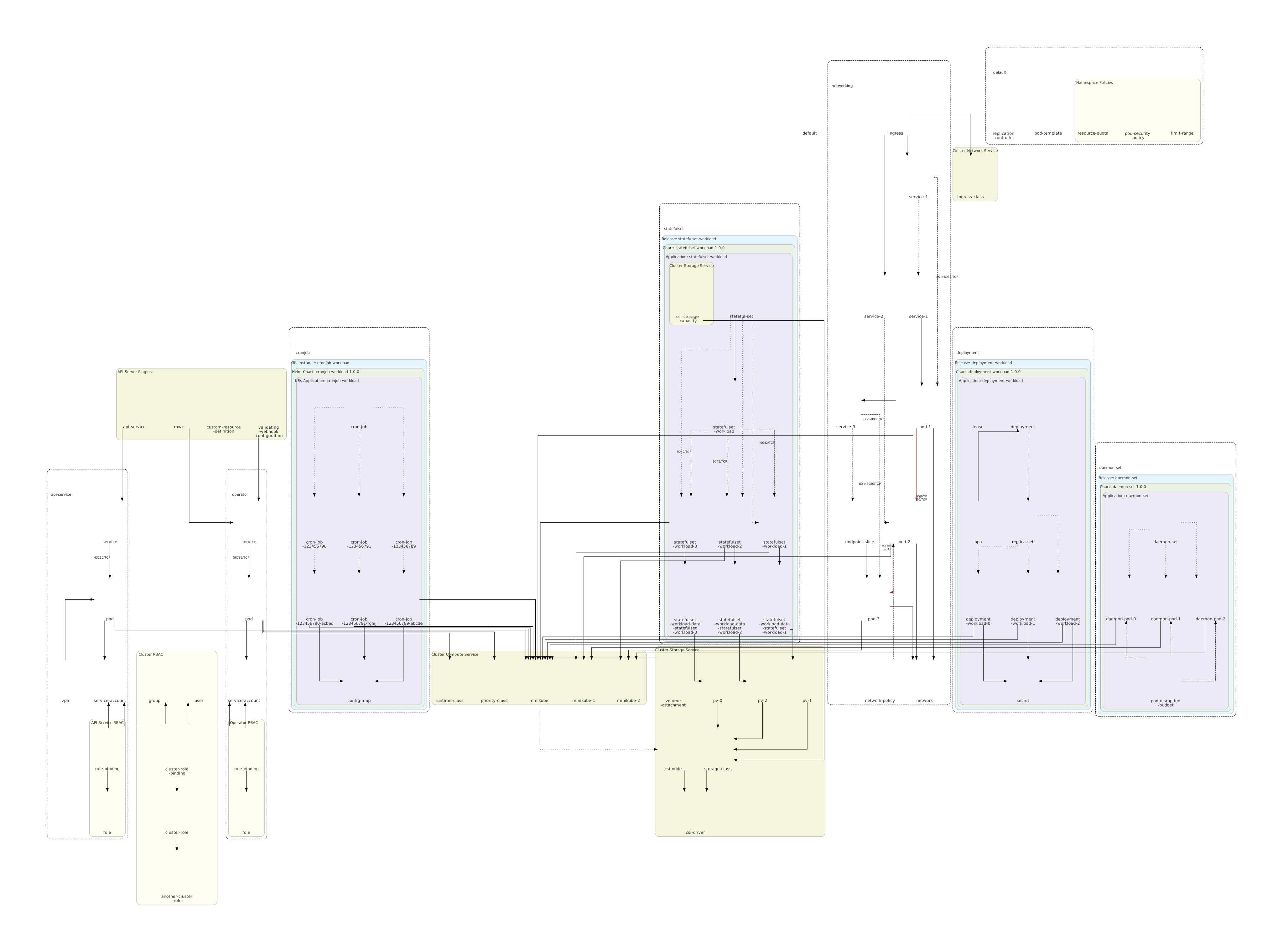
Generated SVG diagrams contain tooltips for each cluster/node/edge as illustrated in images/semiotics.svg
Declarative custom diagrams
By default, KubeDiagrams generates diagrams from data contained into Kubernetes manifest files, actual cluster state, kustomization files, or Helm charts automatically. But sometimes, users would like to customize generated diagrams by adding their own clusters, nodes and edges as illustrated in the following diagram:
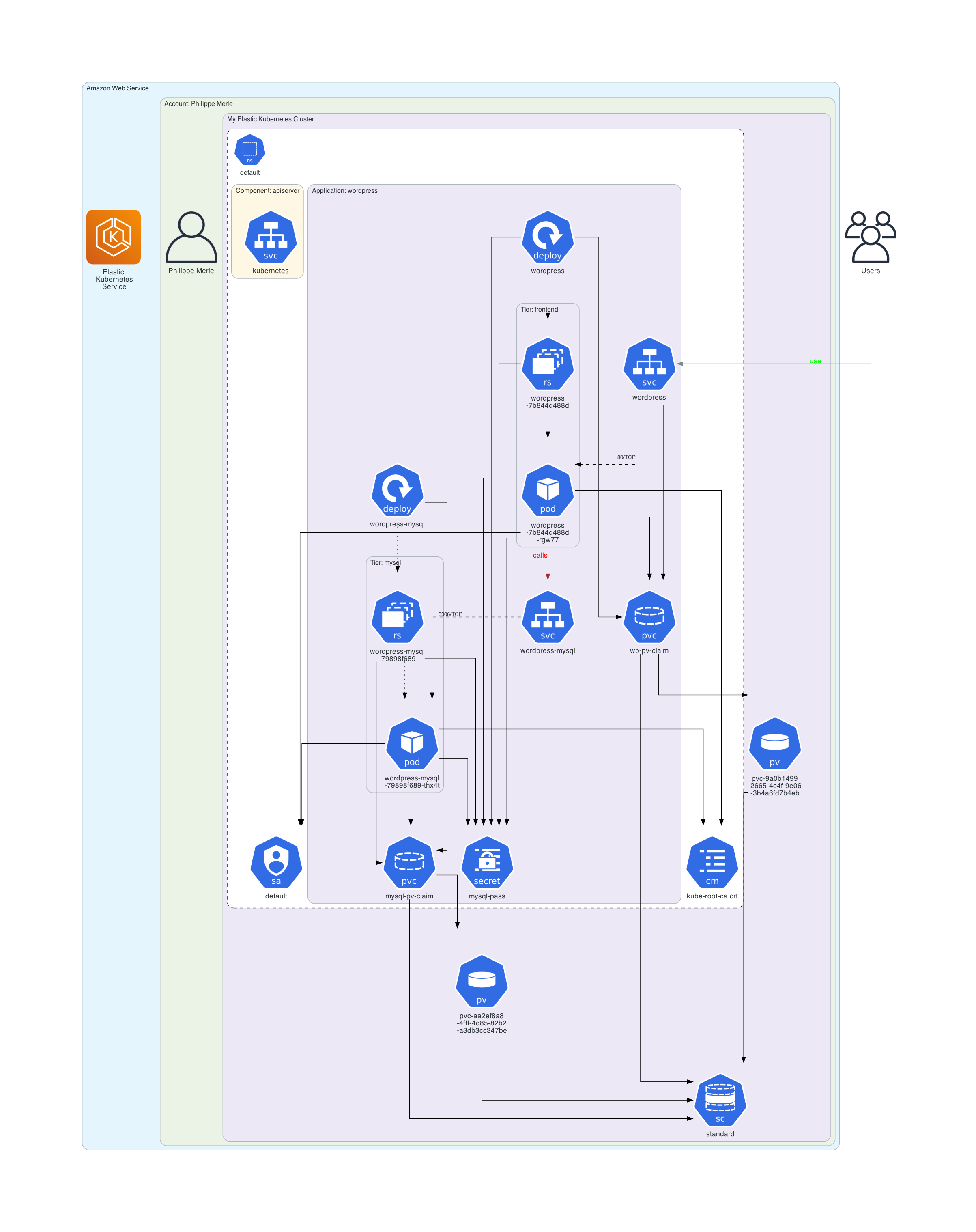
This previous diagram contains three custom clusters labelled with Amazon Web Service, Account: Philippe Merle and My Elastic Kubernetes Cluster, three custom nodes labelled with Users, Elastic Kubernetes Services, and Philippe Merle, and two custom edges labelled with use and calls. The rest of this custom diagram is generated from actual cluster state for a deployed WordPress application automatically.
Have a look to examples/wordpress/custom_diagram.kd, examples/online-boutique/custom_diagram.kd, and
examples/custom-object-items/config/custom-object-items.kd to see how to define custom diagrams, clusters, nodes and edges declaratively.
KubeDiagrams Interactive Viewer
KubeDiagrams could output diagrams in the dot_json format. For instance, type:
kube-diagrams examples/wordpress/*.yaml -o wordpress.dot_json
Diagrams in the dot_json format can be viewed and manipulated interactively thanks to KubeDiagrams Interactive Viewer. For instance, type:
open interactive_viewer/index.html
Then open the wordpress.dot_json file:
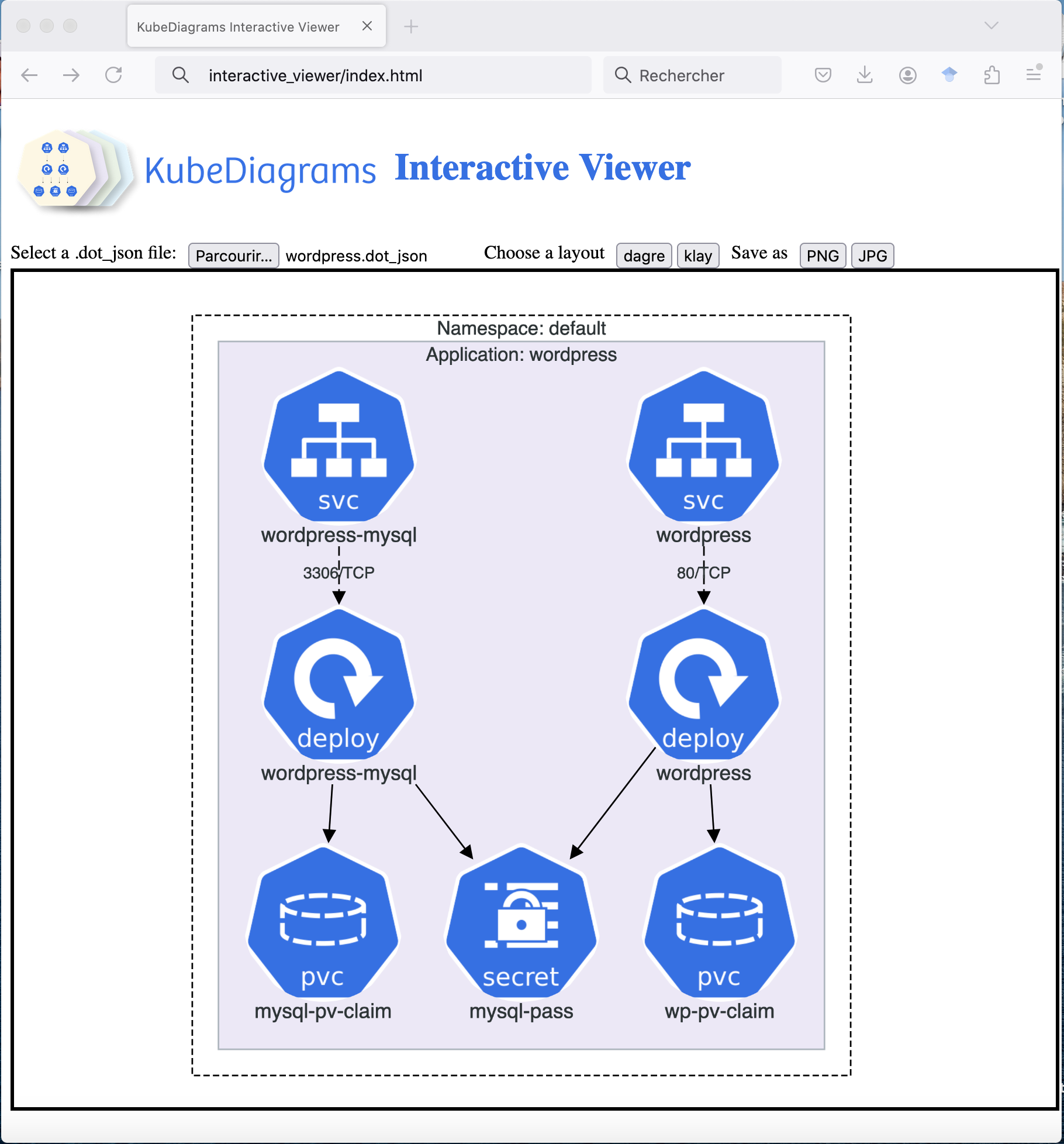
KubeDiagrams Interactive Viewer allows users to zoom in/out diagrams, to see cluster/node/edge tooltips, open/close clusters, move clusters/nodes interactively, filter shown resource kinds, and save as PNG/JPG images.
KubeDiagrams WebApp
A modern web app for KubeDiagrams is available in webapp. See a demo in this video.
Editable draw.io Export
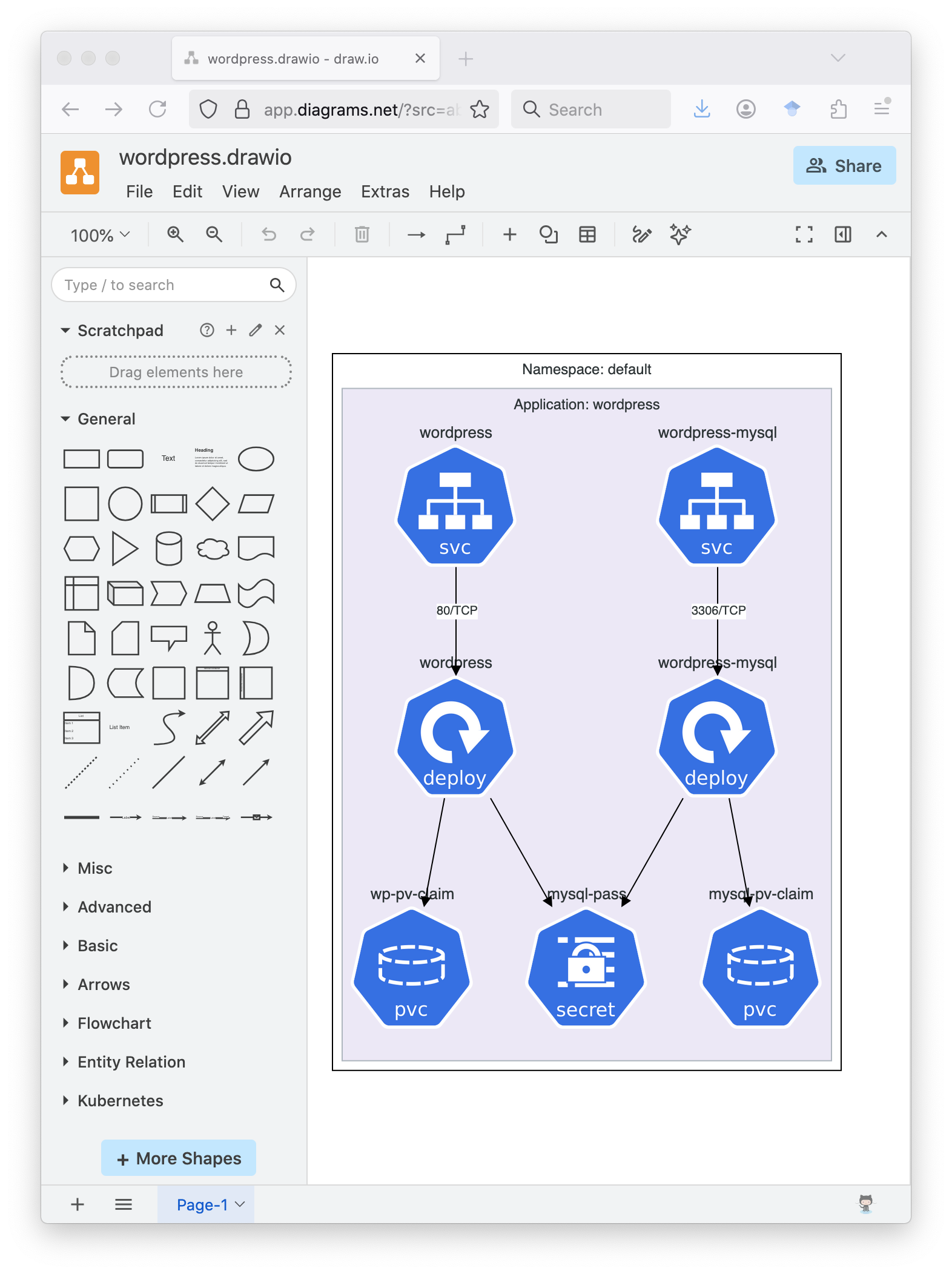
KubeDiagrams could output diagrams in the drawio format. For instance, type:
kube-diagrams examples/wordpress/*.yaml -o wordpress.drawio
✨ Generated drawio files can be opened with draw.io or your favorite diagram editor.
D2 Diagram Generation
KubeDiagrams could output diagrams in the D2 format. For instance, type:
kube-diagrams examples/wordpress/*.yaml -o wordpress.d2
After compiling with D2 CLI, the generated diagram is rendered as follows:

Mermaid Diagram Generation
KubeDiagrams could output diagrams in the Mermaid format. For instance, type:
kube-diagrams examples/wordpress/*.yaml -o wordpress.mermaid
The generated diagram is rendered as follows:
flowchart TB
  subgraph Namespace_default [Namespace: default]
    direction TB
    style Namespace_default fill:white,color:#2D3436,font:sans-serif,font-size:12pt,stroke:black,stroke-dasharray:4
    subgraph Application_wordpress [Application: wordpress]
      direction TB
      style Application_wordpress fill:#ECE8F6,color:#2D3436,font:sans-serif,font-size:12pt,stroke:#AEB6BE
      309b7a6a980d471ab77463b5b100daf4@{ img: "https://raw.githubusercontent.com/mingrammer/diagrams/refs/heads/master/resources/k8s/network/svc.png", label: "wordpress-mysql", h: 120, constraint: "on" }
      style 309b7a6a980d471ab77463b5b100daf4 fill:none,stroke:none
      418cdbdf8b6e4c15808f6790ca468518@{ img: "https://raw.githubusercontent.com/mingrammer/diagrams/refs/heads/master/resources/k8s/storage/pvc.png", label: "mysql-pv-claim", h: 120, constraint: "on" }
      style 418cdbdf8b6e4c15808f6790ca468518 fill:none,stroke:none
      86aea62b4d7e4855b53c90a845137ac1@{ img: "https://raw.githubusercontent.com/mingrammer/diagrams/refs/heads/master/resources/k8s/compute/deploy.png", label: "wordpress-mysql", h: 120, constraint: "on" }
      style 86aea62b4d7e4855b53c90a845137ac1 fill:none,stroke:none
      a86b1243aba448808bb39f896fa92ed6@{ img: "https://raw.githubusercontent.com/mingrammer/diagrams/refs/heads/master/resources/k8s/podconfig/secret.png", label: "mysql-pass", h: 120, constraint: "on" }
      style a86b1243aba448808bb39f896fa92ed6 fill:none,stroke:none
      ace15327f7724ee89433abe9c08c81b2@{ img: "https://raw.githubusercontent.com/mingrammer/diagrams/refs/heads/master/resources/k8s/network/svc.png", label: "wordpress", h: 120, constraint: "on" }
      style ace15327f7724ee89433abe9c08c81b2 fill:none,stroke:none
      31f2b483d2c646f890233c302438cb84@{ img: "https://raw.githubusercontent.com/mingrammer/diagrams/refs/heads/master/resources/k8s/storage/pvc.png", label: "wp-pv-claim", h: 120, constraint: "on" }
      style 31f2b483d2c646f890233c302438cb84 fill:none,stroke:none
      efa901d5916f4a6b8f0b56c88ac08b73@{ img: "https://raw.githubusercontent.com/mingrammer/diagrams/refs/heads/master/resources/k8s/compute/deploy.png", label: "wordpress", h: 120, constraint: "on" }
      style efa901d5916f4a6b8f0b56c88ac08b73 fill:none,stroke:none
    end
  end
  309b7a6a980d471ab77463b5b100daf4 -- "3306/TCP" --> 86aea62b4d7e4855b53c90a845137ac1
  linkStyle 0 stroke:black,color:#2D3436,font:sans-serif,font-size:10pt,stroke-dasharray:4
  86aea62b4d7e4855b53c90a845137ac1 --> 418cdbdf8b6e4c15808f6790ca468518
  linkStyle 1 stroke:black,color:#2D3436,font:sans-serif,font-size:13pt
  86aea62b4d7e4855b53c90a845137ac1 --> a86b1243aba448808bb39f896fa92ed6
  linkStyle 2 stroke:black,color:#2D3436,font:sans-serif,font-size:13pt
  ace15327f7724ee89433abe9c08c81b2 -- "80/TCP" --> efa901d5916f4a6b8f0b56c88ac08b73
  linkStyle 3 stroke:black,color:#2D3436,font:sans-serif,font-size:10pt,stroke-dasharray:4
  efa901d5916f4a6b8f0b56c88ac08b73 --> a86b1243aba448808bb39f896fa92ed6
  linkStyle 4 stroke:black,color:#2D3436,font:sans-serif,font-size:13pt
  efa901d5916f4a6b8f0b56c88ac08b73 --> 31f2b483d2c646f890233c302438cb84
  linkStyle 5 stroke:black,color:#2D3436,font:sans-serif,font-size:13pt
Architecture
Following figure shows the software architecture of KubeDiagrams.

Real-World Use Cases
Following provides links to real-world use cases.
Documentation
KubeDiagrams could be used to generate architectural diagrams documenting your Kubernetes applications (manifests, Helm charts, helmfiles, or cluster state). See following links:
Architectural defects identification
Diagrams generated by KubeDiagrams could help you to identify architectural defects in your own or used Kubernetes applications. See following links:
Debugging
Generated diagrams could help you to debug your own or used Kubernetes applications. See following links:
- How KubeDiagrams Saved My Day While Debugging Kubernetes at Porch
- A subtle issue in Kube Prometheus Stack Helm Chart
Your own real-world use cases
Don't hesitate to submit your own real-world use cases as pull requests.
What do they say about it?
Papers
-
Visualizing Cloud-native Applications with KubeDiagrams. Philippe Merle and Fabio Petrillo. Proceedings of the 13th IEEE Working Conference on Software Visualization - VISSOFT 2025, pp.106-116, Auckland, New Zealand, September 2025.
-
Visualizing Cloud-native Applications with KubeDiagrams. Philippe Merle and Fabio Petrillo. arXiv. May 28, 2025.
Talks
-
Visualizing Cloud-native Applications with KubeDiagrams, Philippe Merle, Fabio Petrillo. 13th IEEE Working Conference on Software Visualization (VISSOFT 2025), Auckland, New Zealand, September 7-8, 2025.
-
Visualizing cloud-native applications with KubeDiagrams, Philippe Merle, PEPR Cloud Taranis Project, February 17, 2025.
Blogs
-
KubeDiagrams Launches Automated Kubernetes Architecture Visualization, TheNextGenTechInsider.com, May 22, 2026.
-
KubeDiagrams in action: turning kubectl get all into a visual architecture diagram, the strongest weapon for newbies onboarding, Tony.Wu's Blog, April 19, 2026.
-
KubeDiagrams: Automatically Generate Stunning Kubernetes Architecture Diagrams from Code and Clusters, 01 Cloud Engineering, December 24, 2025.
-
KubeDiagrams - Como gerar diagramas das suas arquiteturas Kubernetes, Paulo Cerqueira, October 22, 2025.
-
Visualising the architecture of cloud-native applications with KubeDiagrams, Inria, October 15, 2025.
-
KubeDiagrams: Automating your Kubernetes Architecture, Daniel Makhoba Emmanuel, Medium, June 19, 2025.
-
[Literature Review] Visualizing Cloud-native Applications with KubeDiagrams, Moonlight, May 27, 2025.
-
KubeDiagrams, CSDN, April 10, 2025.
-
Generate Kubernetes Architecture Maps Directly from Your Cluster, Abhimanyu Saharan, March 29, 2025.
-
KubeDiagrams 0.2.0 Makes It Way Easier to Visualize Your Kubernetes Setup, Mr.PlanB, Medium, March 27, 2025.
-
Visualising SQL Server in Kubernetes, Andrew Pruski, February 6, 2025.
Social Networks
-
KubeDiagrams 0.8.0 is out!, Reddit, July 8, 2026.
-
Pablo Cesar La Madrid Rojas's post on LinkedIn, July 3, 2026.
-
Kube Architect's post on X, June 13, 2026.
-
Bart Farrell's post on LinkedIn, May 14, 2026.
-
Kube Architect's post on X, May 13, 2026.
-
Vaishnavi's post on X, May 6, 2026.
-
Nidouille's post on X, May 6, 2026.
-
Ayaan's post on X, May 5, 2026.
-
kienletech's post on Threads, April 25, 2026.
-
Frederyk Leonam's post on LinkedIn, April 9, 2026.
-
Tom Dörr's post on X, April 2, 2026.
-
Kube Architect's post on LinkedIn, March 20, 2026.
-
Kube Architect's post on X, March 20, 2026.
-
Binayak Chatterjee's post on LinkedIn, March 7, 2026.
-
KubeDiagrams 0.7.0 is out!, Reddit, February 18, 2026.
-
Kube Architect's post on X, January 2, 2026.
-
01Cloud's post, LinkedIn, December 24, 2025.
-
KubeDiagrams, Reddit, December 19, 2025.
-
James Whyley's post on LinkedIn, December 5, 2025.
-
Kube Architect's post on X, December 2, 2025.
-
Kube Architect's post on X, November 7, 2025.
-
OSO's post on X, November 4, 2025.
-
Philippe Merle's post on LinkedIn, October 24, 2025.
-
Online KubeDiagrams Service, Reddit, October 12, 2025.
-
Kube Architect's post on X, October 7, 2025.
-
Kube Architect's post on LinkedIn, October 7, 2025.
-
Kubernetes What's New's post on LinkedIn, September 22, 2025.
-
KubeDiagrams 0.6.0 is out!, Reddit, September 4, 2025.
-
Evgeny Anikiev's post on LinkedIn, September 2, 2025.
-
Naveen Dornala's post on LinkedIn, August, 2025.
-
Kube Architect's post on X, August 15, 2025.
-
Kubernetes Insights Report - July 2025, Kube Today, August 12, 2025.
-
KubeDiagrams 0.5.0 is out!, Reddit, August 7, 2025. Announce also available here.
-
Shakur Shaik's post on LinkedIn, August 6, 2025.
-
Shakur Shaik's post on LinkedIn, August 6, 2025.
-
Python Hub's post on X, July 25, 2025.
-
Alain AIROM's post on LinkedIn, July 19, 2025.
-
Christian Josef Aquino's post on LinkedIn, July 17, 2025.
-
Daniele Polencic's post on X, July 16, 2025.
-
Learn Kubernetes Weekly Issue 140, LinkedIn, July 16, 2025.
-
Python Trending's post on X, July 16, 2025.
-
Kube Architect's post on X, July 15, 2025.
-
KubeDiagrams, Reddit, July 14, 2025.
-
New Open-Source Tool Spotlight, Instagram, July 2, 2025.
-
Kube Architect's post on X, June 29, 2025.
-
Suman Chakraborty's post on LinkedIn, June 23, 2025.
-
KubeDiagrams 0.4.0 is out!, Reddit, June 20, 2025.
-
Syed Mansoor A's post on LinkedIn, June 19, 2025.
-
Out Now: Kubernetes Content Performance Analysis Report, May 2025 , LinkedIn, June 17, 2025. Full Report.
-
KubeDiagrams Interactive Viewer on Reddit, June 14, 2025.
-
Mahyar Mirrashed's post on LinkedIn, June 13, 2025.
-
Christophe Gourdin's post on LinkedIn, June 10, 2025.
-
Preview: Kubernetes Content Performance Analysis Report for May 2025, LinkedIn, June 9, 2025. Full Report Preview.
-
Mathieu Acher's post on X, June 9, 2025.
-
Philippe Merle's post on LinkedIn, June 9, 2025.
-
KubeDiagrams moved from GPL-3.0 to Apache 2.0 License on Reddit, June 6, 2025.
-
Jimmy Song's post on X, June 4, 2025.
-
Sebastian Sejzer’s post on Facebook, May 30, 2025.
-
Donald Lutz’s post on LinkedIn, May 30, 2025.
-
Dor Ben Dov’s post on LinkedIn, May 30, 2025.
-
박상길’s post on LinkedIn, May 30, 2025.
-
Visualizing Cloud-native Applications with KubeDiagrams on Reddit, May 30, 2025.
-
Kubernetes Architect's post on LinkedIn, May 29, 2025.
-
Kubernetes Architect's post on X, May 29, 2025.
-
KubeDiagrams on Daily.dev, May 8, 2025.
-
KubeDiagrams 0.3.0 is out! on Reddit, April 29, 2025.
-
JReuben1's post on X, April 19, 2025.
-
Custom declarative diagrams with KubeDiagrams on Reddit, April 17, 2025.
-
DevOps Radar on LinkedIn, April 1, 2025.
-
Gregory Lindner’s post on LinkedIn, March, 2025.
-
Vishnu Hari Dadhich’s post on LinkedIn, March, 2025.
-
Rino Rondan’s post on LinkedIn, March, 2025.
-
Michael Cade's post on X, March 29, 2025.
-
Paco Xu's post on X, March 26, 2025.
-
KubeDiagrams 0.2.0 is out! on Reddit, March 25, 2025.
-
KubeDiagrams: Revolutionizing Cloud Cluster Management! on LinkedIn, March 18, 2025.
-
Anyone know of any repos/open source tools that can create k8 diagrams? on Reddit, March 13, 2025.
-
Automation of diagram creation for Kubernetes, DevSecOps, February/March 2025.
-
Facebook Kubernetes Users Group, February 6, 2025.
-
KubeDiagrams on Reddit, February 4, 2025.
Referencing sites
-
Tool of the day, TechOps Examples, February 11, 2025.
Your own contributions
Don't hesitate to submit your own papers, talks, blogs, social network posts, and referencing sites as pull requests.
Star History
Issue Stats
License
This project is licensed under the Apache 2.0 License - see the LICENSE file for details.