Color Fix for VapourSynth
August 27, 2026 · View on GitHub
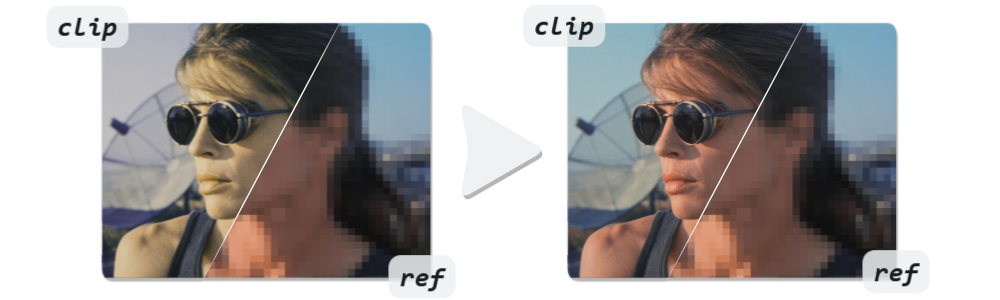
For example for fixing color shift from AI upscaling/restoration models, or transferring color grading from an old release to a remaster. Also known as Color Transfer or Color Matching. See this collection of Comparisons.
Installation
Nvidia
pip install -U vs_colorfix[tensorrt] --extra-index-url https://pypi.nvidia.com/
To enable the Wavelet Color Fix CPU backend, install the ATWT plugin. (optional)
Others
pip install -U vs_colorfix
To enable the Wavelet Color Fix CPU backend, install the ATWT plugin. (optional)
Tip
For VapourSynth R73 and older, follow the manual installation steps.
Average Color Fix
Fixes color shift by matching the average color of a clip to a reference clip. A very fast way to transfer colors from one clip to another.
import vs_colorfix
clip = vs_colorfix.average(clip, ref, radius=10, planes=[0, 1, 2], fast=False)
clip
Base clip where the colors will be applied to.
Recommended higher than 8-bit to avoid banding.
ref
Reference clip where the colors are taken from.
Check the comparisons to get an idea how close it should match the base clip.
radius
Higher means a more global color match and wider bloom/bleed.
Lower means a more local color match and smaller bloom/bleed. Too low and the reference clip will become visible.
Test values 5 and 30 and this will become more clear.
planes (optional)
Which planes to color fix. Any unmentioned planes will simply be copied.
If not set, all planes will be color-fixed.
fast (optional)
Does the averaging via a downscale instead of a blur, which is much faster, but will produce faint blocky artifacts.
Useful for very large radii where artifacts are no longer noticeable, or to fix something like a prefilter clip.
Tip
Wavelet Color Fix
Fixes color shift by converting into wavelets, then matching the average color of a clip to a reference clip. Works similarly to the Average Color Fix, but more accurate for larger color differences, at the cost of more computation.
import vs_colorfix
clip = vs_colorfix.wavelet(clip, ref, wavelets=4, planes=[0, 1, 2], backend="ncnn", num_streams=2, gpu_id=0, engine_folder=None)
clip
Base clip where the colors will be applied to.
Recommended higher than 8-bit to avoid banding.
ref
Reference clip where the colors are taken from.
Check the comparisons to get an idea how close it should match the base clip.
wavelets
Number of wavelets in the 1-10 range. Around 4 seems to work best in most cases.
Higher means a more global color match and wider bloom/bleed.
Lower means a more local color match and smaller bloom/bleed. Too low and the reference clip will become visible.
Test values 3 and 8 and this will become more clear.
planes (optional)
Which planes to color fix. Any unmentioned planes will simply be copied.
If not set, all planes will be color-fixed.
backend (optional)
The used backend. 16-bit float input is always much faster on GPU, but not supported by older GPUs.
cpuCPU mode (slow).ncnnGPU mode using NCNN. Works on almost any GPU, even Mac (fast).directmlGPU mode using DirectML. Works on most GPUs, Windows only (fast).tensorrtGPU mode using TensorRT. Requires an Nvidia RTX GPU. On the first run, this mode will automatically build an engine, which may take a few minutes. Changing wavelets or input dimensions will trigger rebuilding, but build engines are stored (very fast).
num_streams (optional)
Number of parallel GPU streams. Higher can be faster, but requires more VRAM. Does not affect the CPU backend.
gpu_id (optional)
Which GPU to use starting from 0. Can be used to switch between iGPU/dGPU. Does not affect the CPU backend.
engine_folder (optional)
Optional path to the TensorRT engine storage location. By default engines are stored in vs_colorfix/engines. Only affects the TensorRT backend.
Tip
If your clips are not sufficiently aligned or synchronized, use vs_align to align them first.
Guided Color Fix
Fixes colors guided by a trained AI model that can intelligently transfer colors from a reference while avoiding the bleed/bloom produced by the Average and Wavelet Color Fix when the shift is not uniform, but is much slower.
import vs_colorfix
clip = vs_colorfix.guided(clip, ref, planes=[0, 1, 2], backend="tensorrt", num_streams=1, gpu_id=0, engine_folder=None)
clip
Base clip where the colors will be applied to.
Must be in float format.
ref
Reference clip where the colors are taken from.
Check the comparisons to get an idea how close it should match the base clip.
planes (optional)
Which planes to color fix. Any unmentioned planes will simply be copied.
If not set, all planes will be color-fixed.
backend (optional)
The used backend.
cpuCPU mode (very slow).ncnnGPU mode using NCNN. Works on almost any GPU, even Mac (fast).directmlGPU mode using DirectML. Works on most GPUs, Windows only (faster).tensorrtGPU mode using TensorRT. Requires an Nvidia RTX GPU. On the first run, this mode will automatically build an engine, which may take a few minutes. Changing input dimensions will trigger rebuilding, but build engines are stored (very fast, low vram).
num_streams (optional)
Number of parallel GPU streams. Higher can be faster, but requires more VRAM. Does not affect the CPU backend.
gpu_id (optional)
Which GPU to use starting from 0. Can be used to switch between iGPU/dGPU. Does not affect the CPU backend.
engine_folder (optional)
Optional path to the TensorRT engine storage location. By default engines are stored in vs_colorfix/engines. Only affects the TensorRT backend.
Tip
If your clips are not sufficiently aligned or synchronized, use vs_align to align them first.
Benchmarks
Benchmarks were done on a RTX 4090 GPU and a Ryzen 5900X CPU with 16-bit input clips.
|
|
||||||||||||||||||||||||||||||||||||||||||||||||||||
Acknowledgements
Average Color Fix idea from chaiNNer.
Wavelet Color Fix idea from sd-webui-stablesr.
Guided Color Fix architecture created and model training by Bendel.