WinSafe
August 17, 2026 · View on GitHub




Windows API and GUI in safe, idiomatic Rust.
Handwritten since 2019.
WinSafe has:
- low-level Win32 API constants, functions and structs;
- high-level structs to build native Win32 GUI applications.
WinSafe documentation:
| Branch | Docs |
|---|---|
| Stable | docs.rs/winsafe |
| Nightly (master) | rodrigocfd.github.io/winsafe/winsafe |
Current status
Native FFI items implemented
| Native FFI item | Count |
|---|---|
| Functions | 914 |
| Structs | 264 |
| Constants | 12,307 |
| Window messages | 684 |
| Handles | 54 |
| COM interfaces | 98 |
| COM methods | 643 |
Although WinSafe already has a lot of Win32 APIs, it doesn't have everything, simply because Win32 API is gigantic. So if you're looking for a comprehensive Win32 coverage, take a look at winapi or windows crates, which are unsafe, but have everything.
High-level GUI controls implemented
- User custom window/dialog – main, modal, modeless, control, message-only.
- Native controls – button, check box, combo box, date and time picker, edit, header, label, list box, list view, month calendar, progress bar, radio button, status bar, tab, track bar, tree view, up down.
Usage
Add the dependency in your Cargo.toml:
[dependencies]
winsafe = { version = "0.0.28", features = [] }
Then you must enable the Cargo features you want to be included – these modules are named after native Windows DLL and library names, mostly.
Cargo features
The APIs in WinSafe are split into Cargo features to speed up compilation time. Only the features you include will be compiled.
The following Cargo features are available so far:
| Feature | Description |
|---|---|
advapi | Advapi32.dll and Ktmw32.dll, advanced kernel functions |
comctl | ComCtl32.dll, the Common Controls |
dshow | DirectShow |
dwm | Desktop Window Manager |
dxgi | DirectX Graphics Infrastructure |
gdi | Gdi32.dll, the Windows GDI |
gui | The WinSafe high-level GUI abstractions |
htmlhelp | HTML Help |
kernel | Kernel32.dll, basic kernel functions |
mf | Media Foundation |
ole | Basic OLE/COM support |
oleaut | OLE Automation |
psapi | Process Status API |
raw-dylib | Enables raw-dylib linking |
shell | Shell32.dll, Shlwapi.dll, and Userenv.dll, the COM-based Windows Shell |
taskschd | Task Scheduler |
user | User32.dll and ComDlg32.dll, the basic Windows GUI support |
uxtheme | UxTheme.dll, extended window theming |
version | Version.dll, to manipulate *.exe version info |
winmm | Windows Multimedia |
wininet | Windows Internet |
winspool | Print Spooler API |
Don't worry about including dependency features. Once you use a feature, Cargo will add and resolve all dependencies automatically.
You can visualize the complete dependency graph here.
Example
Note: You can find several examples in the dedicated repo: github.com/rodrigocfd/winsafe-examples
WinSafe allows you to create windows in two ways:
- programmatically defining parameters; or
- loading dialogs from a
.resfile created with a WYSIWYG resource editor.
The example below creates a window with a button programmatically. Note how the click event is handled with a closure:
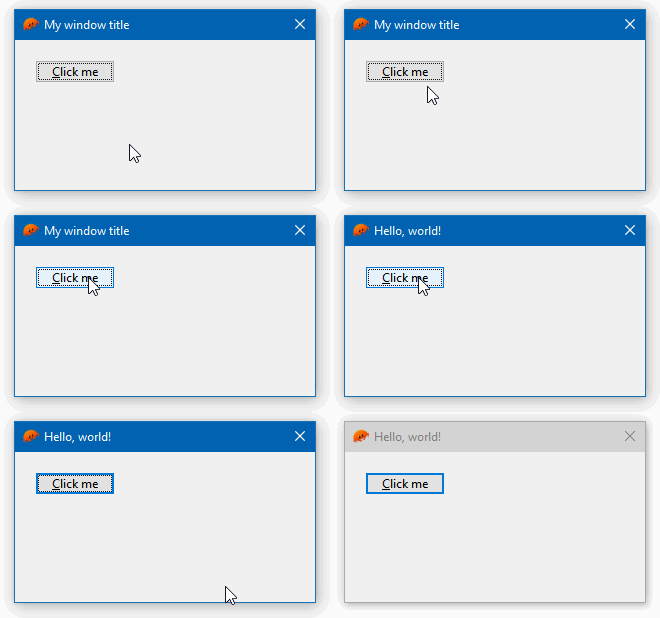
[dependencies]
winsafe = { version = "0.0.28", features = ["gui"] }
#![windows_subsystem = "windows"]

use winsafe::{self as w, gui, prelude::*};

fn main() {
    if let Err(e) = MyWindow::create_and_run() {
        eprintln!("{}", e);
    }
}

#[derive(Clone)]
pub struct MyWindow {
    wnd: gui::WindowMain,   // responsible for managing the window
    btn_hello: gui::Button, // a button
}

impl MyWindow {
    pub fn create_and_run() -> w::AnyResult<i32> {
        let wnd = gui::WindowMain::new(
            // instantiate the window manager
            gui::WindowMainOpts {
                title: "My window title",
                size: gui::dpi(300, 150),
                ..Default::default() // leave all other options as default
            },
        );

        let btn_hello = gui::Button::new(
            &wnd, // the window manager is the parent of our button
            gui::ButtonOpts {
                text: "&Click me",
                position: gui::dpi(20, 20),
                ..Default::default()
            },
        );

        let new_self = Self { wnd, btn_hello };
        new_self.events(); // attach our events

        new_self.wnd.run_main(None) // show the main window; will block until closed
    }

    fn events(&self) {
        let wnd = self.wnd.clone(); // clone so it can be passed into the closure
        self.btn_hello.on().bn_clicked(move || {
            wnd.hwnd().SetWindowText("Hello, world!")?; // call native Windows API
            Ok(())
        });
    }
}
License
Licensed under MIT license, see LICENSE.md for details.