React Chrome Extension
July 27, 2026 · View on GitHub
A Chrome extension boilerplate built with React 19, TypeScript and Vite, using the inject-page strategy.
Stop worrying about the configuration challenges of setting up a Chrome extension — just start writing components.
📖 Eight years later: rebuilding the React Chrome extension boilerplate — how the current Vite + MV3 + React 19 setup works, and what changed from the original. The 2018 post is still the best explanation of why the inject-page strategy is worth using, but its build steps no longer apply.
This project is sponsored by Recast Studio
The motivation behind the boilerplate:
- Instead of Chrome's ready-made popup, we wanted our own page injected into the DOM as a sidebar, for better UX.
- We wanted to use React for its component model and build tooling.
- We needed to guarantee the extension's CSS can never conflict with the host page's styles.
Features
- React 19 + TypeScript, strict mode, fully type-checked
- Manifest V3 — the manifest is generated from
manifest.config.ts, so it can never drift frompackage.json - Real HMR — edit a component and the injected sidebar updates in place, without reloading the extension
- Iframe-isolated styles — the host page cannot leak styles in, and the extension cannot leak styles out
- Lazy mounting — React only mounts on pages where the user actually opens the sidebar
- Working options page and
chrome.storage.syncexample, wired to the sidebar - An optional popup page, ready to switch on
- CI that type-checks, lints, builds, and uploads a packaged
extension.zip
Requirements
Node ^20.19.0 || >=22.12.0 (the version in .nvmrc is what CI uses).
Getting started
npm install
Development, with hot reload
npm run dev
This writes an unpacked extension to dist/ and keeps it in sync as you edit. Load dist/ into Chrome once (see below) and leave it — component edits hot-reload into the running sidebar, and changes to the background service worker reload the extension automatically.
Production build
npm run build
The output lands in dist/. To type-check, lint and build in one go — the same sequence CI runs:
npm run check
To produce an uploadable archive:
npm run zip
Loading the extension in Chrome
Go to chrome://extensions and switch on Developer mode.

Click Load unpacked and select the dist folder, not the project root. Then open any website and click the extension icon — the injected sidebar toggles.
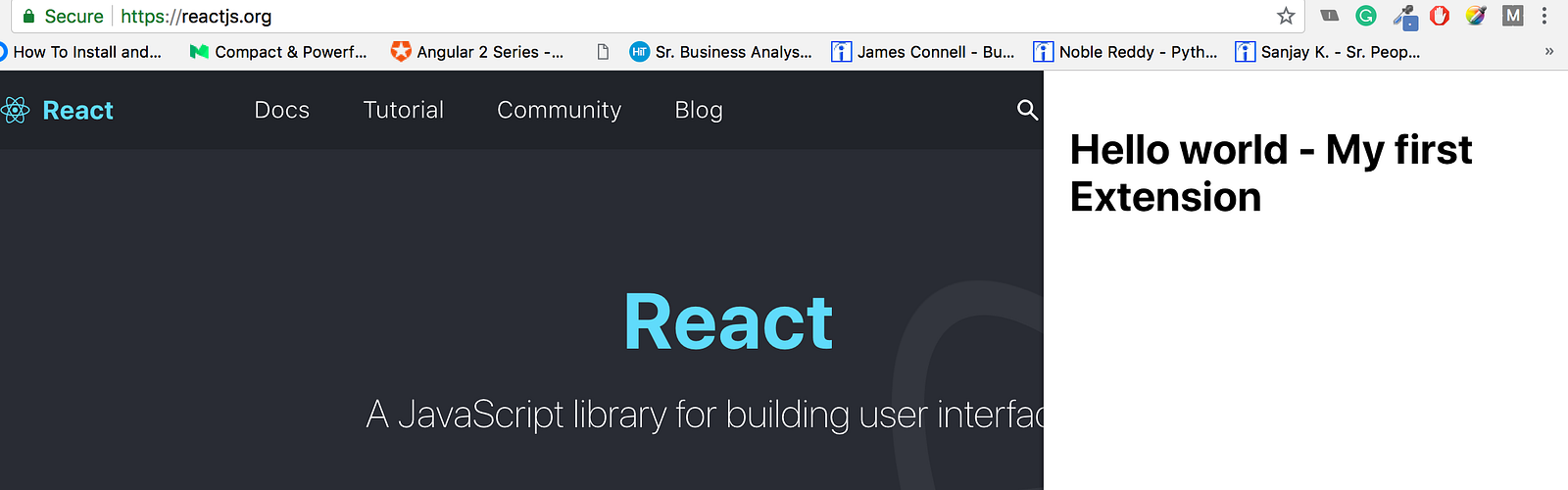
Coming from the webpack version of this boilerplate? The build output moved from
build/todist/, and the manifest is now generated at build time rather than committed atpublic/manifest.json. Selecting the project root gives you "Manifest file is missing or unreadable" — there is no manifest there to find.
Content scripts are only injected on navigation. Tabs that were already open when you installed or reloaded the extension need a refresh before the toolbar button will do anything there.
npm run dev and npm run build both write to dist/, but they are not interchangeable: only the npm run dev output is wired for hot reload. If you loaded a production build, stop and re-run npm run dev, then hit the reload icon on the extension card.
Project structure
manifest.config.ts     MV3 manifest, generated and type-checked
vite.config.ts         Vite + CRXJS setup
src/
  background/          service worker — turns a toolbar click into a message
  content/             the injected sidebar
    index.tsx            content script entry: owns the host-page container
    Sidebar.tsx          the iframe and everything React renders inside it
    host.css             the only CSS injected into the visited page
    sidebar.css          styles that live inside the iframe
  components/App.tsx   shared UI, reused by every surface
  options/             options page — reads and writes chrome.storage
  popup/               optional popup page (not wired up by default)
  lib/                 typed messaging and settings helpers
  styles/app.css       styles for the shared App component
public/icons/          extension icons
How the style isolation works
The sidebar renders inside an iframe, so the host page's stylesheet cannot reach it. Getting the extension's own CSS into that iframe is the interesting half:
import appCss from '../styles/app.css?inline'
Vite's ?inline suffix returns the compiled CSS as a string instead of injecting it into the page. Sidebar.tsx puts that string into a <style> tag in the iframe's <head>. Two things follow from this:
- Styles meant for the sidebar can never touch the host page.
- The extension needs no
web_accessible_resourcesentry for stylesheets.
The one stylesheet that is injected into the visited page is src/content/host.css, which positions the container. Every rule in that file must be scoped to #my-extension-root. A bare body { … } rule there would restyle every site the user visits — this boilerplate used to ship exactly that bug.
Because of the split, components/App.tsx deliberately does not import its own stylesheet. Each surface supplies it: the sidebar inlines it into the iframe, while the popup and options pages import it normally.
Using SASS
sass is already installed, so rename a stylesheet to .scss and update the import — Vite handles the rest. The ?inline suffix works on .scss files too.
Options and storage
src/lib/settings.ts wraps chrome.storage.sync in a typed API, and useSettings() keeps any React tree in sync with it. The options page writes the sidebar's side and width; the content script subscribes and repositions the container live, in every open tab.
Note the pattern in Options.tsx: the width slider holds its value locally while being dragged and writes once on release. chrome.storage.sync permits only 120 writes per minute, which a range input firing on every step would exhaust in a single drag.
Using a popup instead
src/popup/ is built and type-checked but is not attached to the toolbar button, because declaring a popup stops chrome.action.onClicked from firing — which is what toggles the sidebar. To switch strategies, add one line to manifest.config.ts:
action: {
  default_icon: icons,
  default_popup: 'src/popup/index.html',
},
The sidebar toggle stops working at that point; the background service worker's click listener becomes dead code.
Known trade-offs
web_accessible_resources. CRXJS loads the content script as an ES module, so its chunks must be reachable from the page, and it emits them withuse_dynamic_url: false. Those URLs are stable, which a page can probe to detect that this extension is installed. Chrome'suse_dynamic_urlwould close that gap, but CRXJS only applies it to dynamically registered scripts. CRXJS'scontentScripts.standaloneFilesoption avoids the whole mechanism, but as of@crxjs/vite-plugin@2.7.1it leavesprocess.env.NODE_ENVunreplaced and drops the content script's CSS from the manifest, so it is not usable here yet.<all_urls>. The content script is registered on every site so the toolbar button responds instantly. Narrowcontent_scripts.matchesinmanifest.config.tsto the sites you actually target — the Chrome Web Store reviews broad host access closely.- TypeScript 5.9, not 7.
typescript-eslintcurrently requirestypescript <6.1.0. Upgrading TypeScript ahead of it would mean giving up type-aware linting.
Migrating from the webpack version
The pre-Vite toolchain (ejected Create React App, webpack 4, node-sass) has been removed: config/, scripts/, public/manifest.json and src/registerServiceWorker.js are all gone, along with roughly 1,200 lines of build plumbing. Build output moved from build/ to dist/, and the project now uses npm rather than Yarn 1.
If you had customised the old webpack config, the equivalents are: loaders → Vite handles them natively, public/manifest.json → manifest.config.ts, and SWPrecacheWebpackPlugin → deleted, as it generated a web-app service worker unrelated to the MV3 background worker.
Contributing
Bug reports and pull requests are welcome on GitHub at https://github.com/satendra02/react-chrome-extension/. This project is intended to be a safe, welcoming space for collaboration, and contributors are expected to adhere to the Contributor Covenant code of conduct.
License
The repo is available as open source under the terms of the MIT License.