🦀 Ultralytics YOLO Rust Inference
August 20, 2026 · View on GitHub

🦀 Ultralytics YOLO Rust Inference
High-performance YOLO inference library written in Rust. This library provides a fast, safe, and efficient interface for running YOLO models using ONNX Runtime, with an API designed to match the Ultralytics Python package.











✨ Features
- 🚀 High Performance - Pure Rust implementation with zero-cost abstractions
- 🎯 Ultralytics API Compatible -
Results,Boxes,Masks,Keypoints,Probs,SemanticMask, andDepthMaptypes matching the Python API shape - 🔧 Multiple Backends - CPU, XNNPACK, CUDA, TensorRT, CoreML, OpenVINO, and more via ONNX Runtime
- 📦 Dual Use - Library for Rust projects + standalone CLI application
- 🏷️ Auto Metadata - Automatically reads class names, task type, and input size from ONNX models
- ⬇️ Auto Download - Downloads supported YOLO26, YOLO11, and YOLOv8 ONNX models (sizes: n/s/m/l/x) when not found locally
- 🖼️ Multiple Sources - Images, directories, glob patterns, video files, webcams, and streams
- 🪶 Lean Runtime - No PyTorch, TensorFlow, or Python runtime required
✨ Models
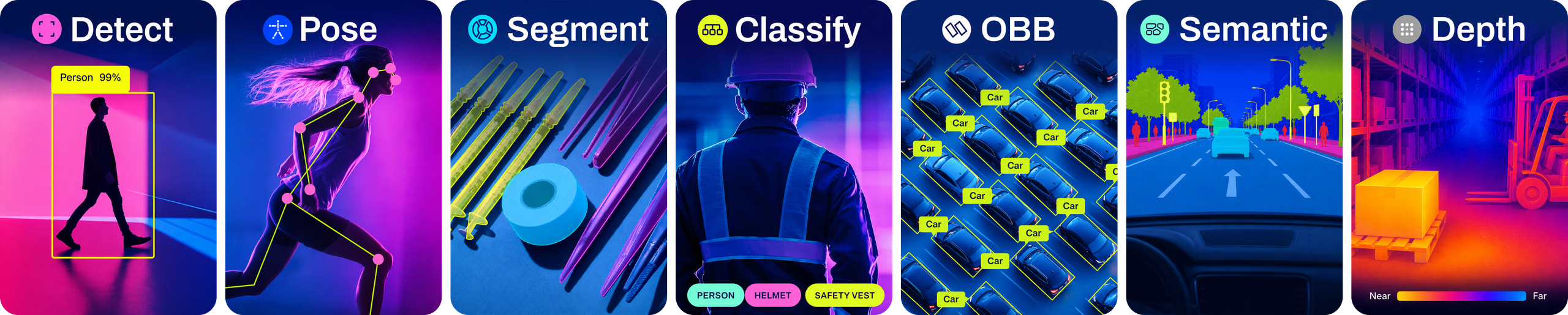
This crate runs YOLOv8, YOLO11, and YOLO26 ONNX models. They are pretrained on COCO for Detection, Segmentation, and Pose Estimation; on DOTA for OBB; on Cityscapes for Semantic Segmentation; on ImageNet for Classification; and for monocular Depth Estimation (YOLO26 only). All models download automatically from the latest Ultralytics release on first use.
🚀 Quick Start
Prerequisites
- Rust 1.89+ (install via rustup)
- A YOLO ONNX model (export from Ultralytics:
yolo export model=yolo26n.pt format=onnx)
System dependencies
Building from source (this includes cargo install) compiles native crates, so you need a C compiler. On Linux you additionally need pkg-config and the OpenSSL development headers, which the HTTPS model/asset downloader links against. macOS and Windows use their system TLS backends, so a C toolchain is all that is required.
# Debian/Ubuntu
sudo apt install build-essential pkg-config libssl-dev

# Fedora/RHEL
sudo dnf install gcc gcc-c++ pkgconf-pkg-config openssl-devel

# Arch
sudo pacman -S base-devel openssl pkgconf

# macOS (Xcode Command Line Tools provide the clang compiler)
xcode-select --install

# Windows: install the "Desktop development with C++" workload from
# Visual Studio Build Tools (https://visualstudio.microsoft.com/downloads/)
Installation
# Install CLI globally from crates.io
cargo install ultralytics-inference

# Install CLI globally with custom features
# Minimal build (no default features)
cargo install ultralytics-inference --no-default-features

# Enable video support
cargo install ultralytics-inference --features video

# Enable multiple accelerators
cargo install ultralytics-inference --features "cuda,tensorrt"
Development install
# Install CLI directly from the git repository
cargo install --git https://github.com/ultralytics/inference.git ultralytics-inference

# Or clone, build, and install from source
git clone https://github.com/ultralytics/inference.git
cd inference
cargo build --release

# Install from local checkout
cargo install --path . --locked
cargo install places binaries in Cargo's default bin directory:
- macOS/Linux:
~/.cargo/bin - Windows:
%USERPROFILE%\\.cargo\\bin
Ensure this directory is in your PATH, then run from anywhere:
ultralytics-inference help
Export a YOLO Model to ONNX
# Using Ultralytics CLI (FP32, default)
yolo export model=yolo26n.pt format=onnx

# FP16 - ~50% smaller model
yolo export model=yolo26n.pt format=onnx quantize=16
# Or with Python
from ultralytics import YOLO

model = YOLO("yolo26n.pt")
model.export(format="onnx")  # FP32 (default)
model.export(format="onnx", quantize=16)  # FP16
Precision / quantization: Ultralytics ≥8.4 uses a single
quantizeargument instead of the deprecatedhalf=True/int8=Trueflags. For ONNX the supported values are32/fp32(FP32, the default),16/fp16(FP16), and8/int8(INT8 - requires a calibration dataset viadata=). The old flags still work but emit a deprecation warning. See the export docs and the ONNX integration guide.
Run Inference
# With defaults (auto-downloads yolo26n.onnx and sample images)
ultralytics-inference predict

# Select task: auto-downloads the nano model for that task
ultralytics-inference predict --task segment  # downloads yolo26n-seg.onnx
ultralytics-inference predict --task pose     # downloads yolo26n-pose.onnx
ultralytics-inference predict --task obb      # downloads yolo26n-obb.onnx
ultralytics-inference predict --task classify # downloads yolo26n-cls.onnx
ultralytics-inference predict --task semantic # downloads yolo26n-sem.onnx (YOLO26 only)
ultralytics-inference predict --task depth    # downloads yolo26n-depth.onnx (YOLO26 only)

# With explicit model (task is read from model metadata)
ultralytics-inference predict --model yolo26n.onnx --source image.jpg

# Auto-download any supported size (n/s/m/l/x) across YOLO26, YOLO11, and YOLOv8
ultralytics-inference predict --model yolo26l.onnx --source image.jpg
ultralytics-inference predict --model yolo11x-seg.onnx --source image.jpg
ultralytics-inference predict --model yolov8n.onnx --source image.jpg

# On a directory of images
ultralytics-inference predict --model yolo26n.onnx --source assets/

# With custom thresholds
ultralytics-inference predict -m yolo26n.onnx -s image.jpg --conf 0.5 --iou 0.45

# Filter by class IDs
ultralytics-inference predict --model yolo26n.onnx --source image.jpg --classes 0
ultralytics-inference predict --model yolo26n.onnx --source image.jpg --classes "0,1,2"

# With visualization and custom image size
ultralytics-inference predict --model yolo26n.onnx --source video.mp4 --show --imgsz 1280

# Save individual frames for video input
ultralytics-inference predict --model yolo26n.onnx --source video.mp4 --save-frames

# Rectangular inference
ultralytics-inference predict --model yolo26n.onnx --source image.jpg --rect

# Semantic segmentation: write per-image PNG class maps to runs/semantic/predictN/results/
ultralytics-inference predict --task semantic --source cityscapes/ --save-json

# Depth estimation: blend the colorized depth over the image into runs/depth/predictN/
ultralytics-inference predict --task depth --source image.jpg
Example Output
ultralytics-inference predict
WARNING ⚠️ 'model' argument is missing. Using default '--model=yolo26n.onnx'.
WARNING ⚠️ 'source' argument is missing. Using default images: https://ultralytics.com/images/bus.jpg, https://ultralytics.com/images/zidane.jpg
Ultralytics Inference 0.0.37 🚀 Rust ONNX FP32 CPU
Using ONNX Runtime CPUExecutionProvider
YOLO26n summary: 80 classes, imgsz=(640, 640)

image 1/2 /home/ultralytics/inference/bus.jpg: 640x480 4 persons, 1 bus, 36.4ms
image 2/2 /home/ultralytics/inference/zidane.jpg: 384x640 2 persons, 1 tie, 28.6ms
Speed: 1.5ms preprocess, 32.5ms inference, 0.5ms postprocess per image at shape (1, 3, 384, 640)
Results saved to runs/detect/predict1
💡 Learn more at https://docs.ultralytics.com/modes/predict
With --task (auto-downloads the matching nano model):
ultralytics-inference predict --task segment
WARNING ⚠️ 'model' argument is missing. Using default '--model=yolo26n-seg.onnx'.
WARNING ⚠️ 'source' argument is missing. Using default images: https://ultralytics.com/images/bus.jpg, https://ultralytics.com/images/zidane.jpg
Ultralytics Inference 0.0.37 🚀 Rust ONNX FP32 CPU
Using ONNX Runtime CPUExecutionProvider
YOLO26n-seg summary: 80 classes, imgsz=(640, 640)

image 1/2 /home/ultralytics/inference/bus.jpg: 640x480 4 persons, 1 bus, 48.2ms
image 2/2 /home/ultralytics/inference/zidane.jpg: 384x640 2 persons, 1 tie, 38.1ms
Speed: 1.6ms preprocess, 44.3ms inference, 1.2ms postprocess per image at shape (1, 3, 384, 640)
Results saved to runs/segment/predict1
💡 Learn more at https://docs.ultralytics.com/modes/predict
📚 Usage
As a CLI Tool
# Show help
ultralytics-inference help

# Show version
ultralytics-inference version

# Run inference
ultralytics-inference predict --model <model.onnx> --source <source>
--help and --version are also supported as standard flag aliases.
CLI Options:
| Option | Short | Description | Default |
|---|---|---|---|
--model | -m | Path to ONNX model file; auto-downloaded if a known YOLOv8/YOLO11/YOLO26 name | yolo26n.onnx |
--task | Task type (detect, segment, pose, obb, classify, semantic*, depth*); selects nano model when --model is omitted | detect | |
--source | -s | Input source (image, directory, glob, video, webcam index, or URL) | Task-dependent Ultralytics URL assets |
--conf | Confidence threshold | 0.25 | |
--iou | IoU threshold for NMS | 0.7 | |
--max-det | Maximum number of detections | 300 | |
--imgsz | Inference image size | Model metadata | |
--rect | Enable rectangular inference (minimal padding) | true | |
--batch | Batch size for inference | 1 | |
--quantize | Inference precision: 8, 16, 32, int8, fp16, fp32, w8a8, w16a16, w8a16, or w8a32 | Model precision | |
--save | Save annotated results to runs/<task>/predict | true | |
--save-frames | Save individual frames for video input (instead of video file) | false | |
--save-json | Save semantic segmentation class-map PNGs for external evaluation | false | |
--show | Display results in a window | false | |
--device | Device string, e.g. cpu, cuda:0, coreml, directml:0, intel:cpu, intel:gpu, intel:npu, tensorrt:0, rocm:0, xnnpack; additional providers selectable when their feature is enabled (see Features table) | cpu | |
--verbose | Show verbose output | true | |
--classes | Filter by class IDs, e.g. 0 or "0,1,2" or "[0, 1, 2]" | all classes |
The legacy --half flag remains accepted for backward compatibility, maps to --quantize 16, and emits the same deprecation warning as Ultralytics Python. An explicit --quantize value wins.
On CPU, --quantize 32 promotes an FP16 ONNX graph to FP32 in memory before ONNX Runtime creates the inference session. The compact FP16 source remains unchanged.
Task and Model Resolution:
| Invocation | Model used | Notes |
|---|---|---|
predict | yolo26n.onnx | Default detect model, auto-downloaded |
predict --task segment | yolo26n-seg.onnx | Nano seg model, auto-downloaded |
predict --task pose | yolo26n-pose.onnx | Nano pose model, auto-downloaded |
predict --task obb | yolo26n-obb.onnx | Nano OBB model, auto-downloaded |
predict --task classify | yolo26n-cls.onnx | Nano classify model, auto-downloaded |
predict --task semantic | yolo26n-sem.onnx* | Nano semantic segmentation model, auto-downloaded (YOLO26 only) |
predict --task depth | yolo26n-depth.onnx* | Nano depth estimation model, auto-downloaded (YOLO26 only) |
predict --model yolo26l-seg.onnx | yolo26l-seg.onnx | Task read from model metadata |
predict --task segment --model yolo26l-seg.onnx | yolo26l-seg.onnx | --task matches metadata, proceeds normally |
predict --task segment --model yolo26n.onnx | error | --task conflicts with model metadata (detect), exits with error |
* semantic (semantic segmentation) and depth (depth estimation) are YOLO26-only.
Auto-downloadable models:
YOLOv8, YOLO11, and YOLO26 ONNX models in sizes n / s / m / l / x are supported for auto-download across the standard task variants. YOLO26 also includes -sem for semantic segmentation and -depth for depth estimation:
| Family | Variants |
|---|---|
| YOLO26 | yolo26{n,s,m,l,x}.onnx, yolo26{n,s,m,l,x}-seg.onnx, -pose, -obb, -cls, -sem*, -depth* |
| YOLO11 | yolo11{n,s,m,l,x}.onnx, yolo11{n,s,m,l,x}-seg.onnx, -pose, -obb, -cls |
| YOLOv8 | yolov8{n,s,m,l,x}.onnx, yolov8{n,s,m,l,x}-seg.onnx, -pose, -obb, -cls |
* -sem (semantic segmentation) and -depth (depth estimation) are YOLO26-only.
Source Options:
| Source Type | Example Input | Description |
|---|---|---|
| Image | image.jpg | Single image file |
| Directory | images/ | Directory of images |
| Glob | images/*.jpg | Glob pattern for images |
| Video | video.mp4 | Video file |
| Webcam | 0,1 | Webcam index (0 = default webcam) |
| URL | https://example.com/image.jpg | Remote image URL |
As a Rust Library
Add to your Cargo.toml (choose one):
# Stable release from crates.io
[dependencies]
ultralytics-inference = "0.0.37"
# Development version (latest unreleased code from GitHub)
[dependencies]
ultralytics-inference = { git = "https://github.com/ultralytics/inference.git" }
Basic Usage:
use ultralytics_inference::YOLOModel;

fn main() -> Result<(), Box<dyn std::error::Error>> {
    // Load model - metadata (classes, task, imgsz) is read automatically
    let mut model = YOLOModel::load("yolo26n.onnx")?;

    // Run inference
    let results = model.predict("image.jpg")?;

    // Process results
    for result in &results {
        if let Some(ref boxes) = result.boxes {
            println!("Found {} detections", boxes.len());
            for i in 0..boxes.len() {
                let cls = boxes.cls()[i] as usize;
                let conf = boxes.conf()[i];
                let name = result.names.get(&cls).map(|s| s.as_str()).unwrap_or("unknown");
                println!("  {} {:.2}", name, conf);
            }
        }
    }

    Ok(())
}
With Custom Configuration:
use ultralytics_inference::{YOLOModel, InferenceConfig};

fn main() -> Result<(), Box<dyn std::error::Error>> {
    let config = InferenceConfig::new()
        .with_confidence(0.5)
        .with_iou(0.45)
        .with_max_det(300);

    let mut model = YOLOModel::load_with_config("yolo26n.onnx", config)?;
    let results = model.predict("image.jpg")?;

    Ok(())
}
Accessing Detection Data:
if let Some(ref boxes) = result.boxes {
    // Bounding boxes in different formats
    let xyxy = boxes.xyxy();      // [x1, y1, x2, y2]
    let xywh = boxes.xywh();      // [x_center, y_center, width, height]
    let xyxyn = boxes.xyxyn();    // Normalized [0-1]
    let xywhn = boxes.xywhn();    // Normalized [0-1]

    // Confidence scores and class IDs
    let conf = boxes.conf();      // Confidence scores
    let cls = boxes.cls();        // Class IDs
}
Selecting a Device:
use ultralytics_inference::{Device, InferenceConfig, YOLOModel};

fn main() -> Result<(), Box<dyn std::error::Error>> {
    // Select a device (e.g., CUDA, CoreML, CPU)
    let device = Device::Cuda(0);

    // Configure the model to use this device
    let config = InferenceConfig::new().with_device(device);

    let mut model = YOLOModel::load_with_config("yolo26n.onnx", config)?;
    let results = model.predict("image.jpg")?;

    Ok(())
}
Depth Visualization:
Depth results are rendered by blending the colorized depth map over the source image at
alpha = 0.6, using the jet colormap and disparity normalization. This matches the
Ultralytics Python Annotator.depth_map default, so the CLI needs no depth flags and
--save produces the same image Python's plot() does.
Set the colormap, normalization, and overlay opacity explicitly through the library
(Jet + Disparity + 0.6 below match the CLI default; swap in any other variant):
use ultralytics_inference::YOLOModel;
use ultralytics_inference::annotate::{annotate_image_with, load_image};
use ultralytics_inference::visualizer::color::{Colormap, DepthViz};

fn main() -> Result<(), Box<dyn std::error::Error>> {
    let mut model = YOLOModel::load("yolo26n-depth.onnx")?;
    let results = model.predict("image.jpg")?;

    // Per-pixel depth in meters, at the original image resolution
    if let Some(depth) = &results[0].depth {
        println!("{:?} {:?}m", depth.data.shape(), depth.min_depth());
    }

    // Colormap: inferno / jet / spectral / gray. Normalization: disparity / metric.
    // Opacity: 0.6 blends over the image (CLI default), 1.0 is the full colorized map.
    let image = load_image("image.jpg")?;
    let annotated = annotate_image_with(&image, &results[0], None, Colormap::Jet, DepthViz::Disparity, 0.6);
    annotated.save("depth.jpg")?;

    Ok(())
}
disparity colors 1/d instead of d, clipped to the 2nd-98th percentile. Inverting the
depth spends the color range on nearby detail rather than the distant background, so near
objects read warm and a few stray pixels cannot wash out the rest. metric colors depth
directly, linearly between its min and max.
For runnable programs you can copy and adapt, see the examples directory.
🗂️ Project Structure
inference/
├── src/
│   ├── lib.rs              # Library entry point and public exports
│   ├── main.rs             # CLI application
│   ├── model.rs            # YOLOModel - ONNX session and inference
│   ├── results.rs          # Results, Boxes, Masks, Keypoints, Probs, Obb, SemanticMask, DepthMap
│   ├── preprocessing.rs    # Image preprocessing (letterbox, normalize, SIMD)
│   ├── postprocessing.rs   # Post-processing for all tasks (NMS/decode for detection, argmax for semantic, resize for depth)
│   ├── metadata.rs         # ONNX model metadata parsing
│   ├── source.rs           # Input source handling (images, video, webcam)
│   ├── task.rs             # Task enum (Detect, Segment, Pose, Classify, Obb, Semantic, Depth)
│   ├── inference.rs        # InferenceConfig
│   ├── batch.rs            # Batch processing pipeline
│   ├── device.rs           # Device enum (CPU, CUDA, CoreML, etc.)
│   ├── cuda_inference.rs   # Fused CUDA preprocess kernel (cuda-preprocess feature)
│   ├── parallel.rs         # Rayon parallelism shims (sequential on wasm)
│   ├── download.rs         # Model and asset downloading
│   ├── annotate.rs         # Image annotation (bounding boxes, instance masks, keypoints, semantic overlay, depth colormap)
│   ├── io.rs               # Result saving (images, videos)
│   ├── logging.rs          # Logging macros
│   ├── error.rs            # Error types
│   ├── utils.rs            # Utility functions (NMS, IoU)
│   ├── cli/                # CLI module
│   │   ├── mod.rs          # CLI module exports
│   │   ├── args.rs         # CLI argument parsing
│   │   └── predict.rs      # Predict command implementation
│   └── visualizer/         # Real-time visualization (minifb)
├── tests/
│   └── integration_test.rs # Integration tests
├── examples/               # Runnable library examples
│   ├── basic.rs            # Load a model, run inference, print detections
│   ├── config.rs           # Set confidence, IoU, image size, and device
│   ├── tasks.rs            # Summary for detect, segment, pose, obb, classify
│   ├── annotate.rs         # Draw boxes and labels, save the annotated image
│   └── README.md           # Examples guide
├── assets/                 # Test images
│   ├── boats.jpg
│   ├── bus.jpg
│   └── zidane.jpg
├── crates/web/             # ultralytics-inference-web: wasm32 WebGPU bindings
├── web/                    # @ultralytics/yolo npm package (TypeScript wrapper)
├── docs/                   # Additional guides
│   ├── CUDA.md             # NVIDIA CUDA and TensorRT setup
│   └── DGX.md              # DGX Spark (aarch64) setup and benchmarks
├── Cargo.toml              # Rust dependencies and features
├── LICENSE                 # AGPL-3.0 License
├── README.md               # English README
└── README.zh-CN.md         # Simplified Chinese README
⚡ Hardware Acceleration
Enable hardware acceleration by adding features to your build:
# NVIDIA GPU (CUDA)
cargo build --release --features cuda

# NVIDIA TensorRT
cargo build --release --features tensorrt

# NVIDIA GPU preprocessing + zero-copy TensorRT input (fastest; needs CUDA toolkit)
cargo build --release --features cuda-preprocess

# Apple CoreML (macOS/iOS)
cargo build --release --features coreml

# Intel OpenVINO (select the target hardware with intel:cpu, intel:gpu, or intel:npu)
cargo build --release --features openvino
ultralytics-inference predict --source bus.jpg --device intel:gpu

# Multiple features
cargo build --release --features "cuda,tensorrt"
NVIDIA setup, requirements, and the GPU preprocessing fast path are documented in
docs/CUDA.md.
Each accelerator feature links a prebuilt ONNX Runtime containing that provider. Not every combination is published, and asking for one that is not stops the build with no builds available that satisfy the requested feature set. To take the closest available build instead of an error, enable lax-feature-matching on ort:
[dependencies]
ultralytics-inference = { version = "0.0.37", features = ["coreml", "xnnpack"] }
ort = { version = "=2.0.0-rc.13", features = ["lax-feature-matching"] }
Providers missing from the chosen build are then absent at runtime and inference falls back to CPU. On aarch64-unknown-linux-gnu only a CPU distribution is published, so every GPU feature hits this; see docs/DGX.md for linking a GPU ONNX Runtime instead of falling back.
The CUDA and TensorRT binaries are built against CUDA 13, and no CUDA 12 build is published. To run them on CUDA 12, compile ONNX Runtime yourself and link it with
ORT_LIB_PATH.
Available Features:
Default features (enabled unless --no-default-features is passed): annotate, visualize.
| Feature | Description |
|---|---|
annotate | Image annotation for --save (default) |
visualize | Real-time window display for --show (default) |
video | Video file decoding/encoding (requires FFmpeg) |
cuda | NVIDIA CUDA support |
tensorrt | NVIDIA TensorRT optimization |
cuda-preprocess | GPU preprocessing + zero-copy TensorRT input (needs CUDA toolkit; see docs/CUDA.md) |
coreml | Apple CoreML (macOS/iOS) |
openvino | Intel OpenVINO |
onednn | Intel oneDNN |
rocm | AMD ROCm |
migraphx | AMD MIGraphX |
directml | DirectML (Windows) |
nnapi | Android Neural Networks API |
qnn | Qualcomm Neural Networks |
xnnpack | XNNPACK (cross-platform) |
acl | ARM Compute Library |
tvm | Apache TVM |
rknpu | Rockchip NPU |
cann | Huawei CANN |
webgpu | WebGPU |
azure | Azure |
nvidia | Convenience: CUDA + TensorRT |
amd | Convenience: ROCm + MIGraphX |
intel | Convenience: OpenVINO + oneDNN |
mobile | Convenience: NNAPI + CoreML + QNN |
all | Convenience: annotate + visualize + video |
🌐 Browser / WebGPU (WASM)


The same engine runs in the browser on WebGPU, compiled to WebAssembly. The
shared Rust preprocessing and postprocessing run in wasm, so results match the
native path, while the forward pass runs on a pluggable backend: the official
ONNX Runtime Web build (bridged through ort-web)
for .onnx models, or LiteRT.js
for .tflite models.
It ships as the @ultralytics/yolo npm package:
import { YOLO } from "@ultralytics/yolo";

const model = await YOLO.load("yolo26n.onnx");
const results = await model.predict("bus.jpg");
console.log(results.boxes); // [{ x1, y1, x2, y2, conf, cls, name, color }, ...]
Pass { device: "webgpu" | "cpu" } to pick the accelerator ("auto" is the
default), and read model.device to see what actually ran.
The backend is picked automatically from the model format (its extension when
available, otherwise the model bytes), so switching is just a matter of the model
you load. LiteRT.js (Google's LiteRT for Web) is optional and
often ~2× faster than ONNX Runtime Web on WebGPU — point YOLO.load at an
Ultralytics .tflite export and npm install @litertjs/core alongside the package.
See the LiteRT.js section for details.
The browser bindings live in crates/web (the
ultralytics-inference-web cdylib); the JS/TS wrapper and build instructions are
in web/. A WebGPU-capable browser and a secure context
(https/localhost) are required.
📦 Dependencies
One of the key benefits of this library is a Rust/ONNX Runtime stack with no PyTorch, TensorFlow, or Python runtime required.
Core Dependencies (always included)
| Crate | Purpose |
|---|---|
ort | ONNX Runtime bindings |
ndarray | N-dimensional arrays |
image | Image loading/decoding |
jpeg-decoder | JPEG decoding |
fast_image_resize | SIMD-optimized resizing |
half | FP16 support |
lru | LRU cache for preprocessing LUT |
wide | SIMD for fast preprocessing |
Optional Dependencies (for the annotate feature)
| Crate | Purpose |
|---|---|
imageproc | Drawing boxes and shapes |
ab_glyph | Text rendering (embedded font) |
Optional Dependencies (for Video & Visualization)
| Crate | Purpose |
|---|---|
minifb | Window creation and buffer display |
video-rs | Video decoding/encoding (ffmpeg) |
Video Support (FFmpeg)
Video features require FFmpeg (6, 7 or 8) installed on your system:
# macOS
brew install ffmpeg

# Ubuntu/Debian
apt-get install -y ffmpeg libavutil-dev libavformat-dev libavfilter-dev libavdevice-dev libclang-dev

# Build with video support
cargo build --release --features video
To build without annotation and visualization support (smaller binary):
cargo build --release --no-default-features
🧪 Testing
# Run all tests
cargo test

# Run with output
cargo test -- --nocapture

# Run specific test
cargo test test_boxes_creation
📊 Performance
Benchmarks on Apple M4 MacBook Pro (CPU, ONNX Runtime):
YOLO26n Detection Model (640x640)
| Precision | Model Size | Preprocess | Inference | Postprocess | Total |
|---|---|---|---|---|---|
| FP32 | 10.2 MB | ~9ms | ~21ms | <1ms | ~31ms |
| FP16 | 5.2 MB | ~9ms | ~24ms | <1ms | ~34ms |
Key findings:
- FP16 models are ~50% smaller (5.2 MB vs 10.2 MB)
- FP32 is slightly faster on CPU (~21ms vs ~24ms) due to the CPU's native FP32 support
- FP16 requires upcasting to FP32 for computation on most CPUs, adding overhead
- Use FP32 for CPU inference, FP16 for GPU (where it provides speedup)
Threading Optimization
ONNX Runtime threading is set to auto (num_threads: 0), which lets ORT choose the optimal thread count:
- Manual threading (4 threads): ~40ms inference
- Auto threading (0 = ORT decides): ~21ms inference
🔮 Roadmap
Completed
- Detection, Segmentation, Pose, Classification, OBB, Semantic Segmentation, and Depth Estimation inference
- ONNX model metadata parsing (auto-detect classes, task, imgsz)
- Hardware acceleration support (CUDA, TensorRT, CoreML, OpenVINO, XNNPACK)
- Ultralytics-compatible Results API (
Boxes,Masks,Keypoints,Probs,Obb,SemanticMask,DepthMap) - Multiple input sources (images, directories, globs, URLs)
- Video file support and webcam/RTSP streaming
- Image annotation and visualization
- FP16 inference
- Batch inference support
- Rectangular inference support and optimization
- Class filtering support
- Auto-download all YOLO26, YOLO11, and YOLOv8 ONNX models (all sizes n/s/m/l/x, all tasks)
-
--taskCLI flag: selects and auto-downloads the matching nano model when--modelis omitted; errors on task/model metadata conflict - WebAssembly (WASM) browser inference on WebGPU (npm
@ultralytics/yolo)
In Progress
- Python bindings (PyO3)
💡 Contribute
Ultralytics thrives on community collaboration, and we deeply value your contributions! Whether it's reporting bugs, suggesting features, or submitting code changes, your involvement is crucial.
- Report Issues: Found a bug? Open an issue
- Feature Requests: Have an idea? Share it
- Pull Requests: Read our Contributing Guide first
- Feedback: Take our Survey
A heartfelt thank you 🙏 goes out to all our contributors! Your efforts help make Ultralytics tools better for everyone.

📄 License
Ultralytics offers two licensing options to suit different needs:
- AGPL-3.0 License: This OSI-approved open-source license is perfect for students, researchers, and enthusiasts. It encourages open collaboration and knowledge sharing. See the LICENSE file for full details.
- Ultralytics Enterprise License: Designed for commercial use, this license allows for the seamless integration of Ultralytics software and AI models into commercial products and services, bypassing the open-source requirements of AGPL-3.0. If your use case involves commercial deployment, please contact us via Ultralytics Licensing.
📮 Contact
- GitHub Issues: Bug reports and feature requests
- Discord: Join our community
- Documentation: docs.ultralytics.com


