Ultralytics YOLO npm Inference
July 29, 2026 · View on GitHub

Ultralytics YOLO npm Inference








Run Ultralytics YOLO models directly in the browser,
with no server and no Python. It runs on WebGPU (with an automatic CPU/wasm
fallback) and covers detection, segmentation, pose, classification, OBB,
semantic segmentation, and depth estimation, behind a small TypeScript API with a built-in
annotate() that draws results straight to a canvas.
import { YOLO, annotate } from "@ultralytics/yolo";

const model = await YOLO.load("yolo26n.onnx");
const results = await model.predict("bus.jpg");
await annotate(document.querySelector("canvas"), "bus.jpg", results);
It is a library only (no CLI; that is the native Rust crate). Under the hood
the engine is the ultralytics-inference Rust crate compiled to WebAssembly.
Inference runs on ONNX Runtime Web
via ort-web, and all pre/postprocessing,
colors, and the pose skeleton come from that shared Rust code, so results and
visuals match the native and Python paths.
📦 Install
npm install @ultralytics/yolo
# or
pnpm add @ultralytics/yolo
yarn add @ultralytics/yolo
bun add @ultralytics/yolo
It ships as an ES module with TypeScript types and works in any modern bundler (Vite, webpack, esbuild, Bun) or directly via a CDN such as esm.sh.
🚀 Quick Start
import { YOLO, annotate } from "@ultralytics/yolo";

// Loads the model and initializes WebGPU + ONNX Runtime Web on first use.
const model = await YOLO.load("yolo26n.onnx");

const results = await model.predict("bus.jpg");
for (const box of results.boxes) {
  console.log(box.name, box.conf.toFixed(2), [box.x1, box.y1, box.x2, box.y2]);
}

// Draw boxes, OBB, pose, and labels onto a canvas in one call (no canvas code).
await annotate(document.querySelector("canvas"), "bus.jpg", results);
predict() accepts a URL/path, a Blob/File, raw encoded image bytes
(Uint8Array/ArrayBuffer), ImageData, an HTMLImageElement,
HTMLCanvasElement, HTMLVideoElement, or an ImageBitmap.
const results = await model.predict(canvas, { conf: 0.25, iou: 0.7 });
console.log(model.device); // "webgpu" or "cpu"
YOLO.load also takes a Blob/File, so you can load a model the user drops or
picks. The backend is detected from the bytes, so the same call handles .onnx
and .tflite:
const model = await YOLO.load(fileInput.files[0]); // a dropped/picked .onnx or .tflite
Webcam / Video
Drawable sources (<video>, canvas, ImageBitmap, ImageData) take a
raw-pixel fast path with no re-encoding, so a render loop is smooth:
const model = await YOLO.load("yolo26n.onnx");
async function frame() {
  const results = await model.predict(video); // <video> element
  await annotate(canvas, video, results);
  requestAnimationFrame(frame);
}
✨ Models
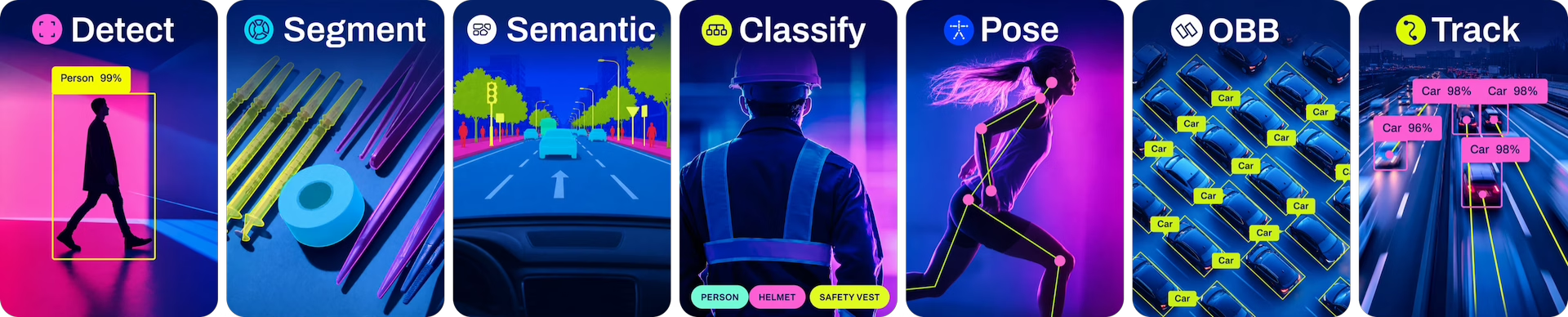
Runs Ultralytics YOLOv8, Ultralytics YOLO11, and Ultralytics YOLO26 ONNX exports for detection, segmentation, pose, OBB, classification, semantic segmentation, and depth estimation.
Pass a bare ONNX name and it is auto-downloaded from the Ultralytics assets release (the same weights the native crate and Python use):
await YOLO.load("yolo26n.onnx"); // auto-downloads from the release: .../download/v8.4.0/yolo26n.onnx
Auto-download covers Ultralytics YOLO26, Ultralytics YOLO11, and Ultralytics YOLOv8 in sizes n/s/m/l/x
with task suffixes -seg, -pose, -cls, -obb, -sem (semantic), and -depth (depth
estimation) — the last two Ultralytics YOLO26 only. A value containing a / or a scheme is
used as a URL/path as-is.
CORS note: GitHub release assets do not send
Access-Control-Allow-Origin, so a browser cannot fetch them cross-origin. Host the.onnxsame-origin (e.g.YOLO.load("/models/yolo26n.onnx")) or behind a CORS-enabled origin / proxy. The bare-name shortcut is convenient when you mirror the assets on such a host.
📐 Results Shape
predict() resolves to a Results object whose field names match the
Rust/Ultralytics Results API 1-1:
| Field | Type | Tasks |
|---|---|---|
task | string | all |
width / height | number | all |
boxes | { x1, y1, x2, y2, conf, cls, name, color }[] | detect, segment, pose |
obb | { x, y, w, h, angle, conf, cls, name, color }[] | obb |
keypoints | { points: [x, y, conf][], color }[] | pose |
probs | { top1, top5, top1conf, top5conf, name, top5names, color } | null | classify |
masks | Uint8Array (RGBA overlay, width*height*4) | segment, semantic |
semantic_mask | Uint16Array (class id per pixel, width*height) | semantic |
depth | Uint8Array (opaque colorized depth map, width*height*4) | depth |
depth_range | [min, max] in meters | depth |
speed | { preprocess, inference, postprocess } ms | all |
model.names is the class id to name map (like model.names in Python). Every
detection carries its Ultralytics palette color, and annotate() draws the
masks overlay and the pose skeleton with the same per-limb/keypoint colors as
the native renderer. None of this is duplicated in JS.
For the depth task, predict(img, { colormap, depthViz }) picks the colormap
("jet" default, "inferno", "spectral", "gray") and normalization
("disparity" default, "metric"); annotate() blends the returned map over the
frame at depthAlpha (default 0.6, 1 shows the raw map):
const results = await model.predict(img, { colormap: "spectral", depthViz: "metric" });
await annotate(canvas, img, results, { depthAlpha: 0.6 });
⚙️ Requirements & Notes
-
WebGPU (Chrome/Edge, or Firefox with WebGPU enabled) from a secure context (
https://orhttp://localhost) gives the fast path. Without WebGPU (older browsers, some phones),YOLO.loadautomatically falls back to a portable CPU/wasm build that runs everywhere. Pick the device withYOLO.load("yolo26n.onnx", { device: "webgpu" | "cpu" })(default"auto"). If WebGPU cannot engage, the load falls back to CPU;model.devicereports what actually ran. -
Model format: export your model to ONNX with Ultralytics so the metadata (task, class names,
imgsz) is embedded:from ultralytics import YOLO YOLO("yolo26n.pt").export(format="onnx") # FP32 (default) YOLO("yolo26n.pt").export(format="onnx", quantize=16) # FP16 (~50% smaller)Ultralytics ≥8.4 uses the
quantizeargument instead of the deprecatedhalf=True/int8=Trueflags. For ONNX the supported values are32/fp32(default),16/fp16, and8/int8. -
Runtime assets: on first load,
ort-webfetches the ONNX Runtime Web wasm bundle (~25 MB, browser-cached afterward) fromcdn.pyke.io. If you set a Content-Security-Policy, allow that origin inscript-src/connect-src. To avoid the CDN entirely, self-host the runtime and point to it:const model = await YOLO.load("yolo26n.onnx", { ortBaseUrl: "/ort/" });The folder must contain the ONNX Runtime Web entry scripts (
ort.webgpu.min.jsandort.wasm.min.jsfor the CPU fallback) plus theort-wasm-simd-threaded.{jsep,asyncify,}.{mjs,wasm}binaries. -
Telemetry:
ort-webreports the page domain to pyke on first session creation. See the ort-web docs to review or disable it.
⚡ LiteRT.js backend
An alternative inference engine that runs an Ultralytics .tflite export
through LiteRT.js (Google's
LiteRT for Web), which is often ~2× faster than ONNX Runtime Web on WebGPU.
Only the inference engine changes; the preprocessing, postprocessing, drawing,
and Results shape are the same shared Rust code, so output matches the ort
path.
The backend is picked from the file extension: a .tflite runs on LiteRT.js, a
.onnx on ONNX Runtime Web. The LiteRT.js wasm loads from a CDN by default, so
the only setup is making @litertjs/core resolve (along with its @litertjs/wasm-utils
dependency, which npm installs automatically and the import map below lists explicitly).
With npm (a bundler):
npm install @ultralytics/yolo @litertjs/core
import { YOLO, annotate } from "@ultralytics/yolo";

const model = await YOLO.load("/models/yolo26n.tflite"); // .tflite -> LiteRT.js
const results = await model.predict("bus.jpg");
await annotate(document.querySelector("canvas"), "bus.jpg", results);
Without a build step (CDN): map the modules to a CDN, then use the exact same code as above:
<script type="importmap">
  {
    "imports": {
      "@ultralytics/yolo": "https://esm.sh/@ultralytics/yolo",
      "@litertjs/core": "https://esm.sh/@litertjs/core",
      "@litertjs/wasm-utils": "https://esm.sh/@litertjs/wasm-utils"
    }
  }
</script>
For webcam or video, pass the <video> element each frame:
const results = await model.predict(video);
await annotate(canvas, video, results);
The wasm loads from the jsDelivr CDN by default; pass litertWasmUrl: "/litert/" to
YOLO.load to self-host it (copy node_modules/@litertjs/core/wasm/).
Notes:
-
Model: export with Ultralytics to
.tflite(float32 for WebGPU). It loads from the single file. The metadata (task, class names,imgsz, stride) is read straight from the.tflite, the same as the.onnxpath. No sidecar. -
Requires Ultralytics
>= 8.4.83: the single-file LiteRT export (with embedded metadata) ships in v8.4.83 and later. Earlier versions emit the legacy TFLite format and won't load here. -
Export end2end-free models (
end2end=False): Ultralytics YOLO26 defaults to an end-to-end, NMS-free head whoseint64/gather_ndops the LiteRT WebGPU delegate cannot run, so those exports silently fall back to CPU/wasm. Export them withend2end=Falseso the standard head is used and NMS runs in this package's Rust, keeping inference on WebGPU:yolo export model=yolo26n.pt format=litert end2end=FalseIf you load an end2end
.tfliteanyway, the backend auto-switches it to wasm (slower) and logs a warning rather than returning empty results. -
Tasks: detect, segment, pose, obb, classify, and semantic are all supported.
-
Cross-origin isolation: LiteRT's threaded wasm wants
SharedArrayBuffer, so serve withCross-Origin-Opener-Policy: same-originandCross-Origin-Embedder-Policy: require-corp.
🔨 Building From Source
This package builds the wasm from the Rust crate with
wasm-pack:
npm run build # wasm-pack build + tsc
Serve the built package over localhost (a secure context) with the two
cross-origin isolation headers above, then open it in a WebGPU browser.
💡 Contributing
Ultralytics thrives on community collaboration, and we deeply value your contributions! Whether it's reporting bugs, suggesting features, or submitting code changes, your involvement is crucial.
- Report Issues: Found a bug? Open an issue
- Feature Requests: Have an idea? Share it
- Pull Requests: Read our Contributing Guide first
- Feedback: Take our Survey
A heartfelt thank you 🙏 goes out to all our contributors! Your efforts help make Ultralytics tools better for everyone.

📜 License
Ultralytics offers two licensing options to suit different needs:
- AGPL-3.0 License: This OSI-approved open-source license is perfect for students, researchers, and enthusiasts. It encourages open collaboration and knowledge sharing. See the LICENSE file for full details.
- Ultralytics Enterprise License: Designed for commercial use, this license allows for the seamless integration of Ultralytics software and AI models into commercial products and services, bypassing the open-source requirements of AGPL-3.0. If your use case involves commercial deployment, please contact us via Ultralytics Licensing.
📮 Contact
- GitHub Issues: Bug reports and feature requests
- Discord: Join our community
- Documentation: docs.ultralytics.com


