README.md
May 27, 2024 · View on GitHub





📖 Introduction
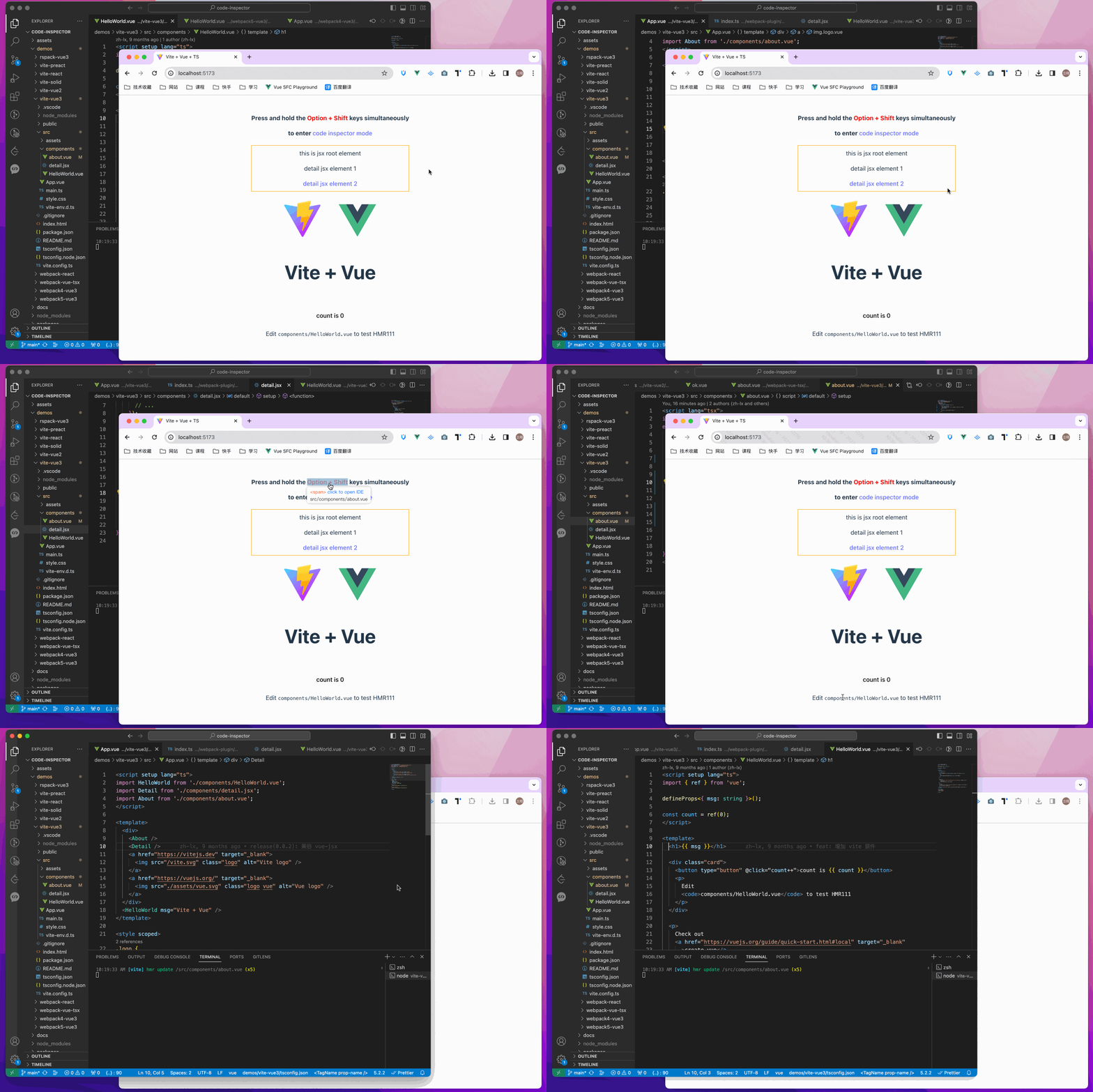
Click the element on the page, it can automatically open the code editor and position the cursor to the source code of the element.
💻 Try it out online
- vue online demo
- react online demo
- preact online demo
- solid online demo
- qwik online demo
- svelte online demo
- astro online demo
🎨 Support
The following are which compilers, web frameworks and editors we supported now:
- The following bundlers are currently supported:
✅ webpack
✅ vite
✅ rspack / rsbuild
✅ farm
✅ esbuild
✅ turbopack
✅ mako - The following Web frameworks are currently supported:
✅ vue2 / vue3 / nuxt
✅ react / nextjs / umijs
✅ preact
✅ solid
✅ qwik
✅ svelte
✅ astro - Supported editor list | and Others
🚀 Install
npm i code-inspector-plugin -D
# or
yarn add code-inspector-plugin -D
# or
pnpm add code-inspector-plugin -D
🌈 Usage
Please check here for more usage information: code-inspector-plugin configuration
-
1.Configuring Build Tools
Click to expand configuration about: webpack
// webpack.config.js
const { codeInspectorPlugin } = require('code-inspector-plugin');

module.exports = () => ({
  plugins: [
    codeInspectorPlugin({
      bundler: 'webpack',
    }),
  ],
});
Click to expand configuration about: vite
// vite.config.js
import { defineConfig } from 'vite';
import { codeInspectorPlugin } from 'code-inspector-plugin';

export default defineConfig({
  plugins: [
    codeInspectorPlugin({
      bundler: 'vite',
    }),
  ],
});
Click to expand configuration about: rspack
// rspack.config.js
const { codeInspectorPlugin } = require('code-inspector-plugin');

module.exports = {
  // other config...
  plugins: [
    codeInspectorPlugin({
      bundler: 'rspack',
    }),
    // other plugins...
  ],
};
Click to expand configuration about: rsbuild
// rsbuild.config.js
const { codeInspectorPlugin } = require('code-inspector-plugin');

module.exports = {
  // other config...
  tools: {
    rspack: {
      plugins: [
        codeInspectorPlugin({
          bundler: 'rspack',
        }),
      ],
    },
  },
};
Click to expand configuration about: esbuild
// esbuild.config.js
const esbuild = require('esbuild');
const { codeInspectorPlugin } = require('code-inspector-plugin');

esbuild.build({
  // other configs...
  // [注意] esbuild 中使用时,dev 函数的返回值需自己根据环境判断,本地开发的环境返回 true,线上打包返回 false
  plugins: [codeInspectorPlugin({ bundler: 'esbuild', dev: () => true })],
});
Click to expand configuration about: farm
// farm.config.js
import { defineConfig } from '@farmfe/core';
import { codeInspectorPlugin } from 'code-inspector-plugin';

export default defineConfig({
  vitePlugins: [
    codeInspectorPlugin({
      bundler: 'vite',
    }),
    // ...other code
  ],
});
Click to expand configuration about: vue-cli
// vue.config.js
const { codeInspectorPlugin } = require('code-inspector-plugin');

module.exports = {
  // ...other code
  chainWebpack: (config) => {
    config.plugin('code-inspector-plugin').use(
      codeInspectorPlugin({
        bundler: 'webpack',
      })
    );
  },
};
Click to expand configuration about: nuxt
-
For nuxt3.x :
// nuxt.config.js import { codeInspectorPlugin } from 'code-inspector-plugin'; // https://nuxt.com/docs/api/configuration/nuxt-config export default defineNuxtConfig({ vite: { plugins: [codeInspectorPlugin({ bundler: 'vite' })], }, }); -
For nuxt2.x :
// nuxt.config.js
import { codeInspectorPlugin } from 'code-inspector-plugin';

export default {
  build: {
    extend(config) {
      config.plugins.push(codeInspectorPlugin({ bundler: 'webpack' }));
      return config;
    },
  },
};
Click to expand configuration about: next.js
-
For next.js(<= 14.x):
// next.config.js const { codeInspectorPlugin } = require('code-inspector-plugin'); const nextConfig = { webpack: (config, { dev, isServer }) => { config.plugins.push(codeInspectorPlugin({ bundler: 'webpack' })); return config; }, }; module.exports = nextConfig; -
For next.js(15.0.x ~ 15.2.x):
import type { NextConfig } from 'next'; import { codeInspectorPlugin } from 'code-inspector-plugin'; const nextConfig: NextConfig = { experimental: { turbo: { rules: codeInspectorPlugin({ bundler: 'turbopack', }), }, }, }; export default nextConfig; -
For next.js(>= 15.3.x):
// next.config.js
import type { NextConfig } from 'next';
import { codeInspectorPlugin } from 'code-inspector-plugin';

const nextConfig: NextConfig = {
  turbopack: {
    rules: codeInspectorPlugin({
      bundler: 'turbopack',
    }),
  },
};

export default nextConfig;
Click to expand configuration about: umi.js
-
With webpack:
// umi.config.js or umirc.js import { defineConfig } from '@umijs/max'; import { codeInspectorPlugin } from 'code-inspector-plugin'; export default defineConfig({ chainWebpack(memo) { memo.plugin('code-inspector-plugin').use( codeInspectorPlugin({ bundler: 'webpack', }) ); }, // other config }); -
With mako:
// .umirc.ts
import { defineConfig } from 'umi';
import { codeInspectorPlugin } from 'code-inspector-plugin';

export default defineConfig({
  // other config...
  mako: {
    plugins: [
      codeInspectorPlugin({
        bundler: 'mako',
      }),
    ],
  },
});
Click to expand configuration about: astro
// astro.config.mjs import { defineConfig } from 'astro/config'; import { codeInspectorPlugin } from 'code-inspector-plugin'; export default defineConfig({ vite: { plugins: [codeInspectorPlugin({ bundler: 'vite' })], }, }); -
-
2.Using the function
Now you can enjoy using it!~
When pressing the combination keys on the page, moving the mouse over the page will display a mask layer on the DOM with relevant information. Clicking will automatically open the IDE and position the cursor to the corresponding code location. (The default combination keys for Mac are
Option + Shift; for Windows, it'sAlt + Shift, and the browser console will output related combination key prompts)
👨💻 Contributors
Special thanks to the contributors of this project:
📧 Communication and Feedback
For any usage issues, please leave a message below my Twitter post or submit an issue on Github.
For Chinese users, you can join the QQ group 769748484 or add the author's WeiXin account zhoulx1688888 for consultation and feedback:



💖 Sponsor
Sponsoring this project can help the author create better. If you are willing, you can sponsor me through Alipay or WeChatPay: