terraform-aws-jenkins [](https://github.com/cloudposse/terraform-aws-jenkins/releases/latest) [](https://slack.cloudposse.com)
May 17, 2023 · View on GitHub

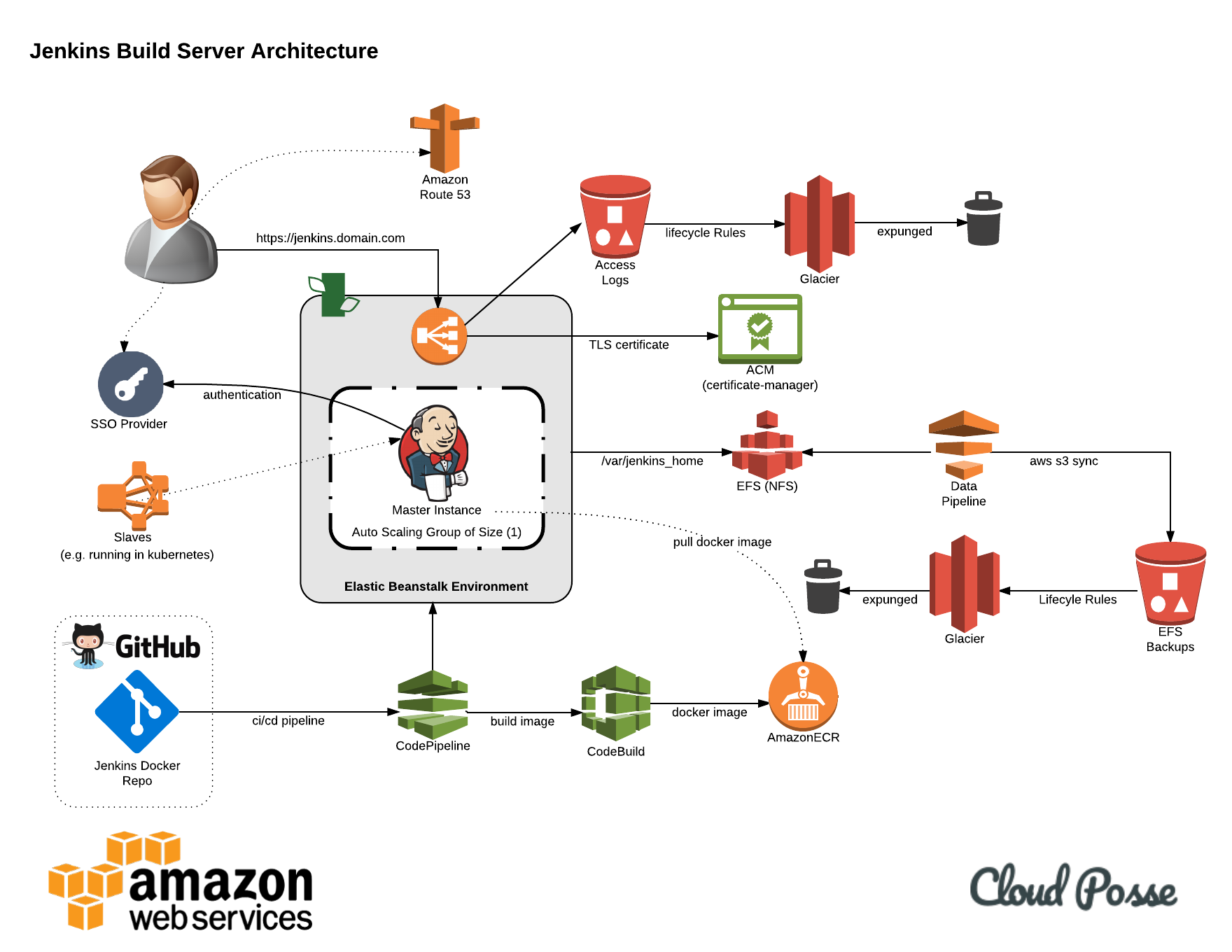
terraform-aws-jenkins is a Terraform module to build a Docker image with Jenkins, save it to an ECR repo,
and deploy to Elastic Beanstalk running Docker.
This is an enterprise-ready, scalable and highly-available architecture and the CI/CD pattern to build and deploy Jenkins.
Features
The module will create the following AWS resources:
- Elastic Beanstalk Application
- Elastic Beanstalk Environment with Docker stack to run the Jenkins master
- ECR repository to store the Jenkins Docker image
- EFS filesystem to store Jenkins config and jobs (it will be mounted to a directory on the EC2 host, and then to the Docker container)
- AWS Backup stack to automatically backup the EFS
- CodePipeline with CodeBuild to build and deploy Jenkins so even Jenkins itself follows the CI/CD pattern
After all of the AWS resources are created,
CodePipeline will:
- Get the specified Jenkins repo from GitHub, e.g. https://github.com/cloudposse/jenkins
- Build a Docker image from it
- Save the Docker image to the ECR repo
- Deploy the Docker image from the ECR repo to Elastic Beanstalk running Docker stack
- Monitor the GitHub repo for changes and re-run the steps above if new commits are pushed
This project is part of our comprehensive "SweetOps" approach towards DevOps.



It's 100% Open Source and licensed under the APACHE2.
We literally have hundreds of terraform modules that are Open Source and well-maintained. Check them out!
Security & Compliance 
Security scanning is graciously provided by Bridgecrew. Bridgecrew is the leading fully hosted, cloud-native solution providing continuous Terraform security and compliance.
| Benchmark | Description |
|---|---|
| Infrastructure Security Compliance | |
| Center for Internet Security, KUBERNETES Compliance | |
| Center for Internet Security, AWS Compliance | |
| Center for Internet Security, AZURE Compliance | |
| Payment Card Industry Data Security Standards Compliance | |
| National Institute of Standards and Technology Compliance | |
| Information Security Management System, ISO/IEC 27001 Compliance | |
| Service Organization Control 2 Compliance | |
| Center for Internet Security, GCP Compliance | |
| Health Insurance Portability and Accountability Compliance |
Usage
IMPORTANT: We do not pin modules to versions in our examples because of the difficulty of keeping the versions in the documentation in sync with the latest released versions. We highly recommend that in your code you pin the version to the exact version you are using so that your infrastructure remains stable, and update versions in a systematic way so that they do not catch you by surprise.
Also, because of a bug in the Terraform registry (hashicorp/terraform#21417), the registry shows many of our inputs as required when in fact they are optional. The table below correctly indicates which inputs are required.
For a complete example, see examples/complete.
For automatic tests of the complete example, see test.
provider "aws" {
  region = var.region
}

module "vpc" {
  source     = "git::https://github.com/cloudposse/terraform-aws-vpc.git?ref=tags/0.8.0"
  namespace  = var.namespace
  stage      = var.stage
  name       = var.name
  attributes = var.attributes
  tags       = var.tags
  delimiter  = var.delimiter
  cidr_block = "172.16.0.0/16"
}

module "subnets" {
  source               = "git::https://github.com/cloudposse/terraform-aws-dynamic-subnets.git?ref=tags/0.16.0"
  availability_zones   = var.availability_zones
  namespace            = var.namespace
  stage                = var.stage
  name                 = var.name
  attributes           = var.attributes
  tags                 = var.tags
  delimiter            = var.delimiter
  vpc_id               = module.vpc.vpc_id
  igw_id               = module.vpc.igw_id
  cidr_block           = module.vpc.vpc_cidr_block
  nat_gateway_enabled  = true
  nat_instance_enabled = false
}

module "jenkins" {
  source = "cloudposse/jenkins/aws"
  # Cloud Posse recommends pinning every module to a specific version
  # version = "x.x.x"
  namespace   = var.namespace
  stage       = var.stage
  name        = var.name
  description = var.description

  master_instance_type = var.master_instance_type
  aws_account_id       = var.aws_account_id
  region               = var.region
  availability_zones   = var.availability_zones
  vpc_id               = module.vpc.vpc_id
  dns_zone_id          = var.dns_zone_id
  loadbalancer_subnets = module.subnets.public_subnet_ids
  application_subnets  = module.subnets.private_subnet_ids

  environment_type                       = var.environment_type
  loadbalancer_type                      = var.loadbalancer_type
  loadbalancer_certificate_arn           = var.loadbalancer_certificate_arn
  availability_zone_selector             = var.availability_zone_selector
  rolling_update_type                    = var.rolling_update_type
  loadbalancer_logs_bucket_force_destroy = var.loadbalancer_logs_bucket_force_destroy
  cicd_bucket_force_destroy              = var.cicd_bucket_force_destroy

  github_oauth_token  = var.github_oauth_token
  github_organization = var.github_organization
  github_repo_name    = var.github_repo_name
  github_branch       = var.github_branch

  image_tag = var.image_tag

  healthcheck_url = var.healthcheck_url

  build_image        = var.build_image
  build_compute_type = var.build_compute_type

  efs_backup_schedule           = var.efs_backup_schedule
  efs_backup_start_window       = var.efs_backup_start_window
  efs_backup_completion_window  = var.efs_backup_completion_window
  efs_backup_cold_storage_after = var.efs_backup_cold_storage_after
  efs_backup_delete_after       = var.efs_backup_delete_after

  env_vars = {
    "JENKINS_USER"          = var.jenkins_username
    "JENKINS_PASS"          = var.jenkins_password
    "JENKINS_NUM_EXECUTORS" = var.jenkins_num_executors
  }
}
Makefile Targets
Available targets:

  help                                Help screen
  help/all                            Display help for all targets
  help/short                          This help short screen
  lint                                Lint terraform code
Requirements
| Name | Version |
|---|---|
| terraform | >= 0.14.0 |
| aws | >= 2.0 |
Providers
| Name | Version |
|---|---|
| aws | >= 2.0 |
Modules
| Name | Source | Version |
|---|---|---|
| cicd | cloudposse/cicd/aws | 0.19.5 |
| ecr | cloudposse/ecr/aws | 0.34.0 |
| efs | cloudposse/efs/aws | 0.32.7 |
| efs_backup | cloudposse/backup/aws | 0.14.0 |
| elastic_beanstalk_application | cloudposse/elastic-beanstalk-application/aws | 0.11.1 |
| elastic_beanstalk_environment | cloudposse/elastic-beanstalk-environment/aws | 0.46.0 |
| label_slaves | cloudposse/label/null | 0.25.0 |
| this | cloudposse/label/null | 0.25.0 |
Resources
| Name | Type |
|---|---|
| aws_iam_policy.slaves | resource |
| aws_iam_role_policy_attachment.slaves | resource |
| aws_security_group.slaves | resource |
| aws_iam_policy_document.slaves | data source |
Inputs
| Name | Description | Type | Default | Required |
|---|---|---|---|---|
| additional_tag_map | Additional key-value pairs to add to each map in tags_as_list_of_maps. Not added to tags or id.This is for some rare cases where resources want additional configuration of tags and therefore take a list of maps with tag key, value, and additional configuration. | map(string) | {} | no |
| application_subnets | List of subnets to place EC2 instances and EFS | list(string) | n/a | yes |
| associated_security_group_ids | List of security groups to be allowed to connect to Jenkins master EC2 instances | list(string) | [] | no |
| attributes | ID element. Additional attributes (e.g. workers or cluster) to add to id,in the order they appear in the list. New attributes are appended to the end of the list. The elements of the list are joined by the delimiterand treated as a single ID element. | list(string) | [] | no |
| availability_zone_selector | Availability Zone selector | string | "Any" | no |
| availability_zones | List of Availability Zones for EFS | list(string) | n/a | yes |
| aws_account_id | AWS Account ID. Used as CodeBuild ENV variable $AWS_ACCOUNT_ID when building Docker images. For more info: http://docs.aws.amazon.com/codebuild/latest/userguide/sample-docker.html | string | n/a | yes |
| build_compute_type | CodeBuild compute type, e.g. 'BUILD_GENERAL1_SMALL'. For more info: https://docs.aws.amazon.com/codebuild/latest/userguide/build-env-ref-compute-types.html | string | "BUILD_GENERAL1_SMALL" | no |
| build_image | CodeBuild build image, e.g. 'aws/codebuild/amazonlinux2-x86_64-standard:1.0'. For more info: https://docs.aws.amazon.com/codebuild/latest/userguide/build-env-ref-available.html | string | "aws/codebuild/docker:1.12.1" | no |
| cicd_bucket_force_destroy | Force destroy the CI/CD S3 bucket even if it's not empty | bool | false | no |
| context | Single object for setting entire context at once. See description of individual variables for details. Leave string and numeric variables as null to use default value.Individual variable settings (non-null) override settings in context object, except for attributes, tags, and additional_tag_map, which are merged. | any | { | no |
| delimiter | Delimiter to be used between ID elements. Defaults to - (hyphen). Set to "" to use no delimiter at all. | string | null | no |
| description | Will be used as Elastic Beanstalk application description | string | "Jenkins server as Docker container running on Elastic Benastalk" | no |
| descriptor_formats | Describe additional descriptors to be output in the descriptors output map.Map of maps. Keys are names of descriptors. Values are maps of the form {<br> format = string<br> labels = list(string)<br>}(Type is any so the map values can later be enhanced to provide additional options.)format is a Terraform format string to be passed to the format() function.labels is a list of labels, in order, to pass to format() function.Label values will be normalized before being passed to format() so they will beidentical to how they appear in id.Default is {} (descriptors output will be empty). | any | {} | no |
| dns_zone_id | Route53 parent zone ID. The module will create sub-domain DNS records in the parent zone for the EB environment and EFS | string | n/a | yes |
| efs_backup_cold_storage_after | Specifies the number of days after creation that a recovery point is moved to cold storage | number | null | no |
| efs_backup_completion_window | The amount of time AWS Backup attempts a backup before canceling the job and returning an error. Must be at least 60 minutes greater than start_window | number | null | no |
| efs_backup_delete_after | Specifies the number of days after creation that a recovery point is deleted. Must be 90 days greater than cold_storage_after | number | null | no |
| efs_backup_schedule | A CRON expression specifying when AWS Backup initiates a backup job | string | null | no |
| efs_backup_start_window | The amount of time in minutes before beginning a backup. Minimum value is 60 minutes | number | null | no |
| enabled | Set to false to prevent the module from creating any resources | bool | null | no |
| env_vars | Map of custom ENV variables to be provided to the Jenkins application running on Elastic Beanstalk, e.g. env_vars = { JENKINS_USER = 'admin' JENKINS_PASS = 'xxxxxx' } | map(string) | {} | no |
| environment | ID element. Usually used for region e.g. 'uw2', 'us-west-2', OR role 'prod', 'staging', 'dev', 'UAT' | string | null | no |
| environment_type | Environment type, e.g. 'LoadBalanced' or 'SingleInstance'. If setting to 'SingleInstance', rolling_update_type must be set to 'Time' or Immutable, and loadbalancer_subnets will be unused (it applies to the ELB, which does not exist in SingleInstance environments) | string | "LoadBalanced" | no |
| github_branch | GitHub repository branch, e.g. 'master'. By default, this module will deploy 'https://github.com/cloudposse/jenkins' master branch | string | "master" | no |
| github_oauth_token | GitHub Oauth Token | string | n/a | yes |
| github_organization | GitHub organization, e.g. 'cloudposse'. By default, this module will deploy 'https://github.com/cloudposse/jenkins' repository | string | "cloudposse" | no |
| github_repo_name | GitHub repository name, e.g. 'jenkins'. By default, this module will deploy 'https://github.com/cloudposse/jenkins' repository | string | "jenkins" | no |
| healthcheck_url | Application Health Check URL. Elastic Beanstalk will call this URL to check the health of the application running on EC2 instances | string | "/login" | no |
| id_length_limit | Limit id to this many characters (minimum 6).Set to 0 for unlimited length.Set to null for keep the existing setting, which defaults to 0.Does not affect id_full. | number | null | no |
| image_tag | Docker image tag in the ECR repository, e.g. 'latest'. Used as CodeBuild ENV variable $IMAGE_TAG when building Docker images. For more info: http://docs.aws.amazon.com/codebuild/latest/userguide/sample-docker.html | string | "latest" | no |
| label_key_case | Controls the letter case of the tags keys (label names) for tags generated by this module.Does not affect keys of tags passed in via the tags input.Possible values: lower, title, upper.Default value: title. | string | null | no |
| label_order | The order in which the labels (ID elements) appear in the id.Defaults to ["namespace", "environment", "stage", "name", "attributes"]. You can omit any of the 6 labels ("tenant" is the 6th), but at least one must be present. | list(string) | null | no |
| label_value_case | Controls the letter case of ID elements (labels) as included in id,set as tag values, and output by this module individually. Does not affect values of tags passed in via the tags input.Possible values: lower, title, upper and none (no transformation).Set this to title and set delimiter to "" to yield Pascal Case IDs.Default value: lower. | string | null | no |
| labels_as_tags | Set of labels (ID elements) to include as tags in the tags output.Default is to include all labels. Tags with empty values will not be included in the tags output.Set to [] to suppress all generated tags.Notes: The value of the name tag, if included, will be the id, not the name.Unlike other null-label inputs, the initial setting of labels_as_tags cannot bechanged in later chained modules. Attempts to change it will be silently ignored. | set(string) | [ | no |
| loadbalancer_certificate_arn | Load Balancer SSL certificate ARN. The certificate must be present in AWS Certificate Manager | string | "" | no |
| loadbalancer_logs_bucket_force_destroy | Force destroy the S3 bucket for load balancer logs even if it's not empty | bool | false | no |
| loadbalancer_ssl_policy | Specify a security policy to apply to the listener. This option is only applicable to environments with an application load balancer | string | "" | no |
| loadbalancer_subnets | List of subnets to place Elastic Load Balancer | list(string) | n/a | yes |
| loadbalancer_type | Load Balancer type, e.g. 'application' or 'classic' | string | "application" | no |
| master_instance_type | EC2 instance type for Jenkins master, e.g. 't2.medium' | string | "t2.medium" | no |
| name | ID element. Usually the component or solution name, e.g. 'app' or 'jenkins'. This is the only ID element not also included as a tag.The "name" tag is set to the full id string. There is no tag with the value of the name input. | string | null | no |
| namespace | ID element. Usually an abbreviation of your organization name, e.g. 'eg' or 'cp', to help ensure generated IDs are globally unique | string | null | no |
| regex_replace_chars | Terraform regular expression (regex) string. Characters matching the regex will be removed from the ID elements. If not set, "/[^a-zA-Z0-9-]/" is used to remove all characters other than hyphens, letters and digits. | string | null | no |
| region | AWS region in which to provision the AWS resources | string | n/a | yes |
| rolling_update_type | Health, Time or Immutable. Set it to Immutable to apply the configuration change to a fresh group of instances. For more details, see https://docs.aws.amazon.com/elasticbeanstalk/latest/dg/command-options-general.html#command-options-general-autoscalingupdatepolicyrollingupdate | string | "Health" | no |
| solution_stack_name | Elastic Beanstalk stack, e.g. Docker, Go, Node, Java, IIS. For more info: http://docs.aws.amazon.com/elasticbeanstalk/latest/dg/concepts.platforms.html | string | "64bit Amazon Linux 2018.03 v2.12.17 running Docker 18.06.1-ce" | no |
| ssh_key_pair | Name of SSH key that will be deployed on Elastic Beanstalk instances. The key should be present in AWS | string | "" | no |
| stage | ID element. Usually used to indicate role, e.g. 'prod', 'staging', 'source', 'build', 'test', 'deploy', 'release' | string | null | no |
| tags | Additional tags (e.g. {'BusinessUnit': 'XYZ'}).Neither the tag keys nor the tag values will be modified by this module. | map(string) | {} | no |
| tenant | ID element _(Rarely used, not included by default)_. A customer identifier, indicating who this instance of a resource is for | string | null | no |
| use_efs_ip_address | If set to true, will provide the EFS IP address instead of DNS name to Jenkins as ENV var | bool | false | no |
| vpc_id | ID of the VPC in which to provision the AWS resources | string | n/a | yes |
Outputs
| Name | Description |
|---|---|
| codebuild_badge_url | The URL of the build badge when badge_enabled is enabled |
| codebuild_cache_bucket_arn | CodeBuild cache S3 bucket ARN |
| codebuild_cache_bucket_name | CodeBuild cache S3 bucket name |
| codebuild_project_id | CodeBuild project ID |
| codebuild_project_name | CodeBuild project name |
| codebuild_role_arn | CodeBuild IAM Role ARN |
| codebuild_role_id | CodeBuild IAM Role ID |
| codepipeline_arn | CodePipeline ARN |
| codepipeline_id | CodePipeline ID |
| ecr_registry_id | Registry ID |
| ecr_repository_name | Repository name |
| ecr_repository_url | Repository URL |
| efs_arn | EFS ARN |
| efs_backup_plan_arn | Backup Plan ARN |
| efs_backup_plan_version | Unique, randomly generated, Unicode, UTF-8 encoded string that serves as the version ID of the backup plan |
| efs_backup_selection_id | Backup Selection ID |
| efs_backup_vault_arn | Backup Vault ARN |
| efs_backup_vault_id | Backup Vault ID |
| efs_dns_name | EFS DNS name |
| efs_host | Route53 DNS hostname for the EFS |
| efs_id | EFS ID |
| efs_mount_target_dns_names | List of EFS mount target DNS names |
| efs_mount_target_ids | List of EFS mount target IDs (one per Availability Zone) |
| efs_mount_target_ips | List of EFS mount target IPs (one per Availability Zone) |
| efs_network_interface_ids | List of mount target network interface IDs |
| elastic_beanstalk_application_name | Elastic Beanstalk Application name |
| elastic_beanstalk_environment_all_settings | List of all option settings configured in the environment. These are a combination of default settings and their overrides from setting in the configuration |
| elastic_beanstalk_environment_application | The Elastic Beanstalk Application specified for this environment |
| elastic_beanstalk_environment_autoscaling_groups | The autoscaling groups used by this environment |
| elastic_beanstalk_environment_ec2_instance_profile_role_name | Instance IAM role name |
| elastic_beanstalk_environment_elb_zone_id | ELB zone id |
| elastic_beanstalk_environment_endpoint | Fully qualified DNS name for the environment |
| elastic_beanstalk_environment_hostname | DNS hostname |
| elastic_beanstalk_environment_id | ID of the Elastic Beanstalk environment |
| elastic_beanstalk_environment_instances | Instances used by this environment |
| elastic_beanstalk_environment_launch_configurations | Launch configurations in use by this environment |
| elastic_beanstalk_environment_load_balancers | Elastic Load Balancers in use by this environment |
| elastic_beanstalk_environment_name | Name |
| elastic_beanstalk_environment_queues | SQS queues in use by this environment |
| elastic_beanstalk_environment_security_group_id | Security group id |
| elastic_beanstalk_environment_setting | Settings specifically set for this environment |
| elastic_beanstalk_environment_tier | The environment tier |
| elastic_beanstalk_environment_triggers | Autoscaling triggers in use by this environment |
Share the Love
Like this project? Please give it a ★ on our GitHub! (it helps us a lot)
Are you using this project or any of our other projects? Consider leaving a testimonial. =)
Related Projects
Check out these related projects.
- terraform-aws-elastic-beanstalk-application - Terraform module to provision AWS Elastic Beanstalk application
- terraform-aws-elastic-beanstalk-environment - Terraform module to provision AWS Elastic Beanstalk environment
- terraform-aws-ecr - Terraform Module to manage Docker Container Registries on AWS ECR
- terraform-aws-efs - Terraform Module to define an EFS Filesystem (aka NFS)
- terraform-aws-efs-backup - Terraform module designed to easily backup EFS filesystems to S3 using DataPipeline
- terraform-aws-cicd - Terraform Module for CI/CD with AWS Code Pipeline and Code Build
- terraform-aws-codebuild - Terraform Module to easily leverage AWS CodeBuild for Continuous Integration
Help
Got a question? We got answers.
File a GitHub issue, send us an email or join our Slack Community.
DevOps Accelerator for Startups
We are a DevOps Accelerator. We'll help you build your cloud infrastructure from the ground up so you can own it. Then we'll show you how to operate it and stick around for as long as you need us.

Work directly with our team of DevOps experts via email, slack, and video conferencing.
We deliver 10x the value for a fraction of the cost of a full-time engineer. Our track record is not even funny. If you want things done right and you need it done FAST, then we're your best bet.
- Reference Architecture. You'll get everything you need from the ground up built using 100% infrastructure as code.
- Release Engineering. You'll have end-to-end CI/CD with unlimited staging environments.
- Site Reliability Engineering. You'll have total visibility into your apps and microservices.
- Security Baseline. You'll have built-in governance with accountability and audit logs for all changes.
- GitOps. You'll be able to operate your infrastructure via Pull Requests.
- Training. You'll receive hands-on training so your team can operate what we build.
- Questions. You'll have a direct line of communication between our teams via a Shared Slack channel.
- Troubleshooting. You'll get help to triage when things aren't working.
- Code Reviews. You'll receive constructive feedback on Pull Requests.
- Bug Fixes. We'll rapidly work with you to fix any bugs in our projects.
Slack Community
Join our Open Source Community on Slack. It's FREE for everyone! Our "SweetOps" community is where you get to talk with others who share a similar vision for how to rollout and manage infrastructure. This is the best place to talk shop, ask questions, solicit feedback, and work together as a community to build totally sweet infrastructure.
Discourse Forums
Participate in our Discourse Forums. Here you'll find answers to commonly asked questions. Most questions will be related to the enormous number of projects we support on our GitHub. Come here to collaborate on answers, find solutions, and get ideas about the products and services we value. It only takes a minute to get started! Just sign in with SSO using your GitHub account.
Newsletter
Sign up for our newsletter that covers everything on our technology radar. Receive updates on what we're up to on GitHub as well as awesome new projects we discover.
Office Hours
Join us every Wednesday via Zoom for our weekly "Lunch & Learn" sessions. It's FREE for everyone!

Contributing
Bug Reports & Feature Requests
Please use the issue tracker to report any bugs or file feature requests.
Developing
If you are interested in being a contributor and want to get involved in developing this project or help out with our other projects, we would love to hear from you! Shoot us an email.
In general, PRs are welcome. We follow the typical "fork-and-pull" Git workflow.
- Fork the repo on GitHub
- Clone the project to your own machine
- Commit changes to your own branch
- Push your work back up to your fork
- Submit a Pull Request so that we can review your changes
NOTE: Be sure to merge the latest changes from "upstream" before making a pull request!
Copyright
Copyright © 2017-2023 Cloud Posse, LLC
License

See LICENSE for full details.
Licensed to the Apache Software Foundation (ASF) under one
or more contributor license agreements.  See the NOTICE file
distributed with this work for additional information
regarding copyright ownership.  The ASF licenses this file
to you under the Apache License, Version 2.0 (the
"License"); you may not use this file except in compliance
with the License.  You may obtain a copy of the License at

  https://www.apache.org/licenses/LICENSE-2.0

Unless required by applicable law or agreed to in writing,
software distributed under the License is distributed on an
"AS IS" BASIS, WITHOUT WARRANTIES OR CONDITIONS OF ANY
KIND, either express or implied.  See the License for the
specific language governing permissions and limitations
under the License.
Trademarks
All other trademarks referenced herein are the property of their respective owners.
About
This project is maintained and funded by Cloud Posse, LLC. Like it? Please let us know by leaving a testimonial!
We're a DevOps Professional Services company based in Los Angeles, CA. We ❤️ Open Source Software.
We offer paid support on all of our projects.
Check out our other projects, follow us on twitter, apply for a job, or hire us to help with your cloud strategy and implementation.
Contributors
 Erik Osterman |  Andriy Knysh |  Igor Rodionov |  Ivan Pinatti |  Sergey Vasilyev |  RB |
|---|