HTTP Frames and Stream Multiplexing in HTTP/2
July 7, 2026 · View on GitHub
HTTP Frames and Stream Multiplexing in HTTP/2
The previous article covered how HTTP/2 establishes a connection. Starting with this article, we will discuss the frame structure. Once an HTTP/2 connection has been established, endpoints can begin exchanging frames.
I. Frame Format
HTTP/2 sends binary frames of different types, but they all share the following common fields: Type, Length, Flags, Stream Identifier, and frame payload. This specification defines a total of 10 different frame types, with the two most fundamental ones corresponding to DATA and HEADERS in HTTP/1.1.

All frames begin with a fixed 9-byte header, followed by a variable-length payload.
    +-----------------------------------------------+
    |                 Length (24)                   |
    +---------------+---------------+---------------+
    |   Type (8)    |   Flags (8)   |
    +-+-------------+---------------+-------------------------------+
    |R|                 Stream Identifier (31)                      |
    +=+=============================================================+
    |                   Frame Payload (0...)                      ...
    +---------------------------------------------------------------+
The frame header fields are defined as follows:
-
Length:
The length of the frame payload, expressed as an unsigned 24-bit integer. Unless the receiver has set a larger value for SETTINGS_MAX_FRAME_SIZE (see here for details), values greater than 2 ^ 14 (16,384) MUST NOT be sent. The 9 octets of the frame header are not included in this length value. -
Type:
These 8 bits are used to indicate the frame type. The frame type determines the format and semantics of the frame. Implementations MUST ignore and discard any frame whose type is unknown. -
Flags:
This field is an 8-bit field reserved for frame-type-specific boolean flags. It assigns semantics specific to the indicated frame type to each flag. Flags for which no semantics are defined for a given frame type MUST be ignored and MUST be left unset (0x0) when sending.
Common flags include END_HEADERS, which indicates the end of header data and is equivalent to the blank line after the headers in HTTP/1 ("\r\n"), and END_STREAM, which indicates the end of data transmission in one direction (that is, EOS, End of Stream), equivalent to the end marker for HTTP/1 chunked transfer encoding ("0\r\n\r\n").
-
R:
A reserved 1-bit field. The semantics of this bit are undefined. It MUST remain unset (0x0) when sending and MUST be ignored when received. -
Stream Identifier:
The stream identifier (see Section 5.1.1), expressed as an unsigned 31-bit integer. The value 0x0 is reserved for frames associated with the entire connection rather than with an individual stream.
The structure and content of the frame payload depend entirely on the frame type.
Let's capture packets and look at what an actual frame header looks like. Here we pick an arbitrary frame type, for example a SETTINGS frame:
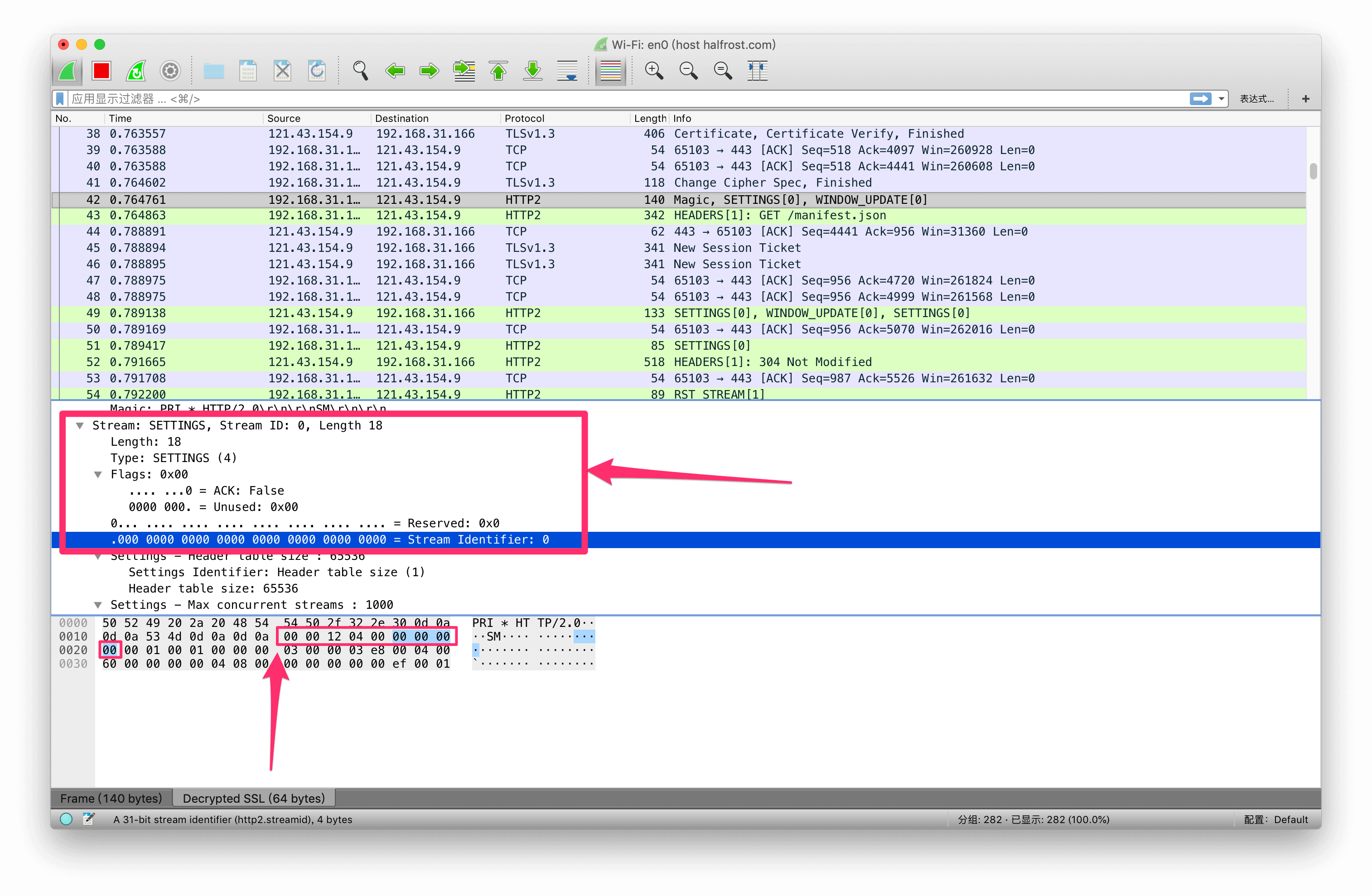
The packet capture shows that the header structure of the frame is indeed 9 bytes at the beginning. Length is 18, Type is 4, the Flags bit is ACK, R is the reserved bit, corresponding to Reserved in the packet-capture image above. Stream Identifier is 0.
II. Frame Size
The size of a frame payload is limited by the maximum size advertised by the receiver in the SETTINGS_MAX_FRAME_SIZE setting. This setting can contain any value between (16,384) and -1 (16,777,215) octets.
All implementations MUST be able to receive and at least process frames with a length of octets, plus the 9-octet frame header. When describing frame size, the size of the frame header is not included.
Note: Certain frame types, such as PING (Section 6.7), impose additional limits on the amount of payload data allowed.
If a frame exceeds the size defined in SETTINGS_MAX_FRAME_SIZE, exceeds any limit defined by the frame type, or is too small to contain mandatory frame data, the endpoint MUST send the error code FRAME_SIZE_ERROR. A frame-size error in a frame that might change the state of the entire connection MUST be treated as a connection error (Section 5.4.1); this includes any frame carrying a header block (Section 4.3) (that is, HEADERS, PUSH_PROMISE, and CONTINUATION), SETTINGS, and any frame whose stream identifier is 0.
An endpoint is not obligated to use all available space in a frame. Using frames smaller than the maximum permitted size can improve responsiveness. Sending large frames can delay the sending of time-sensitive frames (such as RST_STREAM, WINDOW_UPDATE, or PRIORITY), which can hurt performance if their transmission is blocked by a large frame.
III. Header Compression and Decompression
As in HTTP/1, header fields in HTTP/2 are names with one or more associated values. Header fields are used in HTTP request and response messages as well as in server push operations (see Section 8.2).
A header list is a collection of zero or more header fields. When transmitted over a connection, the header list is serialized into a header block using HTTP header compression [COMPRESSION]. The serialized header block is then split into one or more octet sequences, called header block fragments, and sent in the payload of HEADERS (Section 6.2), PUSH_PROMISE (Section 6.6)or CONTINUATION (Section 6.10) frames.
The Cookie field [COOKIE] in headers is handled specially by the HTTP mapping (see Section 8.1.2.5).
A receiving endpoint reassembles a header block by concatenating its fragments, then decompresses the block to reconstruct the header list. A complete header block consists of either:
-
A single HEADERS or PUSH_PROMISE frame with the END_HEADERS flag set.
-
A HEADERS or PUSH_PROMISE frame with the END_HEADERS flag cleared, followed by one or more CONTINUATION frames, where the last CONTINUATION frame has the END_HEADERS flag set.
Header compression is stateful. One compression context and one decompression context are used for the entire connection. A decoding error in a header block MUST be treated as a connection error of type COMPRESSION_ERROR (Section 5.4.1).
Each header block is processed as a discrete unit. A header block MUST be transmitted as a contiguous sequence of frames, without any interleaved frames of other types or frames from any other stream. The last frame in a HEADERS or CONTINUATION frame sequence has the END_HEADERS flag set. The last frame in a PUSH_PROMISE or CONTINUATION frame sequence has the END_HEADERS flag set. This allows a header block to be logically equivalent to a single frame.
Header block fragments can be sent only as the payload of HEADERS, PUSH_PROMISE, or CONTINUATION frames, because the data carried by these frames can modify the compression context maintained by the receiver. An endpoint receiving HEADERS, PUSH_PROMISE, or CONTINUATION frames needs to reassemble the header block and perform decompression, even for frames that are to be discarded. If the header block is not decompressed, the receiver MUST terminate the connection with a connection error of type COMPRESSION_ERROR (Section 5.4.1).
IV. stream State Machine
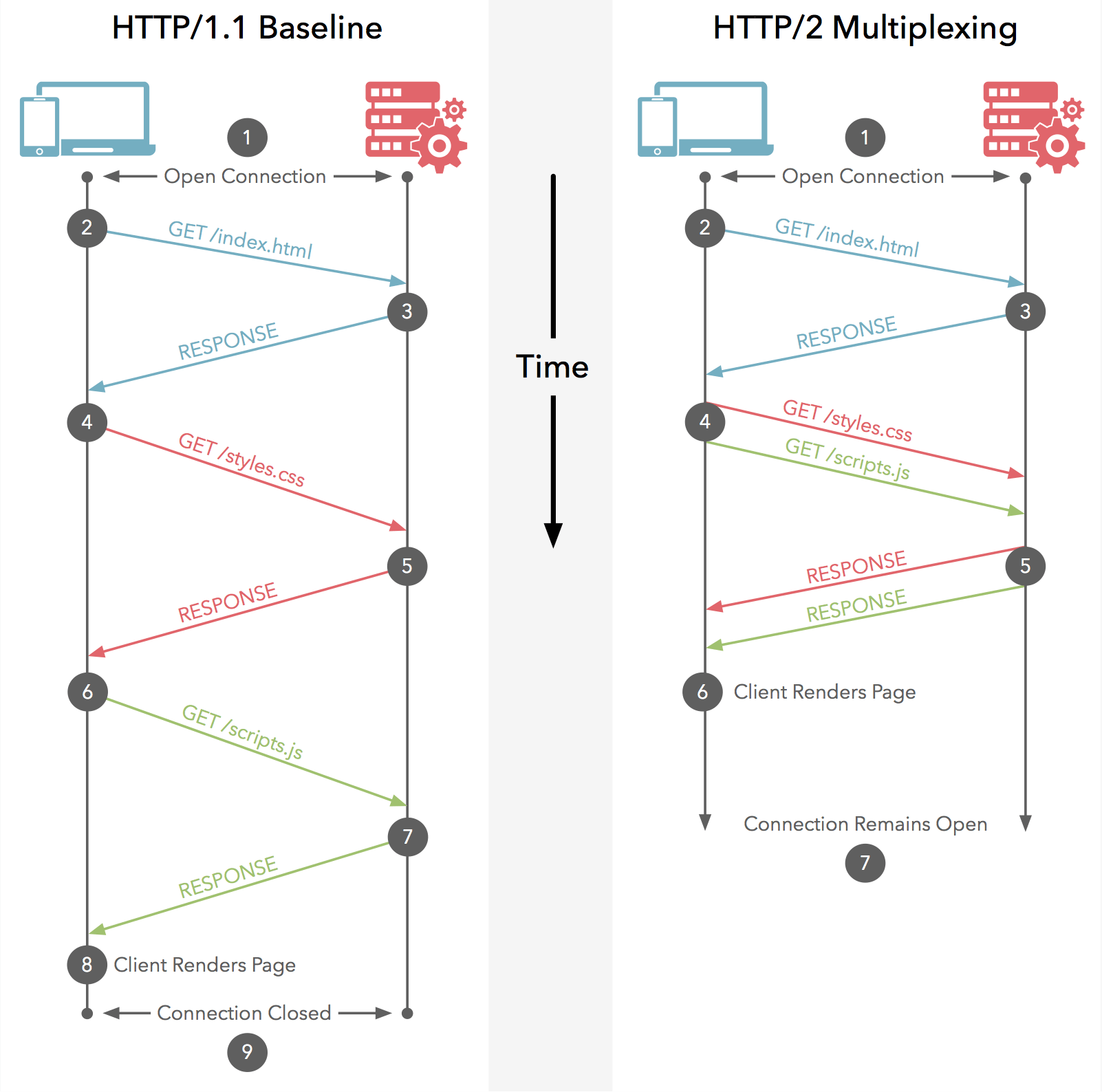
A stream is an independent, bidirectional sequence of frames exchanged between the client and the server within an HTTP/2 connection. A stream has several important characteristics:
- A single HTTP/2 connection can contain multiple concurrently open streams, and either endpoint may receive frames from multiple streams interleaved with one another.
- A stream can be established and used unilaterally, or it can be shared by the client or the server.
- Either endpoint can close a stream.
- The order in which frames are sent on a stream is very important. Recipients process frames in the order in which they are received. In particular, the ordering of HEADERS and DATA frames is semantically significant.
- Streams are identified by integers. A stream identifier is assigned to a stream by the endpoint that initiates the stream.
The lifecycle of a stream is shown below:
                                +--------+
                        send PP |        | recv PP
                       ,--------|  idle  |--------.
                      /         |        |         \
                     v          +--------+          v
              +----------+          |           +----------+
              |          |          | send H /  |          |
       ,------| reserved |          | recv H    | reserved |------.
       |      | (local)  |          |           | (remote) |      |
       |      +----------+          v           +----------+      |
       |          |             +--------+             |          |
       |          |     recv ES |        | send ES     |          |
       |   send H |     ,-------|  open  |-------.     | recv H   |
       |          |    /        |        |        \    |          |
       |          v   v         +--------+         v   v          |
       |      +----------+          |           +----------+      |
       |      |   half   |          |           |   half   |      |
       |      |  closed  |          | send R /  |  closed  |      |
       |      | (remote) |          | recv R    | (local)  |      |
       |      +----------+          |           +----------+      |
       |           |                |                 |           |
       |           | send ES /      |       recv ES / |           |
       |           | send R /       v        send R / |           |
       |           | recv R     +--------+   recv R   |           |
       | send R /  `----------->|        |<-----------'  send R / |
       | recv R                 | closed |               recv R   |
       `----------------------->|        |<----------------------'
                                +--------+

          send:   endpoint sends this frame
          recv:   endpoint receives this frame

          H:  HEADERS frame (with implied CONTINUATIONs)
          PP: PUSH_PROMISE frame (with implied CONTINUATIONs)
          ES: END_STREAM flag
          R:  RST_STREAM frame
Please note that this diagram shows stream state transitions and only the frames and flags that affect those transitions. In this respect, CONTINUATION frames do not cause state transitions; they are effectively part of the HEADERS or PUSH_PROMISE frames they follow.
For the purposes of state transitions, for frames carrying the END_STREAM flag, this flag is treated as a separate event; a HEADERS frame with the END_STREAM flag set can cause two state transitions.
Both endpoints have a subjective view of stream state, and these two views can differ while frames are in transit. Endpoints do not coordinate stream creation; streams are created unilaterally by either endpoint. The negative consequences of mismatched state are limited to the “closed” state after sending RST_STREAM, where frames might still be received for some time after closure.
A stream has the following states:
idle:
All streams start in the idle state. The following transitions are valid in this state:
-
Sending or receiving a HEADERS frame causes the stream to become open. As described in Section 5.1.1, the stream identifier is selected. The same HEADERS frame can also cause the stream to immediately become half-closed.
-
Sending a PUSH_PROMISE frame on another stream reserves an idle stream for later use. The reserved stream’s state transitions to "reserved (local)".
-
Receiving a PUSH_PROMISE frame on another stream reserves an idle stream identified for later use. The reserved stream’s state transitions to "reserved (remote)".
-
Note that the PUSH_PROMISE frame is not sent on an idle stream; instead, it references the newly reserved stream in the Promised Stream ID field.
Receiving any frame on a stream in this state other than HEADERS or PRIORITY MUST be treated as a connection error of type PROTOCOL_ERROR (Section 5.4.1).
reserved (local):
A stream in the "reserved (local)" state is one for which a PUSH_PROMISE frame has been sent. A PUSH_PROMISE frame reserves an idle stream by associating it with an open stream initiated by the remote peer (see Section 8.2). In this state, the following transitions are valid:
- The endpoint can send a HEADERS frame. This causes the stream to open in the "half-closed (remote)" state.
- Either endpoint can send an RST_STREAM frame to cause the stream to become "closed". This releases the stream reservation.
In this state, an endpoint MUST NOT send any type of frame other than HEADERS, RST_STREAM, or PRIORITY. PRIORITY or WINDOW_UPDATE frames can be received in this state. Receiving any type of frame on a stream in this state other than RST_STREAM, PRIORITY, or WINDOW_UPDATE MUST be treated as a connection error of type PROTOCOL_ERROR (Section 5.4.1).
reserved (remote):
A stream in the "reserved (remote)" state has been reserved by the remote peer. In this state, the following transitions are valid:
- Receiving a HEADERS frame causes the stream to transition to "half-closed (local)".
- Either endpoint can send an RST_STREAM frame to cause the stream to become "closed". This releases the stream reservation.
An endpoint can send a PRIORITY frame in this state to reprioritize the reserved stream. In this state, an endpoint MUST NOT send any type of frame other than RST_STREAM, WINDOW_UPDATE, or PRIORITY. Receiving any type of frame on a stream in this state other than HEADERS, RST_STREAM, or PRIORITY MUST be treated as a connection error of type PROTOCOL_ERROR (Section 5.4.1).
open:
Both communicating peers can use a stream in the "open" state to send any type of frame. In this state, the sender must comply with the negotiated stream-level flow-control limits (Section 5.2).
From this state, either endpoint can send a frame with the END_STREAM flag set, which causes the stream to transition to one of the "half-closed" states. For the endpoint that sends the END_STREAM flag, the stream state becomes "half-closed (local)"; for the endpoint that receives the END_STREAM flag, the stream state becomes "half-closed (remote)".
Either endpoint can send an RST_STREAM frame from this state, causing an immediate transition to "closed".
half-closed (local):
A stream in the "half-closed (local)" state cannot be used to send frames other than WINDOW_UPDATE, PRIORITY, and RST_STREAM.
When a frame containing the END_STREAM flag is received, or when either peer sends an RST_STREAM frame, the stream transitions from this state to "closed".
An endpoint can receive any type of frame in this state. Providing flow-control credit using WINDOW_UPDATE frames is necessary to continue receiving flow-controlled frames. In this state, the receiver can ignore WINDOW_UPDATE frames, because these frames might arrive shortly after a frame with the END_STREAM flag has been sent.
PRIORITY frames received in this state are used to reprioritize streams that depend on the identified stream.
half-closed (remote):
The peer no longer uses a "half-closed (remote)" stream to send frames. In this state, the endpoint is no longer responsible for maintaining the receiver’s flow-control window.
If an endpoint receives a frame other than WINDOW_UPDATE, PRIORITY, or RST_STREAM for a stream in this state, it MUST respond with a stream error of type STREAM_CLOSED (Section 5.4.2).
An endpoint can use a "half-closed (remote)" stream to send any type of frame. In this state, the endpoint continues to comply with the negotiated stream-level flow-control limits (Section 5.2).
By sending a frame containing the END_STREAM flag, or by either peer sending an RST_STREAM frame, the stream can transition from this state to "closed".
closed:
The "closed" state is the terminal state.
An endpoint MUST NOT send frames other than PRIORITY on a closed stream. An endpoint that receives any frame other than PRIORITY after receiving RST_STREAM MUST treat it as a stream error of type STREAM_CLOSED (Section 5.4.2). Similarly, an endpoint that receives any frame after receiving a frame with the END_STREAM flag MUST treat it as a connection error of type STREAM_CLOSED (Section 5.4.1), unless the frame is permitted as described below.
After sending a DATA or HEADERS frame containing the END_STREAM flag, WINDOW_UPDATE or RST_STREAM frames can be received in this state for a short period of time. The remote peer might send frames of these types before it receives and processes the RST_STREAM or the frame with the END_STREAM flag. An endpoint MUST ignore WINDOW_UPDATE or RST_STREAM frames received in this state, although an endpoint may treat frames that arrive long after it sent END_STREAM as a connection error of type PROTOCOL_ERROR (Section 5.4.1).
PRIORITY frames can be sent on a closed stream to prioritize streams that depend on the closed stream. An endpoint SHOULD process PRIORITY frames, but MAY ignore them if the stream has been removed from the dependency tree (see Section 5.3.4).
If the closed state is reached as a result of sending an RST_STREAM frame, the peer receiving RST_STREAM might already have sent — or queued for sending — frames on the stream that cannot be withdrawn. An endpoint MUST ignore frames it receives on a closed stream after sending an RST_STREAM frame. An endpoint may choose to limit the period during which it ignores frames and treat frames arriving after that time as errors.
Flow-controlled frames (for example, DATA) received after sending RST_STREAM are counted against the connection flow-control window. Even though these frames might be ignored because they were sent before the sender received RST_STREAM, the sender will have accounted for those frames against the flow-control window.
An endpoint might receive a PUSH_PROMISE frame after sending RST_STREAM. Even if the associated stream has been reset, PUSH_PROMISE causes a stream to become "reserved". Therefore, RST_STREAM is required to close an unwanted stream.
If there is no more specific guidance elsewhere in this document, an implementation SHOULD treat receipt of frames not explicitly permitted by the state descriptions as a connection error of type PROTOCOL_ERROR (Section 5.4.1). Note that PRIORITY frames can be sent and received in any stream state. Frames of unknown types are ignored.
1. stream identifiers
Streams are identified using unsigned 31-bit integers. Streams initiated by the client MUST use odd-numbered stream identifiers; those initiated by the server MUST use even-numbered stream identifiers. Stream identifier zero (0x0) is used for connection control messages; the zero stream identifier cannot be used to establish a new stream.
To summarize, the role of the stream ID is:
- It is the key to multiplexing. The receiver implementation can concurrently assemble messages based on this ID. Frames within the same stream must be ordered. SETTINGS_MAX_CONCURRENT_STREAMS controls the maximum concurrency.
Because the native WebSocket protocol has no field analogous to this stream ID, it does not natively support multiplexing. Frames within the same stream have no other ID number, so they cannot be reordered; they must remain ordered and cannot be processed concurrently (if concurrency is needed, another stream can be opened).
- It is the key to pushing dependent requests. Streams initiated by the client are odd-numbered, and streams initiated by the server are even-numbered.
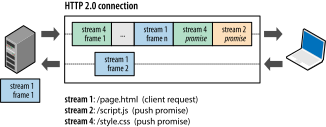
- It defines constraints for stream state management. The rules are described in the following paragraphs:
An HTTP/1.1 request upgraded to HTTP/2 using the "h2c" mechanism (see Section 3.2) is responded to using stream identifier 1 (0x1). After the upgrade is complete, the client’s stream 0x1 is in the "half-closed (local)" state. Therefore, a client upgrading from HTTP/1.1 cannot choose stream 0x1 as a new stream identifier.
The identifier of a newly established stream MUST be numerically greater than all streams that the initiating endpoint has opened or reserved. This governs both streams opened with HEADERS frames and streams reserved with PUSH_PROMISE. An endpoint that receives an unexpected stream identifier MUST treat it as a connection error of type PROTOCOL_ERROR (Section 5.4.1)
The first use of a new stream identifier implicitly closes all streams in the "idle" state that might have been initiated by the peer with lower-valued stream identifiers. For example, if a client sends a HEADERS frame on stream 7 without having sent a frame on stream 5, then stream 5 transitions to the "closed" state when the first frame for stream 7 is sent or received.
Stream identifiers cannot be reused. Long-lived connections can cause an endpoint to exhaust the available range of stream identifiers. A client that cannot establish a new stream identifier can establish a new connection for new streams. A server that cannot establish a new stream identifier can send a GOAWAY frame to force the client to open a new connection for new streams.
2. stream concurrency
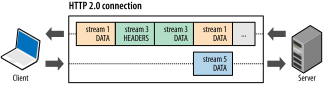
Stream multiplexing means that packets from different streams within the same connection are interleaved. It is as if two (or more) independent “data trains” were spliced together into a single train, but they will eventually be separated again at the terminal. The following diagram shows an example of two “data trains”.


This is how they are assembled into the same train through multiplexing.

A peer can use the SETTINGS_MAX_CONCURRENT_STREAMS parameter in the SETTINGS frame (see Section 6.5.2) to limit the number of concurrent active streams. Each endpoint has its own maximum concurrent streams setting, and this setting applies only to the peer that receives it. That is, the client specifies the maximum number of concurrent streams the server can initiate, and the server specifies the maximum number of concurrent streams the client can initiate.
Streams in the "open" state or in either of the "half-closed" states are included when calculating the maximum number of streams that an endpoint is allowed to open. A stream in any of these three states counts toward the limit advertised by the SETTINGS_MAX_CONCURRENT_STREAMS setting. Streams in any "reserved" state do not count toward the stream limit.
An endpoint MUST NOT exceed the limit set by its peer. An endpoint that receives a HEADERS frame causing it to exceed its advertised concurrent stream limit MUST treat this as a stream error of type PROTOCOL_ERROR or REFUSED_STREAM (Section 5.4.2). The choice of error code determines whether the endpoint wants to enable automatic retry (see Section 8.1.4 for details).
An endpoint that wants to reduce the value of SETTINGS_MAX_CONCURRENT_STREAMS below the current number of open streams can close streams that exceed the new value, or allow streams to complete and close on their own.
V. Flow Control
Using streams for multiplexing introduces contention for the TCP connection, which can cause streams to block. Flow control schemes ensure that streams on the same connection do not destructively interfere with one another. Flow control is used for both individual streams and the connection as a whole.
Because HTTP/2 streams are multiplexed within a single TCP connection, TCP flow control is neither granular enough nor able to provide the necessary application-level APIs for regulating the transmission of individual streams. To address this, HTTP/2 provides a simple set of building blocks that allow clients and servers to implement their own stream-level and connection-level flow control.
HTTP/2 provides flow control by using WINDOW_UPDATE frames (Section 6.9).
1. Flow Control Principles
HTTP/2 stream flow control is designed to allow a variety of flow-control algorithms to be used without protocol changes. Flow control in HTTP/2 has the following characteristics:
- Flow control is specific to a particular connection. Both types of flow control operate between single-hop endpoints, not across the entire end-to-end path. That is, trusted network intermediaries can use it to control resource usage and implement resource allocation mechanisms based on their own conditions and heuristics.
- Flow control is based on WINDOW_UPDATE frames. Receivers advertise how many octets they are prepared to receive on a stream and on the connection as a whole. This is a credit-based scheme. The receiving endpoint sets the limit, and the sending endpoint is expected to follow the instructions issued by the receiver.
- Flow control is directional, with the receiver providing overall control. The receiver can choose any desired window size for each stream and for the entire connection. The sender must comply with the limits imposed by the receiver’s flow control. Clients, servers, and intermediaries, when acting as receivers, all need to independently advertise their flow-control windows and comply with the flow-control limits set by their peers when sending.
- For a new stream and for the overall connection, the initial value of the flow-control window is 65,535 octets.
- The frame type determines whether flow control applies to a frame. Among the frames specified in this document, only DATA frames are subject to flow control; all other frame types do not consume space when advertising their flow-control windows. This ensures that important control frames are not blocked by flow control.
- Flow control cannot be disabled. After an HTTP/2 connection is established, the client exchanges SETTINGS frames with the server, which sets the flow-control window in both directions. The default value of the flow-control window is 65,535 bytes, but the receiver can set a larger maximum window size (-1 bytes) and maintain that size by sending WINDOW_UPDATE frames whenever it receives any data.
- HTTP/2 defines only the format and semantics of the WINDOW_UPDATE frame (Section 6.9). This document does not specify how the receiver decides when to send this frame or what value it sends, nor does it specify how the sender chooses to send data packets. Implementations are free to choose any algorithm that suits their needs.
Both servers and clients support flow control, and sending and receiving can configure flow control independently.
Implementations are also responsible for managing how requests and responses are sent based on priority, choosing how to avoid head-of-line blocking among requests, and managing the creation of new streams. The choice of these algorithms can interact with flow-control algorithms.
2. Appropriate Use of Flow Control
HTTP/2 does not specify any particular algorithm for implementing flow control.
The purpose of flow control is to protect endpoints operating under resource constraints. For example, a proxy needs to share memory across many connections and may also have a slow upstream connection and a fast downstream connection. Flow control addresses the situation where the receiver cannot process data on one stream but wants to continue processing other streams in the same connection.
Deployments that do not need this capability can advertise the maximum flow-control window size (-1) and maintain this window by sending WINDOW_UPDATE frames whenever any data is received. This effectively disables flow control for that receiver. Conversely, the sender always obeys the flow-control window advertised by the receiver.
Deployments with constrained resources (for example, memory) can use flow control to limit the amount of memory that a peer can consume. Note, however, that enabling flow control without knowledge of the bandwidth-delay product can lead to suboptimal use of available network resources (see [RFC7323]).
Even with complete knowledge of the current bandwidth-delay product, implementing flow control is difficult. When using flow control, the receiver must read from the TCP receive buffer in a timely manner. Failing to do so—by not reading and processing critical frames such as WINDOW_UPDATE—can result in deadlock.
VI. Stream Priority
A client can assign a priority to a new stream by including priority information in the HEADERS frame (Section 6.2) that opens the stream. At any other time, a PRIORITY frame (Section 6.3) can be used to change a stream’s priority.
The purpose of prioritization is to allow an endpoint to express how it wants its peer to allocate resources when managing concurrent streams. Most importantly, when sending capacity is limited, priority can be used to choose which streams are used for sending frames.
A stream’s priority can be determined by marking it as dependent on the completion of other streams (Section 5.3.1). Each dependency is assigned a relative weight, and that number is used to determine the relative proportion of available resources allocated to streams that depend on the same stream.
Explicitly setting a stream’s priority participates in the prioritization process. However, it does not guarantee any specific processing or transmission order for the stream relative to any other stream. An endpoint cannot force its peer to use priorities to process concurrent streams in a particular order. Therefore, expressing priority is only a suggestion. Priority information can be omitted from messages. Default values are used before any explicit values are provided (Section 5.3.5).
1. Stream Dependencies
Each stream can be given an explicit dependency on another stream. Including a dependency represents a preference to allocate resources to the identified stream rather than to the stream it depends on. A stream that does not depend on any other stream has a stream dependency of 0x0. In other words, the non-existent stream 0 forms the root of the tree.
A stream that depends on another stream is a dependent stream. The stream on which it depends is the parent stream. A dependency on a stream that is not currently in the tree—for example, a stream in the “idle” state—causes that stream to be assigned the default priority (Section 5.3.5).
When a dependency on another stream is assigned, the stream is added as a new dependency of the parent stream. Dependent streams that share the same parent are not ordered relative to one another. For example, if streams B and C depend on stream A, and stream D is created with a dependency on stream A, this results in a dependency order of A followed by B, C, and D, where the order of B, C, and D is arbitrary.
       A                 A
      / \      ==>      /|\
     B   C             B D C
The exclusive flag allows a new level of dependency to be inserted. The exclusive flag makes the stream the sole dependency of its parent stream, causing the other dependencies to depend on the exclusive stream. In the previous example, if stream D is created with an exclusive dependency on stream A, D becomes the parent of the dependencies B and C.
                         A
       A                 |
      / \      ==>       D
     B   C              / \
                       B   C
Within the dependency tree, a dependent stream should be allocated resources only if all streams on which it depends (the chain of parent streams up to 0x0) are closed or if no further progress can be made on them. A stream cannot depend on itself; an endpoint MUST treat this as a stream error of type PROTOCOL_ERROR (Section 5.4.2).
2. Dependency Weight
All dependent streams are assigned an integer weight in the range [1,256]. Streams with the same parent should be allocated resources in proportion to their weights. Thus, if stream B depends on stream A with a weight of 4, stream C depends on stream A with a weight of 12, and no progress can be made on stream A, then stream B ideally receives one-third of the resources allocated to stream C.
3. Priority Reassignment
A stream’s priority is changed using a PRIORITY frame. Setting a dependency causes the stream to depend on the identified parent stream. If the parent stream’s priority is reassigned, the dependent stream is adjusted along with its parent. Setting a dependency for a reprioritized stream with the exclusive flag causes all dependencies of the new parent stream to become dependent on the reprioritized stream.
If a stream is made dependent on one of its own dependents, the stream it depends on is first moved to the position where the parent stream will be after the priority reassignment is complete. Adjusting dependencies preserves their weights. For example, consider an original dependency tree where B and C depend on A, D and E depend on C, and F depends on D. If A is made dependent on D, then D takes the place of A. All other dependencies remain unchanged, except for F, which will also depend on A if the reprioritization is exclusive.
       x                x                x                 x
       |               / \               |                 |
       A              D   A              D                 D
      / \            /   / \            / \                |
     B   C     ==>  F   B   C   ==>    F   A       OR      A
        / \                 |             / \             /|\
       D   E                E            B   C           B C F
       |                                     |             |
       F                                     E             E
                  (intermediate)   (non-exclusive)    (exclusive)
Streams that share the same parent (that is, sibling streams) should have resources allocated in proportion to their weights. For example, if stream A has a weight of 12 and its sibling stream B has a weight of 4, then to determine the proportion of resources each stream should receive, do the following:
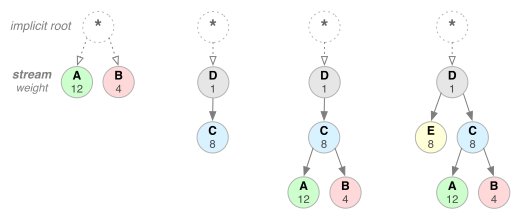
- Sum all weights: 4 + 12 = 16
- Divide each stream’s weight by the total weight: A = 12/16, B = 4/16
Therefore, stream A should receive three quarters of the available resources, and stream B should receive one quarter; stream B receives one third of the resources that stream A receives.
Let’s look at a few other examples in the figure above. From left to right:
- Neither stream A nor stream B specifies a parent dependency; both depend on the explicit “root stream”. A has a weight of 12, and B has a weight of 4. Therefore, based on proportional weights, stream B receives one third of the resources that A receives.
- Stream D depends on the root stream; C depends on D. Therefore, D should receive the full resource allocation before C. The weights do not matter because C’s dependency has higher priority.
- Stream D should receive the full resource allocation before C; C should receive the full resource allocation before A and B; stream B receives one third of the resources that A receives.
- Stream D should receive the full resource allocation before E and C; E and C should receive equal resource allocations before A and B; A and B should receive proportional allocations based on their weights.
As the examples above show, the combination of stream dependencies and weights clearly expresses resource priorities. This is a key capability for improving browsing performance, where the network carries many resource types with different dependencies and weights. Moreover, the HTTP/2 protocol allows clients to update these priorities at any time, further optimizing browser performance. In other words, we can change dependencies and reassign weights based on user interactions and other signals.
Note: Stream dependencies and weights express transmission priority, not requirements, and therefore do not guarantee a particular processing or transmission order. That is, a client cannot force a server to process streams in a specific order through stream priorities. Although this may seem counterintuitive, it is necessary behavior. We do not want the server to be prevented from processing lower-priority resources when higher-priority resources are blocked.
4. Priority State Management
When a stream is removed from the dependency tree, its dependencies can be moved to depend on the closed stream’s parent. The weights of the new dependencies are recalculated by proportionally redistributing the weight of the closed stream’s dependencies based on the dependency weight relationships.
Removing a stream from the dependency tree causes some priority information to be lost. Resources are shared among streams with the same parent, which means that if one stream in that set is closed or blocked, any spare capacity allocated to that stream is assigned to its immediate neighbors. However, if a common dependency is removed from the tree, those streams then share resources with the next highest-level stream.
For example, suppose streams A and B share a parent node, and streams C and D both depend on stream A. Before stream A is removed, if streams A and D cannot continue processing data, stream C receives all resources dedicated to stream A. If stream A is removed from the tree, A’s weight is redistributed between streams C and D. If stream D still cannot continue processing data, this reduces the proportion of resources received by stream C. With equal initial weights, C receives one third of the available resources instead of one half.
There is a case where priority information that creates a dependency on a stream is in transit on the network, and that stream is suddenly closed. If the stream identified in the dependency has no associated priority information, the dependent stream is assigned the default priority (Section 5.3.5). This can produce suboptimal priorities, because a stream may be assigned a priority different from what was intended. To avoid these problems, an endpoint should retain the priority state of a stream for some time after the stream is closed. The longer the state is retained, the less likely it is that an incorrect or default priority value will be assigned to a stream.
Similarly, a stream in the "idle" state can be assigned a priority or become the parent of other streams. This allows grouping nodes to be created in the dependency tree, enabling more flexible expression of priorities. Idle streams start with the default priority (Section 5.3.5).
Retaining priority information for streams that do not count toward the SETTINGS_MAX_CONCURRENT_STREAMS limit can impose a significant state burden on an endpoint. Therefore, the amount of retained priority state can be limited.
The additional amount of state an endpoint maintains for priorities may depend on load; under high load, priority state can be discarded to limit resource commitment. In extreme cases, an endpoint can even discard the priority state of active streams or retained streams. If the limit is honored, an endpoint should maintain at least as much stream state as the value it sets for SETTINGS_MAX_CONCURRENT_STREAMS. Implementations should also attempt to retain the state of streams that are in use in the priority tree.
If it retains sufficient state, then an endpoint that receives a PRIORITY frame should, when changing the priority of a closed stream, change the dependencies of the streams that depend on it.
5. Default Priority
By default, all streams are assigned a non-exclusive dependency on stream 0x0. Pushed streams (Section 8.2) initially depend on their associated streams. In both cases, streams are assigned the default weight of 16.
7. Error Handling
HTTP/2 framing allows two classes of errors:
-
Errors that make the entire connection unusable are connection errors.
-
Errors in a single stream are stream errors.
Section 7 contains a list of error codes.
1. Error Handling for Connection Errors
Connection errors are all errors that prevent further processing of the frame layer or corrupt any connection state.
An endpoint that encounters a connection error should first send a GOAWAY frame (Section 6.8) that contains the stream identifier of the last stream successfully received from its peer. The GOAWAY frame contains an error code that identifies the reason for connection termination. After sending a GOAWAY frame for the error condition, the endpoint MUST close the TCP connection.
The receiving endpoint might not reliably receive the GOAWAY frame (Section 6.6 of [RFC7230] describes how immediate connection closure can cause data loss). If a connection error occurs, the GOAWAY frame is a best-effort attempt to communicate the reason for connection termination to the peer.
An endpoint can terminate a connection at any time. In particular, an endpoint can choose to treat a stream error as a connection error. When circumstances permit, an endpoint should send a GOAWAY frame when terminating the connection.
2. Error Handling for Stream Errors
A stream error is an error associated with one specific stream; it does not affect the processing of other streams.
An endpoint that detects a stream error sends an RST_STREAM frame (Section 6.4) containing the stream identifier of the stream where the error occurred. The RST_STREAM frame contains an error code indicating the type of error.
RST_STREAM is the last frame an endpoint can send on a stream. The peer that sends an RST_STREAM frame MUST be prepared to receive some frames—any frames that were sent by the remote peer or queued for sending. These frames can be ignored unless they modify connection state (for example, state maintained for header compression (Section 4.3 or flow control)).
In general, an endpoint should not send more than one RST_STREAM frame for any stream. However, if an endpoint receives frames on a closed stream after more than a round-trip time has elapsed, the endpoint can send additional RST_STREAM frames. This behavior can be used to handle some incorrect implementations.
To avoid loops, an endpoint MUST NOT send RST_STREAM in response to an RST_STREAM frame.
3. Connection Termination
If the TCP connection is closed or reset while streams remain in the "open" or "half-closed" state, the affected streams cannot be retried automatically (for details, see Section 8.1.4).
8. Extensions in HTTP/2
HTTP/2 allows the protocol to be extended. Within the limits described in this section, protocol extensions can be used to provide additional services or change any aspect of the protocol. Extensions are valid only within the scope of a single HTTP/2 connection.
This applies to protocol elements defined in the HTTP/2 specification. It does not affect existing options for extending HTTP, such as defining new methods, status codes, or header fields.
Extensions are allowed to use new frame types (Section 4.1), new settings (Section 6.5.2), or new error codes (Section 7). Registries are established to manage these extension points: frame types (Section 11.2), settings (Section 11.3), and error codes (Section 11.4).
Implementations MUST ignore unknown and unsupported values in all extensible protocol elements. Implementations MUST discard frames with unknown or unsupported types. This means that any of these extension points can be used safely for extensions without prior arrangement or negotiation. However, extension frames are not allowed to appear in the middle of a header block (Section 4.3); if this occurs, it MUST be treated as a connection error of type PROTOCOL_ERROR (Section 5.4.1).
Some extensions change the semantics of existing protocol components; these extensions MUST be negotiated before use. For example, an extension that changes the layout of the HEADERS frame cannot be used until the peer has provided an acceptable positive signal. In such cases, adaptation may also be required when the modified layout takes effect. Note that treating any frame other than a DATA frame as flow-controlled is a semantic change, and such a change can only be made through negotiation.
The HTTP/2 specification does not define a specific method for negotiating the use of extensions, but the settings frame (Section 6.5.2) can be used for this purpose. If both peers set a value indicating willingness to use an extension, the extension can be used. If this setting is used for extension negotiation, its initial value MUST be defined so that the extension is disabled by default.
Reference:
RFC 7540
Introduction to HTTP/2
http2 Explained
GitHub Repo: Halfrost-Field
Follow: halfrost · GitHub