Git ID Switcher
May 8, 2026 · View on GitHub
⚠️ アイヌ イタㇰ翻訳について
この翻訳は実験的なものであり、誤りを含む可能性があります。 ネイティブスピーカーの方からの修正PRを心よりお待ちしています。
タン ウコイタㇰ ウタㇻ オロワ コㇿカㇺ アン ルウェ ネ。 ピㇼカ ウタㇻ オロワ アイヌ イタㇰ ウコイタㇰ エラマン クㇽ エアㇻキ。
📚 アイヌ イタㇰについて学ぶ / Learn More About Ainu
アイヌ語(アイヌ イタㇰ)は、日本の北海道・樺太・千島列島で話されてきた言語です。現在はユネスコにより「極めて深刻な危機」に分類されていますが、復興の取り組みが進められています。
- UNESCO Atlas of World's Languages in Danger (PDF)
- 公益財団法人アイヌ民族文化財団
- 国立アイヌ民族博物館 ウポポイ
- アイヌ語アーカイブ
- 北海道立アイヌ民族文化研究センター

|
シネㇷ゚ クリㇰ オロワ Git プロフィール ウコイタㇰ。GitHub アカウント、SSH キー、GPG サイン ウコイタㇰ、Git サブモジュール オロワノ プロフィール 自動適用。













 🇺🇸 🇯🇵 🇨🇳 🇹🇼 🇰🇷 🇩🇪 🇫🇷 🇪🇸 🇧🇷 🇮🇹 🇷🇺 🇵🇱 🇹🇷 🇨🇿 🇭🇺 🇧🇬 🇺🇦 🌍 🌺 🐻 🐉 ✨ 🖖 🐱 🏴☠️ 🎭 🇺🇸 🇯🇵 🇨🇳 🇹🇼 🇰🇷 🇩🇪 🇫🇷 🇪🇸 🇧🇷 🇮🇹 🇷🇺 🇵🇱 🇹🇷 🇨🇿 🇭🇺 🇧🇬 🇺🇦 🌍 🌺 🐻 🐉 ✨ 🖖 🐱 🏴☠️ 🎭
|
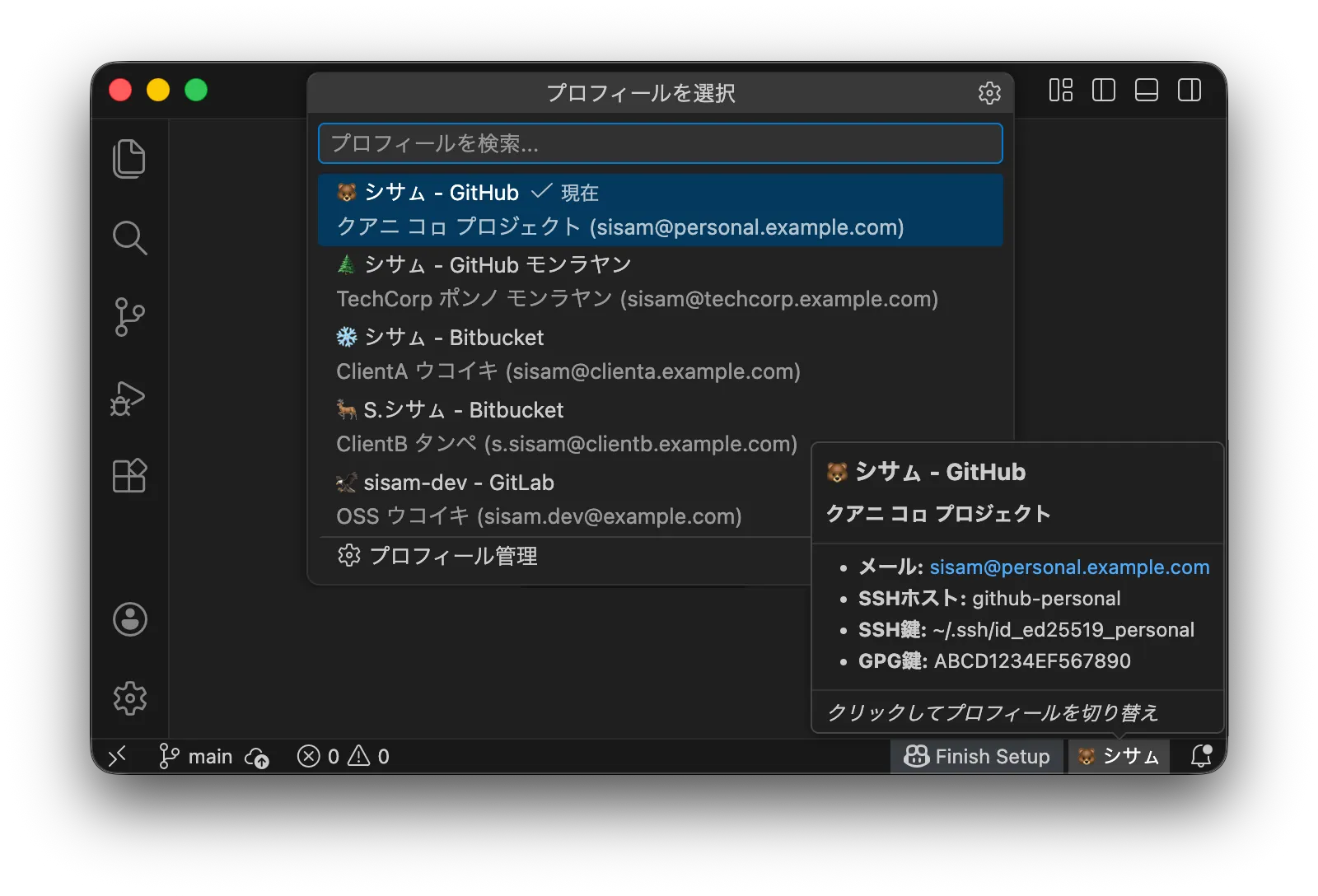
🎯 ネーン クス Git ID Switcher?
Git プロフィール ウコイタㇰ ツール ポㇿ アン、Git ID Switcher ホッカ ツール エヌカㇻ ソモ キ ピㇼカ ウタㇻ:
- サブモジュール ピㇼカ: サブモジュール アン リポジトリ(Hugo テーマ、ベンダーライブラリ)、シネㇷ゚ シネㇷ゚ サブモジュール
git config user.name手動設定。タン Extension、オㇿ サブモジュール オロワノ プロフィール 自動適用。 - SSH & GPG ウコイタㇰ: レー ウコイタㇰ ワノ、ssh-agent SSH キー ウコイタㇰ、GPG サイン 設定。ウェン サイン commit ソモ キ。
ピㇼカ ウタㇻ
- プロフィール 管理 UI: settings.json エトゥㇾ ソモ、プロフィール エレㇷ゚・エトゥㇾ・エオㇷ゚キ・並べ替え UI オロワ
- シネㇷ゚ クリㇰ プロフィール ウコイタㇰ: Git user.name ウン user.email ホㇱキノ エトゥㇾ
- ステータスバー: エネアン プロフィール エヌカㇻ
- Sync Check: プロフィール ウン git config ウコイタㇰ ソモ ヤㇰ ステータスバー 警告
- サブモジュール 対応: Git サブモジュール オロワノ プロフィール 自動伝播
- SSH キー 管理: ssh-agent SSH キー 自動ウコイタㇰ
- GPG サイン 対応: commit サイン GPG キー(オプション)
- リッチ ツールチップ: 説明、SSH ホスト 詳細情報
- クロスプラットフォーム: macOS, Linux, Windows
- 17 イタㇰ 対応: 17 言語 サポート
🌏 イタㇰ ウタㇻ オロワ
クアニ ポン ウタㇻ オロワノ ピㇼカ アン。 ポンノ アン クス ホㇱキ エヤㇺ シㇼ ソモ キ。 ピㇼカノ ウコイタㇰ エアㇻキ シㇼ ソモ ネ ヤㇰカ、ポン イタㇰ オロワ ピㇼカノ エヌカㇻ クス エラㇺ。
タン Extension、VS Code 17 イタㇰ オㇿ。README、ポン イタㇰ ウン ジョーク イタㇰ オロワノ。
タン 「グローバル対応」 ワノ、「イタㇰ 多様性 敬意」。イタㇰ エトゥㇾ、オㇿ コタン 開発者 オロワ ピㇼカ commit...ネプキ インフラ ネ ヤㇰ ピㇼカ。
ホㇱキノ
ウタㇻ アカウント ウン モノレ アカウント(Enterprise Managed User)ウコイタㇰ セットアップ。
ステップ 1: SSH キー
アカウント シネㇷ゚ シネㇷ゚ SSH キー エキ(アン ヤㇰ エレㇷ゚):
# ウタㇻ
ssh-keygen -t ed25519 -C "sisam@personal.example.com" -f ~/.ssh/id_ed25519_personal

# モノレ
ssh-keygen -t ed25519 -C "sisam@techcorp.example.com" -f ~/.ssh/id_ed25519_work
シネㇷ゚ シネㇷ゚ SSH キー 公開鍵(.pub ファイル)GitHub アカウント オロワ。
ウタㇻ: GitHub オロワ
id_ed25519_personal.pub(公開鍵)。id_ed25519_personal(拡張子ソモ)秘密鍵—ホッカ ウタㇻ シェア ソモ キ、アップロード ソモ キ。
ステップ 2: SSH config 設定
~/.ssh/config エトゥㇾ:
# ウタㇻ GitHub アカウント(デフォルト)
Host github.com
    HostName github.com
    User git
    IdentityFile ~/.ssh/id_ed25519_personal
    IdentitiesOnly yes

# モノレ GitHub アカウント
Host github-work
    HostName github.com
    User git
    IdentityFile ~/.ssh/id_ed25519_work
    IdentitiesOnly yes
ステップ 3: Extension 設定
インストール サンプル プロフィール アン。 ポン ガイド、ウタㇻ エトゥㇾ。
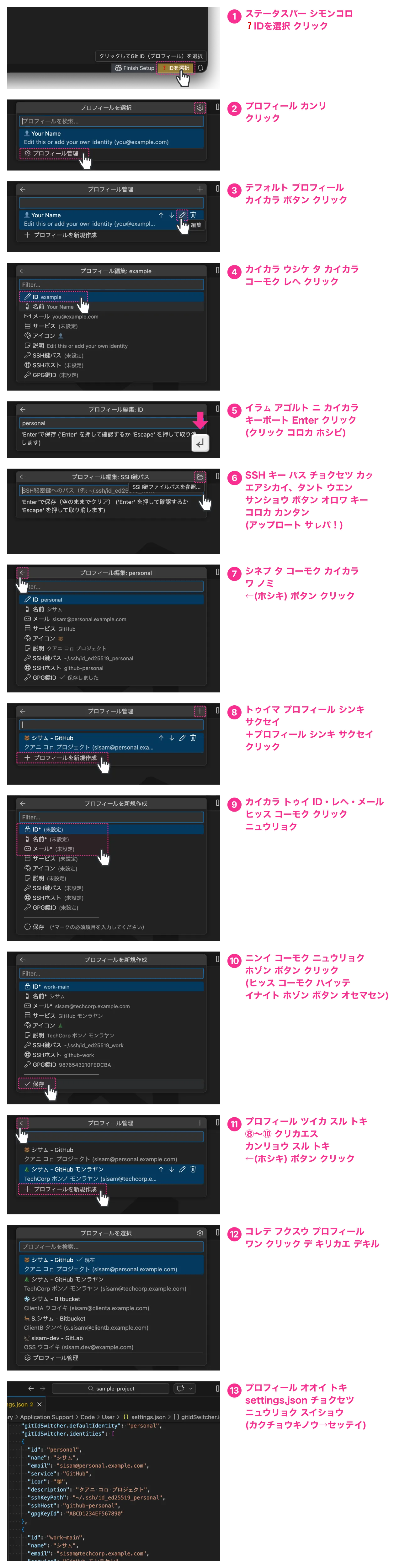
キー ファイル 送信 ソモ キ: SSH キー パス 設定、キー ファイル パス(場所)ワノ。キー ファイル 中身 アップロード ソモ キ、外部送信 ソモ キ。
GPG サイン エキ ヤㇰ: プロフィール エトゥㇾ 画面
gpgKeyId設定。 GPG キー ID 確認、「トラブルシューティング」エヌカㇻ。
ヒント: settings.json オロワ 直接設定。 Extension 設定(
Cmd+,/Ctrl+,)→「Git ID Switcher」エヌカㇻ →「settings.json エトゥㇾ」クリㇰ。 JSON 設定例「フル 設定例」エヌカㇻ。
フル 設定例: 5 アカウント SSH + GPG
オㇿ 組み合わせ 完全例:
SSH 設定 (~/.ssh/config)
# ウタㇻ アカウント(デフォルト)
Host github-personal
    HostName github.com
    User git
    IdentityFile ~/.ssh/id_ed25519_personal
    IdentitiesOnly yes

# モノレ アカウント(Enterprise Managed User)
Host github-work
    HostName github.com
    User git
    IdentityFile ~/.ssh/id_ed25519_work
    IdentitiesOnly yes

# ウレシパ A アカウント(Bitbucket)
Host bitbucket-clienta
    HostName bitbucket.org
    User git
    IdentityFile ~/.ssh/id_ed25519_clienta
    IdentitiesOnly yes

# ウレシパ B アカウント(Bitbucket)
Host bitbucket-clientb
    HostName bitbucket.org
    User git
    IdentityFile ~/.ssh/id_ed25519_clientb
    IdentitiesOnly yes

# OSS アカウント(GitLab)
Host gitlab-oss
    HostName gitlab.com
    User git
    IdentityFile ~/.ssh/id_ed25519_oss
    IdentitiesOnly yes
Extension 設定
{
  "gitIdSwitcher.identities": [
    {
      "id": "personal",
      "name": "シサㇺ",
      "email": "sisam@personal.example.com",
      "service": "GitHub",
      "icon": "🐻",
      "description": "クアニ コㇿ プロジェクト",
      "sshKeyPath": "~/.ssh/id_ed25519_personal",
      "sshHost": "github-personal",
      "gpgKeyId": "ABCD1234EF567890"
    },
    {
      "id": "work-main",
      "name": "シサㇺ",
      "email": "sisam@techcorp.example.com",
      "service": "GitHub モンラヤン",
      "icon": "🌲",
      "description": "TechCorp ポンノ モンラヤン",
      "sshKeyPath": "~/.ssh/id_ed25519_work",
      "sshHost": "github-work",
      "gpgKeyId": "9876543210FEDCBA"
    },
    {
      "id": "client-a",
      "name": "シサㇺ",
      "email": "sisam@clienta.example.com",
      "service": "Bitbucket",
      "icon": "❄️",
      "description": "ClientA ウコイキ",
      "sshKeyPath": "~/.ssh/id_ed25519_clienta",
      "sshHost": "bitbucket-clienta"
    },
    {
      "id": "client-b",
      "name": "S.シサㇺ",
      "email": "s.sisam@clientb.example.com",
      "service": "Bitbucket",
      "icon": "🦌",
      "description": "ClientB タンペ",
      "sshKeyPath": "~/.ssh/id_ed25519_clientb",
      "sshHost": "bitbucket-clientb"
    },
    {
      "id": "oss",
      "name": "sisam-dev",
      "email": "sisam.dev@example.com",
      "service": "GitLab",
      "icon": "🦅",
      "description": "OSS ウコイキ",
      "sshKeyPath": "~/.ssh/id_ed25519_oss",
      "sshHost": "gitlab-oss"
    }
  ],
  "gitIdSwitcher.defaultIdentity": "personal",
  "gitIdSwitcher.autoSwitchSshKey": true,
  "gitIdSwitcher.applyToSubmodules": true
}
ウタㇻ: 4バンメ プロフィール(client-b)ミジカイ ナマエ、5バンメ(oss)ハンドルネーム ア ウサ。シネ ウタㇻ ワノ プロフィール ヘンネ ナマエ ア ウサ エアㇱカイ。
プロフィール 管理
ステータスバー クリㇰ → 一覧 ハヨㇰペ「プロフィール 管理」オロワ 管理画面。 プロフィール エレㇷ゚・エトゥㇾ・エオㇷ゚キ・並べ替え UI オロワ 直接操作。
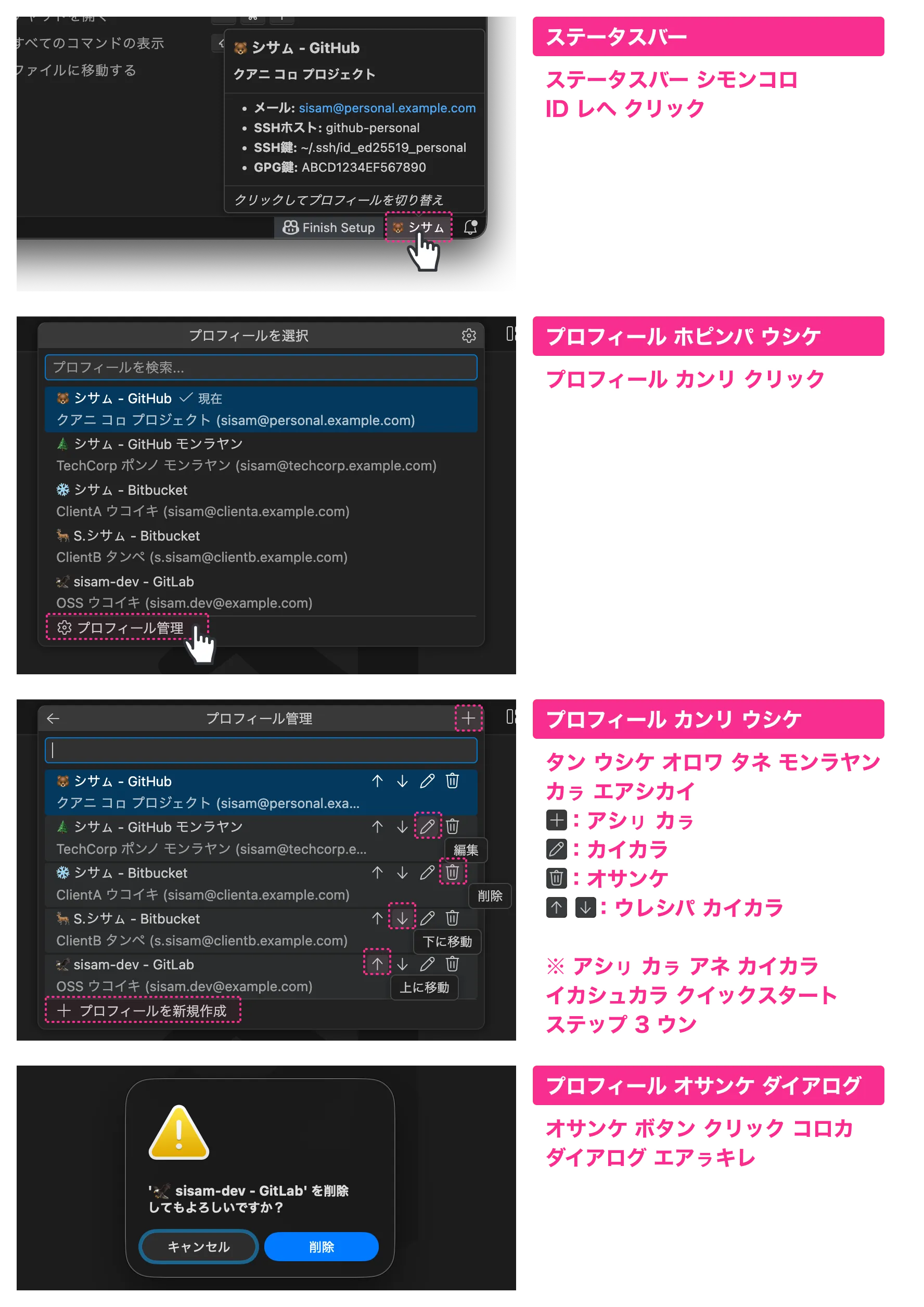
コマンドパレット Git ID Switcher: Delete Identity オロワ プロフィール エオㇷ゚キ。
コマンド
| コマンド | ウコイタㇰ |
|---|---|
Git ID Switcher: Select Identity | プロフィール ピッカー |
Git ID Switcher: Delete Identity | プロフィール エオㇷ゚キ |
Git ID Switcher: Show Current Identity | エネアン プロフィール エヌカㇻ |
Git ID Switcher: Show Documentation | ドキュメント エヌカㇻ |
設定 リファレンス
プロフィール プロパティ
| プロパティ | 必須 | ウコイタㇰ |
|---|---|---|
id | ✅ | ユニーク ID(例:"personal", "work") |
name | ✅ | Git user.name — commit オロワ |
email | ✅ | Git user.email — commit オロワ |
icon | ステータスバー 絵文字(例:"🐻")。シネㇷ゚ 絵文字 ワノ | |
service | サービス レー(例:"GitHub", "GitLab")。UI オロワ | |
description | ピッカー ウン ツールチップ 短い説明 | |
sshKeyPath | SSH 秘密鍵 パス(例:"~/.ssh/id_ed25519_work") | |
sshHost | SSH config ホスト エイリアス(例:"github-work") | |
gpgKeyId | commit サイン GPG キー ID |
表示制限
- ステータスバー: ~25 文字
...オロワ 省略 icon: シネㇷ゚ 絵文字(書記素クラスター)ワノ。ポㇿ 絵文字 ロング 文字列 ソモ キ
グローバル 設定
| 設定 | デフォルト | ウコイタㇰ |
|---|---|---|
gitIdSwitcher.identities | サンプル参照 | プロフィール 設定 リスト |
gitIdSwitcher.defaultIdentity | サンプル参照 | デフォルト プロフィール ID |
gitIdSwitcher.autoSwitchSshKey | true | プロフィール 変更時 SSH キー 自動切り替え |
gitIdSwitcher.showNotifications | true | プロフィール 切り替え時 通知 |
gitIdSwitcher.applyToSubmodules | true | Git サブモジュール プロフィール 伝播 |
gitIdSwitcher.submoduleDepth | 1 | ネスト サブモジュール 設定 最大深度(1-5) |
gitIdSwitcher.includeIconInGitConfig | false | アイコン 絵文字 Git config user.name オロワ |
gitIdSwitcher.syncCheck.enabled | true | プロフィール ウン git config ウコイタㇰ 確認 |
gitIdSwitcher.syncCheck.onFocusReturn | true | エディタ ウィンドウ フォーカス 戻り Sync Check |
gitIdSwitcher.logging.fileEnabled | false | 監査ログ ファイル 保存(ID 切り替え、SSH キー 操作 記録) |
gitIdSwitcher.logging.filePath | "" | ログファイル パス(例:~/.git-id-switcher/security.log)。空 = デフォルト |
gitIdSwitcher.logging.maxFileSize | 10485760 | ローテーション 最大ファイルサイズ(バイト、1MB-100MB) |
gitIdSwitcher.logging.maxFiles | 5 | 保持 ローテーションファイル 最大数(1-20) |
gitIdSwitcher.logging.redactAllSensitive | false | 有効、ログ オㇿ 値 マスク(最大プライバシー) |
gitIdSwitcher.logging.level | "INFO" | ログ 詳細度(DEBUG, INFO, WARN, ERROR, SECURITY)。選択レベル 以上 記録 |
gitIdSwitcher.commandTimeouts | {} | コマンド タイムアウト(ミリ秒、1秒-5分)。例:{"git": 15000, "ssh-add": 10000} |
includeIconInGitConfig オロワ
icon フィールド 設定 動作:
| 値 | 動作 |
|---|---|
false(デフォルト) | icon エディタ UI ワノ。Git config name ワノ |
true | Git config icon + name。コミット 履歴 絵文字 オロワ |
例:icon: "👤", name: "シサㇺ"
| includeIconInGitConfig | Git config user.name | コミット サイン |
|---|---|---|
false | シサㇺ | シサㇺ <email> |
true | 👤 シサㇺ | 👤 シサㇺ <email> |
エキ 仕組み
Git config レイヤー 構造
Git 設定 3 レイヤー; ハヨㇰペ 設定 リㇰンペ 上書き:
システム (/etc/gitconfig)
    ↓ 上書き
グローバル (~/.gitconfig)
    ↓ 上書き
ローカル (.git/config)  ← 最優先
Git ID Switcher --local(リポジトリ ローカル)オロワ。
タン:
- シネㇷ゚ シネㇷ゚ リポジトリ
.git/configプロフィール 保存 - リポジトリ シネㇷ゚ シネㇷ゚ エネアン プロフィール 維持
- グローバル 設定(
~/.gitconfig)変更 ソモ キ
プロフィール 切り替え 動作
プロフィール ウコイタㇰ、Extension 以下(順番):
- Git Config(常時):
git config --local user.nameウンuser.email設定 - SSH キー(
sshKeyPath設定時): ホッカ キー ssh-agent オロワ 削除、選択 キー 追加 - GPG キー(
gpgKeyId設定時):git config --local user.signingkey設定、サイン 有効化 - サブモジュール(有効時): オㇿ サブモジュール 設定 伝播(デフォルト:深度 1)
- Sync Check: プロフィール ウン git config ウコイタㇰ 確認
Sync Check
プロフィール ウン git config --local 値(user.name, user.email, user.signingkey)ウコイタㇰ、ソモ ヤㇰ ステータスバー 警告。
確認 タイミング:
- プロフィール 適用 直後
- ワークスペース フォルダ 変更時
- 設定 変更時
- エディタ ウィンドウ フォーカス 戻り(500 ミリ秒 デバウンス)
ウコイタㇰ ソモ ヤㇰ:
- ステータスバー ⚠️ アイコン 警告色 オロワ
- ツールチップ ウコイタㇰ ソモ フィールド テーブル(フィールド、期待値、実際値)
- ステータスバー クリㇰ 解決オプション:
- プロフィール 再適用 — エネアン プロフィール git config オロワ 再適用
- ホッカ プロフィール 選択 — プロフィール ピッカー
- エレㇷ゚ — 次 確認 マデ 警告 非表示
無効化:
gitIdSwitcher.syncCheck.enabled false 設定、オㇿ Sync Check 無効。
フォーカス 戻り 確認 ワノ 無効、gitIdSwitcher.syncCheck.onFocusReturn false 設定。
サブモジュール 伝播 仕組み
ローカル 設定 リポジトリ 単位、サブモジュール 自動適用 ソモ キ。 タン Extension サブモジュール 伝播機能(詳細「上級者向け: サブモジュール」エヌカㇻ)。
SSH キー 管理 詳細
Git ID Switcher ssh-agent オロワ SSH キー 管理:
| 操作 | 実行コマンド |
|---|---|
| キー 追加 | ssh-add <keyPath> |
| キー 削除 | ssh-add -d <keyPath> |
| キー 一覧 | ssh-add -l |
ウタㇻ: タン Extension ~/.ssh/config 変更 ソモ キ。SSH config 設定 手動(「ホㇱキノ」ステップ 2 エヌカㇻ)。
既存 SSH 設定 相互作用
SSH 設定 アン ヤㇰ、Git ID Switcher 以下:
| 設定 | Git ID Switcher 動作 |
|---|---|
~/.ssh/config IdentityFile 指定 | 両方 使用可能;IdentitiesOnly yes 競合防止 |
環境変数 GIT_SSH_COMMAND 設定 | カスタム SSH コマンド;ssh-agent 引き続き動作 |
git config core.sshCommand 設定 | 上記 同様 |
| direnv SSH 関連 環境変数 設定 | 共存可能;ssh-agent 独立 動作 |
推奨: SSH config 常に IdentitiesOnly yes。SSH ポㇿ キー 試行 防止。
ネーン クス IdentitiesOnly yes?
タン 設定 ソモ ヤㇰ、SSH 以下 順序 キー 試行:
- ssh-agent キー(Git ID Switcher 管理)
~/.ssh/config指定 キー- デフォルト キー(
~/.ssh/id_rsa,~/.ssh/id_ed25519等)
認証失敗 意図 ソモ キー 使用 可能性。
IdentitiesOnly yes 設定、SSH 指定 キー ワノ 使用。Git ID Switcher 設定 キー 確実 使用。
# 推奨 設定
Host github-work
    HostName github.com
    User git
    IdentityFile ~/.ssh/id_ed25519_work
    IdentitiesOnly yes  # ← タン 行 重要
タン 設定、github-work ホスト 接続時 ~/.ssh/id_ed25519_work ワノ 使用、ホッカ キー 試行 ソモ。
上級者向け: サブモジュール
Git サブモジュール 複雑 リポジトリ、プロフィール 管理 厄介。サブモジュール commit、Git タン サブモジュール ローカル 設定 使用、明示的 設定 ソモ ヤㇰ グローバル 設定(ウェン email!)デフォルト 可能性。
Git ID Switcher 自動 サブモジュール 検出、選択 プロフィール 適用。
{
  "gitIdSwitcher.applyToSubmodules": true,
  "gitIdSwitcher.submoduleDepth": 1
}
applyToSubmodules: タン 機能 有効/無効submoduleDepth: ネーン 深さ?1: 直接 サブモジュール ワノ(最も 一般的)2+: ネスト サブモジュール(サブモジュール オロワ サブモジュール)
タン、メイン リポジトリ commit、ベンダーライブラリ commit、プロフィール 常に ピㇼカ。
トラブルシューティング
SSH キー ウコイタㇰ ソモ キ?
-
ssh-agent実行 確認:eval "$(ssh-agent -s)" -
キー パス 正しい 確認:
ls -la ~/.ssh/id_ed25519_* -
macOS、Keychain オロワ シネㇷ゚:
ssh-add --apple-use-keychain ~/.ssh/id_ed25519_work
プッシュ時 ウェン プロフィール?
新規クローン時:
モノレ リポジトリ クローン、SSH config ホスト エイリアス 使用:
# モノレ(github-work エイリアス 使用)
git clone git@github-work:company/repo.git

# ウタㇻ(デフォルト github.com 使用)
git clone git@github.com:sisam/repo.git
既存リポジトリ:
-
リモート URL ホスト エイリアス 確認:
git remote -v # モノレ リポジトリ git@github-work:... オロワ -
必要 更新:
git remote set-url origin git@github-work:company/repo.git
GPG サイン ソモ キ?
-
GPG キー ID 確認:
gpg --list-secret-keys --keyid-format SHORT -
サイン テスト:
echo "test" | gpg --clearsign -
プロフィール email GPG キー email 一致 確認
プロフィール 検出 ソモ キ?
- Git リポジトリ オロワ 確認
settings.jsonシンタックス エラー ソモ 確認- VS Code ウィンドウ リロード(
Cmd+Shift+P→「ウィンドウの再読み込み」)
name フィールド エラー?
name フィールド 以下 文字 エラー:
` $ ( ) { } | & < >
サービス レー オロワ service フィールド 使用。
// ウェン
"name": "シサㇺ (ウタㇻ)"

// ピㇼカ
"name": "シサㇺ",
"service": "GitHub"
新しい 設定項目 表示 ソモ キ?
Extension 更新、新しい 設定項目 設定画面 表示 ソモ 場合。
ホㇱキ: マシン 全体 リスタート。
VS Code 設定スキーマ メモリ キャッシュ、「ウィンドウの再読み込み」 Extension 再インストール ワノ 更新 ソモ。
デフォルト値(identities 等)空っぽ?
新規インストール サンプル 設定 表示 ソモ、Settings Sync 原因 可能性。
過去 空 設定 保存、クラウド 同期、新規インストール デフォルト値 上書き。
ホㇱキ:
- 設定画面 該当 設定項目 エヌカㇻ
- 歯車アイコン →「設定をリセット」選択
- Settings Sync 同期(古い 設定 クラウド 削除)
設計哲学
「クアニ ネノ ネ?」 — タン Extension ネイタ ハウェアン
枯山水アーキテクチャ 設計。コア 100 行 単純さ。 残り 品質(テスト 90%、ログ、タイムアウト)ウン 意図的 制約(GitHub API 連携 ソモ、トークン 管理 ソモ)オロワ。

Contributing
貢献 歓迎! CONTRIBUTING.md エヌカㇻ。
License
MIT License - LICENSE エヌカㇻ。
Credits
Null;Variant オロワ
🐻 イヤイライケレ! 🐻